
You just designed the perfect brand kit for a client. The color palette sings, the layout is sharp, and then you re-read the stock licence terms and realize you cannot use that hero image on merchandise. Licensing restrictions trip up freelance designers constantly, killing momentum and forcing last-minute asset swaps. The good news is that understanding common licence boundaries and building a few reliable workarounds into your workflow lets you stay creative without ever crossing a legal line.
Photo by Kawê Rodrigues from Pexels
TL;DR:- Most stock licence restrictions fall into a handful of predictable categories: print-run caps, no-resale clauses, editorial-only flags, and template redistribution bans.
- Freelancers keep creative freedom by choosing the right licence tier upfront, layering original elements over stock assets, and documenting every licence for fast proof later.
- Treating licence compliance as a design constraint (not a roadblock) actually sharpens your creative output.
The real cost of ignoring licences
Stock platforms like Adobe Stock, Shutterstock, Freepik, and Envato each wrap their assets in slightly different licence terms. Ignore those terms and you risk DMCA takedowns, invoice-killing disputes, and reputation damage that no portfolio piece can fix.
That number is not surprising when you consider how deeply each platform buries its licence details. Freepik's free tier requires attribution in a specific format. Shutterstock's standard licence caps print runs at 500,000 copies. Adobe Stock editorial images cannot appear in ads. iStock has separate "standard" and "extended" tiers with different resale rules. Knowing these boundaries before you open your design tool saves hours of rework.
Fewer than four in ten freelancers routinely save their licence certificates. That gap between usage and documentation is where legal trouble grows.
Common restrictions freelancers face

Not every restriction is obvious. Here are the ones that catch freelance designers most often:
- Print-run caps - Standard licences on Shutterstock and iStock limit reproduction counts. A social media graphic is fine; a nationwide billboard campaign might not be.
- No-resale / no-redistribution - You cannot sell a stock vector as part of a template pack on Creative Market without an extended licence. Envato Elements explicitly prohibits using their assets in competing marketplace products.
- Editorial-only flags - Images of recognizable brands, logos, or certain public figures carry editorial-only restrictions on Adobe Stock and Getty. Using them in a commercial ad is a lawsuit waiting to happen.
- Attribution requirements - Freepik's free plan and many Creative Commons sources require visible credit. Miss it and you violate the licence even if you paid nothing.
- Platform-specific use bans - Some licences prohibit use on print-on-demand products (mugs, t-shirts, phone cases). Canva Pro's licence, for example, does not cover standalone merchandise sales.
- Sensitive-use restrictions - Stock platforms often ban use of recognizable model photos in contexts implying endorsement of political views, adult content, or medical claims.
Creative strategies within boundaries

Restrictions are constraints, and constraints breed creativity. Here is how experienced freelancers turn licence limits into design advantages:
- Layer original artwork over stock bases. Use a stock texture or background, then add your own hand-drawn illustrations, custom typography, or vector shapes on top. The stock element becomes a supporting layer, not the focal point, reducing legal exposure and increasing originality.
- Combine multiple stock assets. A single stock photo used as-is feels generic. Composite two or three images, adjust color grading, and add graphic overlays. The result is transformative enough to feel original while each individual asset stays within its licence scope.
- Choose the right licence tier before you design. If you know the deliverable will appear on merchandise, buy the extended licence from day one. Upgrading mid-project wastes time and sometimes costs more.
- Use editorial images only in editorial contexts. Got a stunning photo of a tech CEO at a conference? Use it in a blog post or newsletter, not in a Facebook ad. Design the ad with a different, commercially-licensed asset.
- Swap stock for original when budgets allow. Commission a photographer or illustrator for hero assets. Use stock for secondary elements like background patterns, icons, and filler imagery where licence risk is lower.
| Approach | Creative Freedom | Licence Risk | Cost |
|---|---|---|---|
| Stock with standard licence | Medium | Low (within limits) | Low |
| Stock with extended licence | High | Very low | Medium |
| Original commissioned assets | Maximum | None | High |
| Mixed (original hero + stock support) | High | Low | Medium |
A step-by-step balancing process
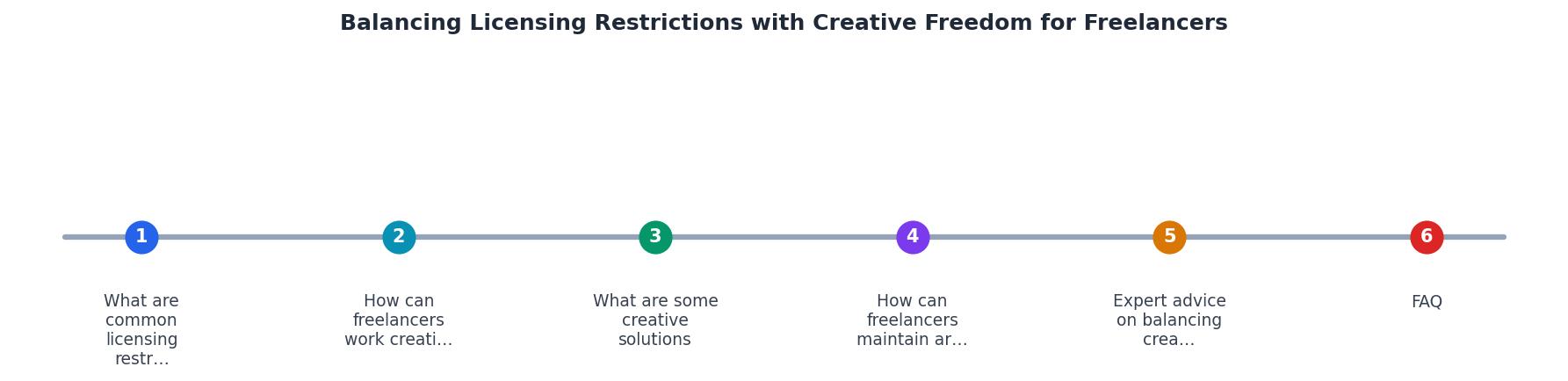
The diagram above breaks the workflow into clear steps: Identify project scope, Check licence terms, Select assets, Layer original elements, Document licences, and Deliver with proof. Following these steps in order prevents the most common mistakes.
Start with the project scope. A social media pack for Instagram has different licence needs than a product packaging run of 50,000 units. Knowing the end use narrows your asset search immediately.
Next, check licence terms on the platform before downloading. Shutterstock shows licence type right on the download page. Adobe Stock marks editorial images with a clear badge. Freepik displays attribution requirements on every asset page.
Select your assets with the licence already confirmed. Then layer your original creative work on top. Document every licence by saving the certificate or receipt. Tools like licencedownloader.com let you bulk-download licence certificates across platforms like Freepik, Shutterstock, Adobe Stock, and Envato, so you have audit-ready proof without manually visiting each dashboard.
Finally, deliver the project to your client with a licence summary attached. This looks professional and protects both of you.
Maintaining artistic integrity

Compliance does not mean compromise. The best freelance designers treat licence terms the same way they treat a brand guideline: as a creative brief, not a cage.
When a licence blocks a specific use, ask yourself what the design actually needs. Nine times out of ten, the answer is not "that exact stock photo." It is a mood, a color, a composition style. You can recreate that feeling with a different asset or an original element.
Build a personal asset library over time. Every texture you photograph, every pattern you draw, every icon set you create from scratch is an asset with zero licence restrictions. Mix these with properly-licensed stock and your work becomes both legally clean and distinctly yours.
"Check out this post on the six most common causes of creative burnout.">, Building a sustainable creative career: Finding balance as a freelancer
Burnout often comes from fighting the same administrative battles repeatedly. Automating licence management removes one of those battles entirely, freeing mental energy for the work that actually matters.
Here is an example dashboard showing how a typical freelancer's licence collection might look after organizing assets across platforms:
Example: Freelancer Licence Status
Licence-Aware Creative Workflow Checklist
Your progress is saved automatically in your browser.
FAQ
Frequently Asked Questions
What is your go-to strategy for staying creative when a licence restriction blocks your first design idea? Share your approach in the comments.
Additional Resources
- Building a sustainable creative career: Finding balance as ... - Avoid stress, exhaustion and burnout as a creative freelancer: keep working in a way that's healthy, sustainable and actually enjoyable.
- Does the freelance economy promote creative freedom? - This paper builds on the creation of new ways of organizing work, where the freelance economy specifically targets the increasing number of ...
- Does the freelance economy promote creative freedom? - Through describing and discussing creativity within the freelance economy, this paper seeks to understand creativity in collaborations among these self-employed ...