

Black Friday campaigns move fast, and the stock images powering those campaigns rarely get a second look until a copyright claim lands in someone's inbox. If you design for e-commerce clients, every hero banner, product lifestyle shot, and social ad you delivered this year carries a licence obligation that someone might question in November. Running a stock audit now saves you from scrambling later and keeps your reputation intact when the stakes are highest.
TL;DR:- Audit every stock image used in your e-commerce client projects before Black Friday traffic spikes and legal scrutiny increases.
- Collect licence certificates from each platform (Freepik, Adobe Stock, Shutterstock, Envato, etc.) into one organized archive.
- Use a tool like Licence Downloader to bulk-pull certificates instead of clicking through dashboards one by one.
- Deliver a clean licence folder to each client so neither of you panics when a takedown notice arrives mid-sale.
Why Black Friday changes the risk
E-commerce brands spend more on paid ads between October and December than any other quarter. That spending amplifies reach, which amplifies exposure. A product listing image seen by 500 people in July gets seen by 50,000 in November. Copyright holders and automated detection bots scan high-traffic pages. The same stock photo that sat quietly on a Shopify store for months suddenly triggers a match.
For freelance designers, this creates a specific problem. Your client calls you in a panic because they received a DMCA notice on their best-selling product page. They need proof that the image was licensed. They need it today. If you cannot produce a certificate, you look unprepared, and the client questions every other asset you delivered.
Running a stock audit in September or early October gives you a buffer. You catch expired licences, missing certificates, and assets that were downloaded from free tiers without commercial rights. You fix those issues before the traffic surge, not during it.

Common audit mistakes
Most designers skip the audit entirely. The ones who attempt it tend to make the same errors:
- Checking only the current project. Black Friday campaigns reuse assets from earlier in the year. That Instagram carousel from March? It gets recycled into a holiday email blast. If you only audit the November deliverables, you miss everything underneath.
- Trusting download history as proof. A download receipt from Adobe Stock is not the same as a licence certificate. Receipts show you downloaded a file. Certificates confirm the licence type, usage rights, and the account holder. Courts and platform dispute teams want the certificate.
- Mixing personal and client accounts. Downloading an image on your personal Freepik subscription and using it in a client project creates a grey area. Some licences are non-transferable. If the client's legal team asks for proof tied to their account, your personal download history does not help.
- Ignoring free-tier assets. Canva free images, Freepik free downloads, and Unsplash photos all carry specific licence terms. "Free" does not mean "no licence." It means the licence has conditions you need to document.
Step-by-step audit process
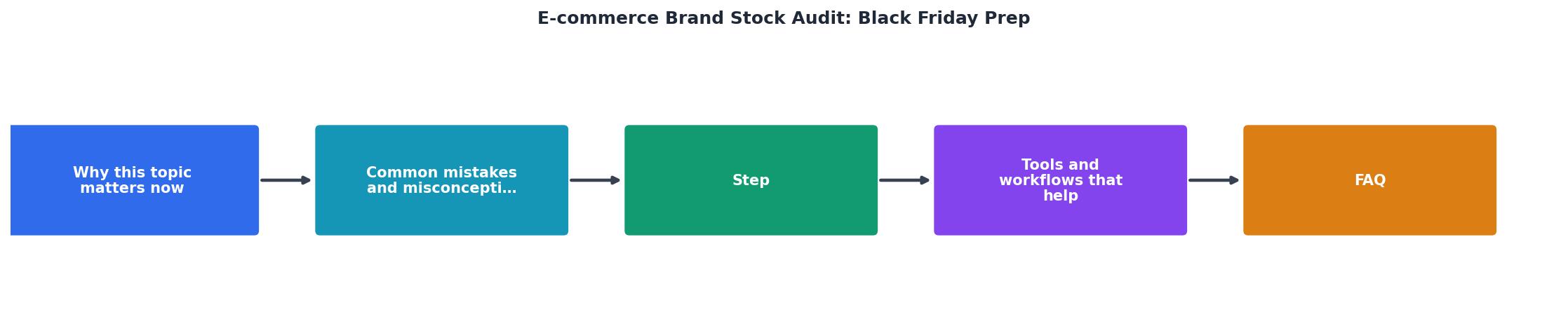
Follow these steps in order. The diagram above shows the flow: Inventory, Match, Collect, Verify, Deliver.
1. Inventory all assets
Open every project folder, Figma file, and shared drive for each e-commerce client. List every stock image, illustration, icon pack, and video clip. Include assets used in:
- Website pages (homepage, product pages, landing pages)
- Email templates
- Social media ads and organic posts
- Print materials (packaging inserts, flyers)
- Marketplace listings (Amazon A+ content, Etsy banners)
2. Match assets to platforms
For each asset, identify which platform it came from. Check file metadata, your browser download history, and platform purchase histories on Freepik, Shutterstock, Adobe Stock, Envato Elements, iStock, and Canva. Flag any asset where the source is unknown.
3. Collect licence certificates
Log into each platform and download the licence certificate or proof-of-purchase for every asset. This is the most time-consuming step when done manually. A single Shutterstock certificate requires navigating to your download history, finding the specific image, and exporting the licence PDF.
This is where bulk tools pay for themselves. On licencedownloader.com, you can pull certificates from multiple platforms in one session instead of logging into five different dashboards and clicking through hundreds of individual downloads.
4. Verify licence terms

With certificates collected, verify that each licence covers the actual usage:
- Standard vs. Extended: Standard licences often cap print runs or prohibit use on merchandise. If your client sells printed products featuring a stock image, they may need an extended licence.
- Editorial-only images: Some stock photos are marked editorial-only and cannot appear in commercial advertising. These slip into e-commerce projects more often than you would expect.
- Expired subscriptions: If you downloaded an image under an Envato Elements subscription that has since lapsed, check whether the licence survives cancellation. (Envato's does for existing projects; not all platforms work the same way.)
5. Deliver to clients
Package each client's licence certificates into a clearly labeled folder. Name it something like ClientName_StockLicences_2026_BF. Include a summary document listing each asset, its source, licence type, and the corresponding certificate file. Send it to the client with a short note explaining what it contains and why it matters.
"The teams that treat Black Friday like a rolling operations exercise - stock check, margin check, warehouse brief, CS surge, contingency tree- end up treating December as harvest instead of triage.">, Every Black Friday, I see the same operational mistakes… and they cost brands ma
Tools and workflows that help

A stock audit does not require expensive software, but the right tools cut hours off the process:
- Spreadsheet tracker: Google Sheets or Notion database with columns for asset name, platform, licence type, certificate status, and client. Sort by "certificate missing" to see gaps instantly.
- Licence Downloader: Bulk-download licence certificates from Freepik, Shutterstock, Adobe Stock, Envato, iStock, Canva, and other platforms. Instead of five separate login sessions and hundreds of clicks, you get all certificates in one batch.
- Cloud storage with versioning: Store certificates in Google Drive or Dropbox with folder-per-client structure. Turn on version history so you never lose a file.
- Reverse image search: For assets where you lost track of the source, use Google Images or TinEye to identify the original platform. Then go pull the certificate.
| Manual Audit | Audit with Bulk Tools |
|---|---|
| 3-5 hours per client | 30-60 minutes per client |
| Login to each platform separately | Pull from multiple platforms at once |
| Easy to miss assets | Systematic coverage |
| Certificates scattered across downloads | Organized folder per client |
Here is an example of what a typical audit dashboard looks like for a freelancer managing three e-commerce clients before Black Friday:
Black Friday Stock Audit Status
Black Friday Stock Audit Checklist
Your progress is saved automatically in your browser.
FAQ
Frequently Asked Questions
Additional Resources
- Black Friday mistakes that cost brands margin and trust - No stock check before going live Brands. A 20-minute audit would save a week of damage control. Brands will run mock campaigns in July, but ...
- Essential Black Friday Ecommerce Strategy: Boost Sales ... - Prepare your ecommerce store for Black Friday with essential strategies to boost sales and maximize your success. stockouts and overstock ...
- How to Prepare For Black Friday Ecommerce - Shopify Agency - Analyze past sales data to forecast demand, prioritize best sellers and avoid overstocking slow movers. Communicate stock levels clearly on site ...