
Every January, freelance designers scramble to locate licence certificates for assets they downloaded months ago. A client emails asking for proof, and suddenly you are digging through three different stock platform dashboards, old email receipts, and random folders on your desktop. Setting up a licence vault before your 2026 campaigns start eliminates that scramble entirely and keeps every project audit-ready from day one.
Photo by cottonbro studio from Pexels
TL;DR:- A licence vault is a single, organized folder structure where every stock-media licence certificate lives, indexed by project and platform.
- Build it once before campaign season starts, then populate it automatically using bulk-download tools like Licence Downloader.
- The result: instant proof of licence for any asset, zero panic when a client or lawyer asks questions.
What a licence vault actually is
A licence vault is not a fancy app. It is a dedicated folder hierarchy on your local drive, cloud storage, or both, where every licence certificate, invoice, and proof-of-purchase PDF for stock media gets stored. Think of it as a filing cabinet with one drawer per client or campaign, and inside each drawer, the receipts for every image, vector, video clip, or font you licensed.
The concept is simple. The execution trips people up because stock platforms do not make it easy. Freepik buries licence info in your download history. Adobe Stock attaches it to your account's licence history page. Shutterstock gives you a licence certificate link per image, but good luck finding it six months later. Envato Elements ties licences to specific "projects" you create inside their system.
When you pull assets from six or more platforms across a dozen client projects per quarter, manual tracking breaks down fast.
That low number is not surprising. Most freelancers treat licence management as an afterthought until a copyright claim lands in their inbox.
Why 2026 campaigns need this now

Stock media licensing enforcement has tightened. Platforms now use automated content-matching to flag unlicensed usage, and copyright holders are more aggressive about sending takedown notices. If you are planning campaigns for Q1 2026, the assets you select in September and October 2026 need traceable licences attached to them before deliverables ship.
Three things changed recently:
- Meta and Google ad platforms now occasionally request licence documentation when a copyright dispute is filed against an ad creative.
- Client contracts increasingly include indemnification clauses that put the designer on the hook for unlicensed assets.
- AI-generated content confusion has made clients more nervous about image provenance in general, which spills over into stock media questions.
Common mistakes that wreck your vault
Before building anything, know what goes wrong:
- Saving only the image, not the certificate. Downloading
photo-12345.jpgwithout its matching licence PDF is the most common failure. The image file alone proves nothing. - Flat folder structure. Dumping every licence into one folder called "Licences" creates a mess by month three. You need hierarchy: client, then campaign, then platform.
- Relying on browser bookmarks. Bookmarking your Shutterstock licence history page is not a backup. If your subscription lapses or the platform changes its URL structure, those bookmarks die.
- Mixing personal and client assets. That icon pack you licensed for your own portfolio does not belong in a client project folder. Separate personal-use licences from commercial-project licences.
Step-by-step vault setup
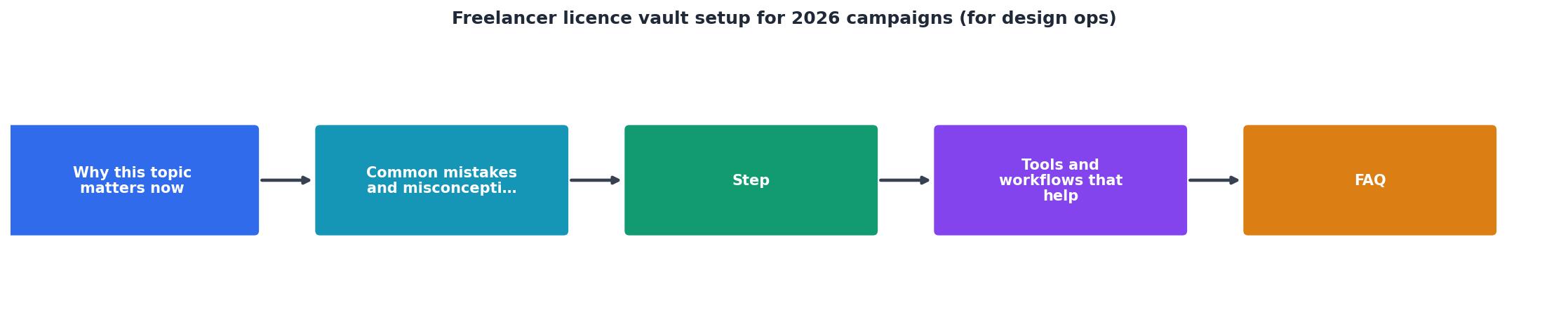
The process diagram above shows five stages: Create Structure, Connect Platforms, Bulk Export, Organize, and Maintain. Here is each stage expanded.
Create Structure
Pick a root location. Cloud storage (Google Drive, Dropbox, iCloud) works best because it syncs across devices and gives you a backup. Inside the root, create:
/Licence-Vault
  /2026
    /ClientName-CampaignName
      /Freepik
      /AdobeStock
      /Shutterstock
      /Envato
      /Other
    /ClientName-CampaignName2
      ...
  /Personal
Each client-campaign combo gets its own folder. Inside that, one subfolder per platform. This structure lets you answer "show me the licence for that hero image in the spring campaign" in under 30 seconds.
Connect Platforms
Log into every stock platform you use and locate where licence certificates live:
- Freepik: Downloads section, then click the licence icon next to each asset.
- Adobe Stock: Licence history under your account menu.
- Shutterstock: Download history, with a "Download licence" link per image.
- Envato Elements: Project-based licence generation inside your account.
- iStock: Purchase history with downloadable licence PDFs.
- Canva: Content licence info is tied to your Canva Pro subscription status.
Bulk Export
Downloading licences one by one from six platforms is brutal. This is where a tool like licencedownloader.com saves hours. It connects to your platform accounts and bulk-exports licence certificates in one batch, so you get a folder of PDFs instead of clicking through hundreds of individual download links.
Organize
Drop exported certificates into the matching client-campaign-platform folders. Name files consistently: platform-assetID-licence.pdf works well. Example: shutterstock-2198437651-licence.pdf.
Maintain
Every time you download new assets for a project, export the licence immediately. Do not wait until the project ships. Build it into your download workflow: get the asset, get the licence, file both.
"The cleanest system is also the least dramatic.">, Expense Tracking for Graphic Designers in 2026
Tools and workflows that help

Your vault does not need expensive software. It needs consistency and the right small tools:
- Cloud storage with search (Google Drive, Dropbox Business): lets you find any licence by filename or content search.
- Licence Downloader: bulk-exports licence certificates from multiple stock platforms so you are not clicking through each one manually.
- A simple spreadsheet: one row per asset, columns for asset ID, platform, client, campaign, licence type (standard vs extended), and file path. This becomes your index.
- Calendar reminders: set a monthly 15-minute reminder to audit your vault and catch any missing certificates before they become a problem.
| Manual Licence Tracking | Vault + Bulk Export |
|---|---|
| 5-10 min per asset | Seconds per asset |
| Scattered across platforms | One central location |
| Easy to forget | Built into workflow |
| Hard to search | Instant file search |
| No backup guarantee | Cloud-synced backup |
Naming and tagging conventions

Consistent naming is what separates a vault from a junk drawer. Adopt a pattern and stick to it across every project:
- Licence files:
[platform]-[assetID]-licence.pdf - Asset files:
[platform]-[assetID]-[descriptive-name].[ext] - Invoice/receipt files:
[platform]-invoice-[date].[ext]
Here is an example dashboard showing what a well-maintained vault looks like for a typical freelancer managing three active client campaigns:
Licence Vault Status, Sept 2026
Five missing certificates out of 147 is manageable. Fifty missing out of 147 is a liability. The vault makes the gap visible so you can close it before it becomes a problem.
Freelancer Licence Vault Setup Checklist
Your progress is saved automatically in your browser.
FAQ
Frequently Asked Questions
Additional Resources
- Expense Tracking for Graphic Designers in 2026 | Money Vault - Expense tracking for graphic designers in 2026. Separate Adobe, Figma, stock assets, contractors, and client revisions from project spend.
- Wise words from @laurensdesignstudio ❤️🫶 Do you ... - You become a designer by designing imperfectly, consistently, graphic design tips, design inspiration, Find inspiration in music, film, nature, ...
- Freelancer Software Tools: 95+ Top Web Apps for ... - Software / SaaS / Tools / App recommendations for the perfect tool deck for solo entrepreneurs, creatives & freelancers.