
Stock platforms rolled out major version upgrades throughout late 2025 and early 2026. Freepik redesigned its licence export flow, Adobe Stock changed certificate formats, and Envato Elements overhauled its download history entirely. If you are a freelance designer heading into new client campaigns this year, your old licence filing system is almost certainly broken or incomplete. This guide walks through building a fresh, audit-ready licence vault from scratch so you never scramble for proof again.
Photo by Phil Evenden from Pexels
TL;DR:- Platform upgrades in 2025/2026 changed how licence certificates are stored, exported, and formatted across Freepik, Adobe Stock, Envato, and others.
- Freelancers need a centralized licence vault (a single folder structure with consistent naming) to stay audit-ready for client campaigns.
- Automate the tedious part with a bulk-download tool like Licence Downloader, then organize once and maintain with a simple quarterly review.
That number comes from informal polls in freelance design communities. Nearly three out of four designers admit they could not produce licence proof for every asset in their last project within 24 hours. That is a liability waiting to happen.
Why this matters right now

Three things converged in early 2026:
- Platform UI overhauls broke existing export bookmarks and scripts. Freepik moved licence certificates into a new "Legal" tab. Adobe Stock switched from a single-page PDF to a multi-page document that includes usage terms inline. Envato Elements rebuilt its download history with pagination that resets session tokens.
- Copyright enforcement got faster. Automated content-matching tools used by stock agencies now flag unlicensed usage within days, not months. A client running Meta ads with a flagged image gets a takedown notice before the campaign even peaks.
- Client contracts tightened. More small businesses and startups include indemnification clauses that put licence responsibility squarely on the freelancer. If you cannot produce proof, you carry the cost.
Ignoring these shifts does not make them go away. It just means the next copyright dispute hits harder.
Common mistakes that cost time

Here are the patterns I see freelancers repeat:
- Relying on platform dashboards as your archive. Shutterstock keeps your download history, sure. But if your subscription lapses or the platform changes its retention policy, that history can vanish. Screenshots of a dashboard are not legal proof.
- Mixing asset files and licence files in the same folder. You end up with
hero-image.jpgandhero-image-licence.pdfin a project folder with 200 other files. Six months later, you cannot find either. - Downloading certificates one at a time. With three platforms and 40 assets per campaign, that is 120 manual clicks. Nobody does that consistently. The result: gaps in your archive.
- Not updating workflows after platform upgrades. The Freepik export button moved. Your muscle memory clicks the old spot, gets nothing, and you skip it "just this once." Multiply that across a year.
Step-by-step vault setup
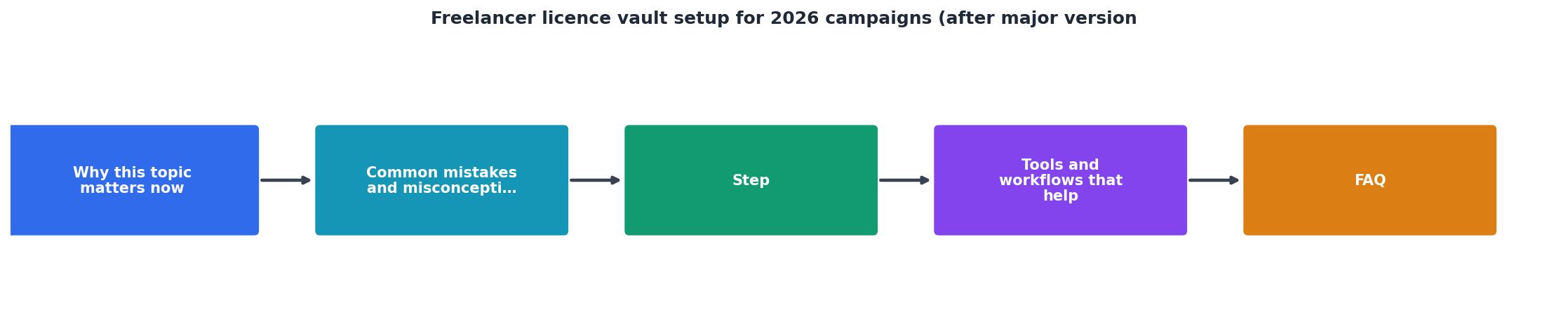
Follow these steps: Audit, Structure, Download, Verify, Maintain.
1. Audit your current state
Open every stock platform you used in the past 12 months. Check:
- Can you still access your download history?
- Has the licence export format changed?
- Are there assets you downloaded but never saved a certificate for?
2. Build your folder structure
Create a root folder called licence-vault (or whatever fits your system). Inside it:
licence-vault/
├── freepik/
│   ├── 2025/
│   └── 2026/
├── adobe-stock/
│   ├── 2025/
│   └── 2026/
├── envato/
│   ├── 2025/
│   └── 2026/
├── shutterstock/
│   └── 2026/
└── _index.csv
The _index.csv file maps each asset ID to its project, client, and certificate filename. Keep it flat and simple. One row per asset.
3. Bulk-download certificates
This is where manual work becomes unsustainable. If you have 50+ assets, downloading certificates one by one from each platform is a full afternoon gone. A tool like Licence Downloader connects to your stock platform accounts and pulls all available licence certificates in bulk. It handles the updated Freepik, Adobe Stock, and Envato interfaces so you do not need to chase changed buttons yourself.
"Your True-Up limit, for which the default value is 30%.">, Upgrading
That quote from JetBrains' licence vault documentation highlights how licence management tools handle upgrade thresholds. The same principle applies here: plan for growth. If your asset usage grows 30% year-over-year, your vault structure and download automation need to handle that without manual intervention.
4. Verify completeness
After the bulk download, cross-reference your _index.csv against the actual files in each folder. Every row should have a matching PDF or certificate file. Flag gaps immediately and resolve them while you still have platform access.
5. Set a maintenance schedule
Quarterly reviews work for most freelancers. At the start of each quarter:
- Download certificates for all new assets from the previous quarter
- Check for platform UI changes that might affect exports
- Back up the entire
licence-vaultfolder to cloud storage
Tools and workflows that help

Your vault does not need to be complicated. Here is what actually works:
- Cloud storage with versioning (Google Drive, Dropbox, iCloud). Versioning protects you if a file gets accidentally overwritten or deleted.
- A CSV or Notion database as your index. Fancy tools are nice, but a spreadsheet you actually update beats a project management system you abandon.
- Licence Downloader for the bulk certificate retrieval step. It eliminates the most tedious part of the process and stays updated when platforms change their export flows.
- Calendar reminders for quarterly maintenance. Seriously. Put it in your calendar or it will not happen.
| Manual Approach | Automated with Licence Downloader |
|---|---|
| 2-3 hours per platform per quarter | 10-15 minutes total |
| Breaks when UI changes | Updated for new platform versions |
| Easy to skip "just this once" | Runs consistently every time |
| Gaps accumulate silently | Missing certificates flagged immediately |
Here is an example dashboard showing what a typical freelancer's licence vault looks like after the initial setup, covering three platforms and one year of campaign work:
Licence Vault Status, Q3 2026
Freelancer Licence Vault Setup Checklist
Your progress is saved automatically in your browser.
FAQ
Frequently Asked Questions
client or team-member layer inside each platform folder. For agencies with higher volume, the same principles apply but the bulk-download step becomes even more critical since manual retrieval at scale is not realistic.Additional Resources
- Upgrading | License Vault Documentation - This section provides detailed instructions on how to upgrade your License Vault to the commercial plan of your choice.
- How to upgrade/migrate Autodesk Vault servers to a newer ... - Quick overview: Plan your Vault upgrade carefully with proper backups, test in a separate environment first, and follow the two-version limit ...
- Efficient JetBrains license management with License Vault - License Vault effectively distributes JetBrains IDE and plugin licenses for your entire organization and provides your team with the ...