
A client emails you in February asking for proof that every stock image in their 2025 holiday campaign was properly licensed. You spend three hours digging through Freepik receipts, Adobe Stock download history, and an old Envato invoice buried in Gmail. That scenario repeats every quarter, and it gets worse when accessibility audits enter the picture because auditors want documentation for every visual asset, not just the hero images. Setting up a licence vault before your 2026 campaigns launch eliminates that scramble entirely.
Photo by Michael Burrows from Pexels
TL;DR:- A licence vault is a single, organized folder structure where every stock-media licence certificate lives, tagged by project and platform.
- Build it now, before 2026 campaigns start, so accessibility audits and client requests take minutes instead of hours.
- Automate the collection step with a tool like Licence Downloader to bulk-pull certificates from Freepik, Shutterstock, Adobe Stock, Envato, and others in one pass.
Why a licence vault matters now
Stock licence compliance used to be a "nice to have." That changed. Accessibility regulations in the EU (European Accessibility Act, effective June 2025) and updated WCAG 2.2 adoption across North America mean auditors now review the full asset chain of a digital product. They check alt text, contrast ratios, and increasingly, whether every decorative or functional image carries a valid commercial licence. If you cannot produce that proof, the audit flags it as a risk.
For freelance designers juggling three or four stock platforms, the risk is real. Each platform stores licence data differently. Freepik gives you a PDF certificate. Adobe Stock buries the licence in your download history. Envato Elements provides a licence code per download. Keeping track manually across dozens of assets per campaign is a recipe for gaps.
A licence vault solves this by giving every certificate a predictable home. Think of it as a filing cabinet with one drawer per client, one folder per campaign, and one file per asset. When an auditor or client asks for proof, you open the drawer and hand it over.
Common mistakes freelancers make

I have seen the same patterns trip up freelancers year after year:
- Relying on email receipts. Purchase confirmations are not licence certificates. They prove payment, not usage rights. An auditor wants the actual licence terms tied to a specific asset ID.
- Mixing personal and client downloads. Using one Shutterstock account for everything means your download history is a tangled mess. When a single client needs their assets isolated, you are stuck scrolling through hundreds of entries.
- Downloading certificates "later." You finish a project, deliver the files, and tell yourself you will grab the licences next week. Next week becomes next quarter. By then, some platforms have rotated their download history or changed their UI.
- Ignoring free-tier assets. Images downloaded under Freepik's free plan or Canva's free library still have licence conditions (attribution requirements, no-resale clauses). Skipping these in your vault creates blind spots.
- No naming convention. Saving files as
licence.pdf,licence(1).pdf,licence(2).pdfhelps nobody. A vault without structure is just a folder of chaos.
Step-by-step vault setup
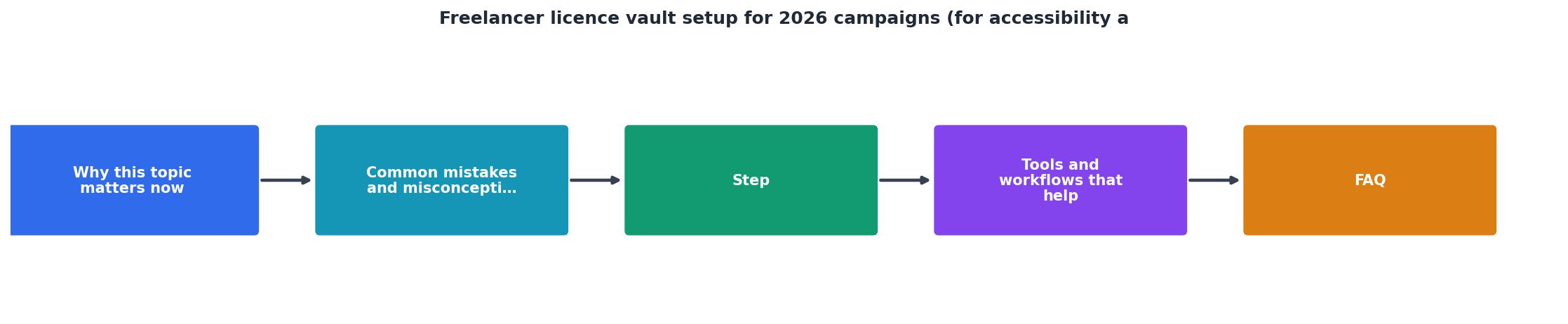
Here is the process, broken into concrete steps. The diagram below shows the flow at a glance.
1. Choose your vault location
Pick a cloud-synced folder: Google Drive, Dropbox, or OneDrive all work. The key requirement is that it syncs automatically and supports sharing. You will share specific subfolders with clients or auditors when needed.
Create a root folder called Licence-Vault (or License-Vault if you prefer American spelling). Inside it, create one subfolder per client using a consistent format: ClientName-Year. For 2026 campaigns, that looks like Acme-2026, BlueWave-2026, etc.
2. Define your naming convention
Every licence file follows this pattern:
[Platform]-[AssetID]-[ProjectCode].pdf
Freepik-28374651-ACME2026Q1.pdfAdobeStock-904821553-BW2026SPRING.pdfEnvato-HGTR7721-ACME2026Q1.txt
3. Bulk-download existing certificates
This is where most freelancers stall. Logging into four platforms, finding each asset's licence page, and downloading one certificate at a time is brutal. For a campaign with 40 stock images across Freepik, Adobe Stock, and Shutterstock, that is easily 90 minutes of clicking.
Licence Downloader handles this in bulk. Point it at your accounts, select the assets or date range, and it pulls every certificate into a local folder. From there, you rename and sort them into your vault structure."The same toggle will also be available on the License Vault settings page, and you can turn it on or off at any time during your trial.">, Getting started
4. Tag for accessibility audits
Accessibility audits care about specific things: alt text accuracy, decorative vs. functional classification, and licence scope (does the licence cover web use? print? social ads?). Add a simple spreadsheet or CSV to each client folder with these columns:
| Asset ID | Platform | Licence Type | Usage Scope | Alt Text | Decorative? |
|---|---|---|---|---|---|
| 28374651 | Freepik | Premium | Web + Social | Team meeting in modern office | No |
| 904821553 | Adobe Stock | Standard | Web only | Abstract gradient background | Yes |
5. Automate ongoing collection
Set a recurring calendar reminder: every Friday, spend 10 minutes downloading that week's new licence certificates and filing them. Better yet, run a bulk download at the end of each project milestone. The habit matters more than the tool.
Tools and workflows that help

Your vault does not need expensive software. Here is what works:
- Cloud storage (Google Drive, Dropbox, OneDrive): Sync, share, and version control built in.
- Licence Downloader: Bulk-pulls certificates from Freepik, Shutterstock, Adobe Stock, Envato Elements, iStock, and Canva. Saves hours per campaign.
- Google Sheets or Notion: For the asset-tracking spreadsheet described above. Notion databases let you attach the PDF directly to each row.
- Naming conventions: Free, zero-tech, and the single most impactful thing you can do.
| Manual Approach | Vault + Automation |
|---|---|
| 90+ min per campaign to gather licences | 10-15 min with bulk download |
| Certificates scattered across email and platforms | Single folder per client/project |
| Audit response takes days | Audit response takes minutes |
| No asset-to-licence mapping | Spreadsheet links every image to its proof |
| Risk of missing free-tier licences | All assets tracked regardless of tier |
Here is an example of what a typical freelancer's vault dashboard might look like after setting up their first two client campaigns:
Licence Vault, Example Overview
Your vault setup checklist
Freelancer Licence Vault Setup Checklist
Your progress is saved automatically in your browser.
FAQ
Frequently Asked Questions
Additional Resources
- Starting Your Accessibility + Compliance Business in 2026 ... - There are six main ways to make money as an accessibility professional: audits, consulting, products, user testing, program management, and ...
- AAArdvark Accessibility Solutions For Freelancers - Offer your clients professional-grade accessibility audits and remediation services with tools tailored for freelancers like you.
- Getting started | License Vault Documentation - Configure User access to licenses. At this step, you can set up JetBrains Account as the first authentication module for your License Vault.