
Black Friday campaigns go live, traffic spikes tenfold, and somewhere in the chaos a stock photo on your hero banner triggers a copyright takedown notice. Your ad gets pulled, your listing disappears, and the revenue window slams shut. Getting your stock image licences in order before the rush is not optional housekeeping. It is revenue protection, and this guide walks you through exactly how to do it.
Photo by https://kaboompics.com/ from Pexels
TL;DR:- Audit every stock image used in your Black Friday campaigns, landing pages, and ads before launch week.
- Download and organize licence certificates from each platform (Freepik, Shutterstock, Adobe Stock, Canva, etc.) so you have instant proof if challenged.
- Build a simple compliance checklist now to avoid takedowns, lost ad spend, and legal headaches during your highest-revenue period.
Why compliance matters more now

Copyright trolls ramp up activity around major shopping events. They know e-commerce stores rush to publish new banners, email headers, and social creatives. A store using an image without a valid commercial licence (or unable to prove it has one) becomes an easy target for a demand letter.
Ad platforms have tightened enforcement too. Meta's automated systems can disable an ad account mid-campaign if a rights holder files a complaint. Google Merchant Center suspensions during Black Friday week are brutal because reinstatement reviews take days.
"In fact, 80% of Millennials and 77% of Gen Z prefer buying from eco-friendly brands.">, How to Prepare for Black Friday and Cyber Monday
That stat matters here because brand trust extends beyond sustainability. Customers who see a "listing removed" notice or a broken image where your product hero shot used to be will bounce. Trust erodes fast, and it does not recover during a 48-hour sale window.
Three concrete risks of skipping compliance prep:
- Ad account suspension on Meta, Google, or TikTok mid-campaign.
- Marketplace listing removal on Amazon, Etsy, or Shopify storefronts.
- Legal demand letters arriving in January with damages claims for unlicensed usage during your highest-traffic period.
Common mistakes that cost money

Assuming "I paid for it" is enough. Paying for a Canva Pro subscription does not automatically mean every image you downloaded is cleared for all commercial uses. Some assets carry editorial-only restrictions. Others require an extended licence for products-for-resale or print runs above a threshold. The receipt alone is not proof of the specific licence terms.
Reusing old campaign assets without checking. That lifestyle photo from your 2024 summer sale might have come from a free trial or a subscription that lapsed. If the subscription expired, the licence terms may have changed depending on the platform. Shutterstock, for example, grants perpetual usage for images downloaded during an active plan, but Envato Elements requires an active subscription for continued use of certain asset types.
Mixing personal and business accounts. Freelancers and small store owners often download stock images from a personal Freepik or Canva account and use them in client or business projects. The licence certificate tied to a personal account may not cover commercial use at the scale a Black Friday campaign demands.
Not keeping the licence file itself. Most platforms let you download a PDF or text certificate at the time of purchase. Almost nobody does. Months later, when a claim arrives, you are scrambling through download history trying to reconstruct proof.
Step-by-step compliance audit

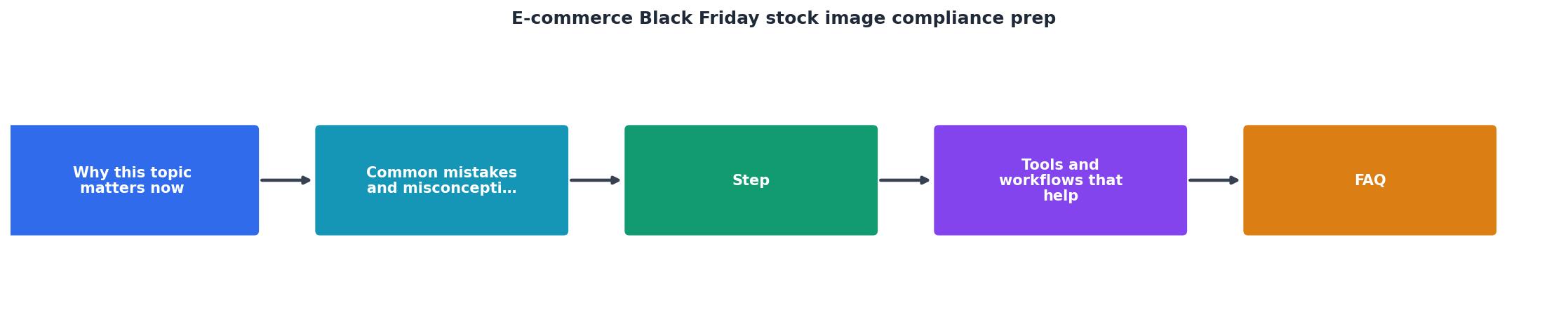
Here is the process broken into clear steps. The diagram below shows the flow at a glance.
1. Inventory all campaign images
Open every Black Friday asset: landing pages, email templates, social ad creatives, product listing images, blog post headers. Create a spreadsheet with columns for Image filename, Source platform, Licence type, and Certificate downloaded (Y/N).
Do not skip images that "came with the theme" or were "always on the site." Those are the ones that cause problems.
2. Match each image to its source
For each image, identify where it was downloaded. Check your Shutterstock download history, Adobe Stock licence history, Freepik downloads page, Canva design history, or Envato Elements downloads list. Record the platform and the licence type (Standard, Extended, Editorial, etc.).
3. Download licence certificates
This is the critical step most people skip. Go to each platform and download the actual licence certificate PDF or confirmation for every image on your list.
- Shutterstock: Account > Download History > Download Licence
- Adobe Stock: Licencing History > Download Certificate
- Freepik: My Downloads > Licence Details
- Canva: Design > Content Licence (available for Canva Pro assets)
- Envato Elements: Downloads > Licence Certificate
4. Organize and store centrally
Create a single folder (cloud-based: Google Drive, Dropbox, or your project management tool) named something like BF2026-Licence-Certificates. Inside, organize by platform or by campaign asset. The goal: anyone on your team can find the proof for any image within 60 seconds.
5. Flag gaps and fix them
Any image without a valid licence certificate gets one of two treatments:- Buy the proper licence if the image is essential to the campaign.
- Replace it with a properly licensed alternative.
Tools and workflows that help
| Manual Approach | Automated Approach |
|---|---|
| Visit each platform individually | Bulk-pull certificates from multiple platforms |
| Copy-paste licence info into spreadsheets | Structured export with filenames and licence types |
| Hours per audit cycle | Minutes per audit cycle |
| Easy to miss expired or changed licences | Flags missing or invalid certificates |
| Scales poorly beyond 20-30 images | Handles hundreds of assets |
A few workflow tips that save real time:
- Tag images at download time. When you download a stock photo, immediately save the licence certificate in the same project folder. Future-you will be grateful.
- Use consistent naming.
shutterstock_12345678_standard.pdftells you everything at a glance. - Set a calendar reminder. Two weeks before any major campaign (Black Friday, holiday season, summer sale), run a quick compliance audit.
The following dashboard shows what a typical compliance status looks like for a small e-commerce store preparing for Black Friday:
Black Friday Image Compliance
Example: Small e-commerce store with 84 campaign images
That 73% compliance rate is typical for stores that have never run a formal audit. The remaining 27% represents real risk: images that could trigger takedowns or legal claims during your busiest sales period.
Your pre-Black Friday compliance checklist
Black Friday Stock Image Compliance Checklist
Your progress is saved automatically in your browser.
FAQ
Frequently Asked Questions
What does your stock image compliance process look like before a big sale? Have you ever had a campaign disrupted by a copyright claim? Share your experience below.
Additional Resources
- How to Prepare for Black Friday and Cyber Monday - A successful e-commerce Black Friday and Cyber Monday starts with ensuring you have the right stock levels to meet demand. Analyze past data to predict which ...
- 10 Last-Minute Ways to Prep Your E-Commerce Store for ... - 10 Last-Minute Ways to Prep Your E-Commerce Store for Black Friday · 1. Start collecting subscribers early · 2. Get your site BFCM ready · 3. Organize your upsells.
- How to Prepare For Black Friday Ecommerce - Shopify Agency - Master Black Friday 2025 with our expert ecommerce guide. UK-focused Shopify strategies to boost sales, CRO, email, SMS, and customer ...