
You just landed a brand identity project. The mood board is perfect, the client is excited, and then you read the fine print on that stock illustration you wanted to use as the hero element. No use in logos. No resale. No sublicensing. Suddenly your creative direction hits a wall built entirely out of licence terms. Every freelance designer faces this tension between what a licence allows and what the project demands, and the ones who handle it well protect both their work and their reputation.
TL;DR:- Licensing restrictions are not creativity killers. They are guardrails you can design around once you understand them.
- Choose flexible licence types (Extended, Editorial-free, or Royalty-Free with broad terms) before you start designing, not after.
- Keep organized proof of every licence so client requests and audits never derail your workflow.
The real problem with restrictions
Freelance designers juggle multiple stock platforms. Freepik, Adobe Stock, Shutterstock, Envato Elements, iStock. Each platform writes its own licence agreement, and those agreements differ in ways that matter. A standard licence on Shutterstock caps print runs at 500,000 copies. Freepik's free tier requires attribution. Envato Elements ties asset usage to a single "end product" per registration.
These are not obscure edge cases. They show up in everyday deliverables: social media kits, packaging, pitch decks, merchandise. The restrictions that trip freelancers up most often fall into a few categories:
- Print run limits on standard licences
- No-resale clauses that block merchandise or template sales
- Attribution requirements that clash with clean brand deliverables
- Single-seat restrictions that prevent sharing files with a client's in-house team
- No-logo rules that prohibit using stock elements in trademark registrations
How restrictions shape your output
Licence terms do not just limit what you can use. They shape what you create. When a standard licence blocks logo use, you either swap the asset, upgrade the licence, or redesign entirely. Each option costs time. And time, for a freelancer billing hourly or per-project, is money.
Here is what happens in practice:
- Scope creep from licence swaps. You find the right image, discover it needs an extended licence at three times the cost, and pivot to a weaker alternative. The design suffers.
- Attribution clutter. Free-tier assets from Freepik or Pixabay require visible credit. That credit line on a minimalist business card looks terrible.
- Client confusion. You deliver a brand kit, the client prints 600,000 flyers, and the standard licence covers only 500,000. Now you are both exposed.
The pattern is clear: restrictions that you discover mid-project cost more than restrictions you plan for upfront.
Strategies that keep creativity intact
The goal is not to avoid stock assets. It is to pick the right licence before the design phase locks you in. Here are concrete strategies that work.
Pick the licence tier first
Before browsing any stock library, define the project scope. Ask three questions:
- Will this asset appear in a logo or trademark?
- What is the maximum distribution (print run, ad impressions, downloads)?
- Does the client need to sublicence or transfer the asset to a third party?
Build a licence-friendly asset library
Maintain a personal library of assets you have already licenced with broad terms. Over time, this library becomes a creative shortcut. You know the terms, you have the proof, and you can reuse elements across projects without re-checking restrictions.
Use original elements for restricted zones
Logos, trademarks, and merchandise are the three areas where stock licences are most restrictive. For these deliverables, create original vector work or commission custom illustrations. Reserve stock assets for supporting roles: backgrounds, textures, mockup scenes, social media filler.
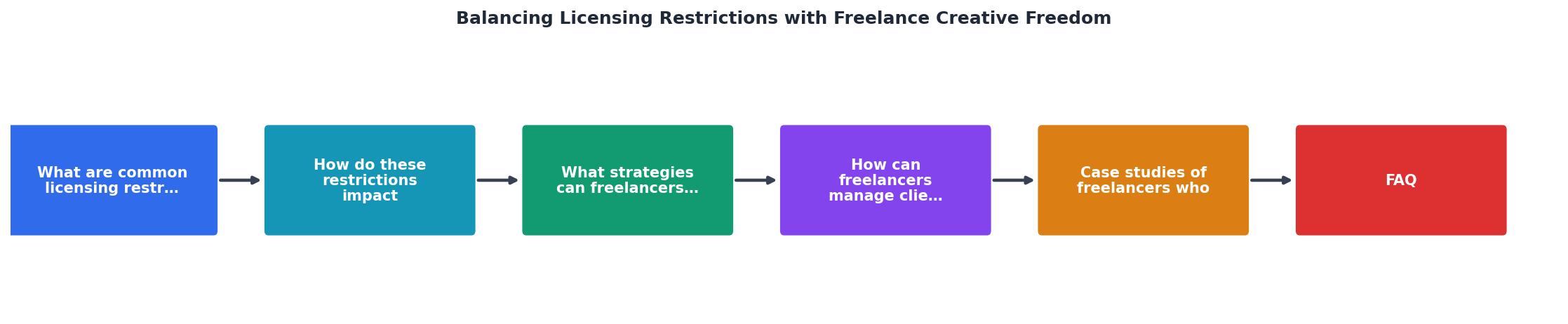
The diagram above shows the flow: Define scope, Check licence tier, Select asset, Verify terms, Design, Archive proof. Following these steps in order prevents the mid-project scramble that kills creative momentum.
Managing client expectations

Clients rarely understand stock licensing. They assume "I paid for it, I own it." That assumption creates risk for both of you. Clear communication upfront eliminates surprises.
In your project proposal or contract, include:
- A clause stating that stock assets are licenced, not owned, and subject to platform terms
- The specific licence tier you plan to purchase (Standard vs. Extended)
- Who is responsible for licence costs (you or the client)
- A note that licence certificates will be delivered alongside final files
Tools like licencedownloader.com let you bulk-download licence certificates from multiple platforms in one session, so archiving proof does not eat into billable hours.
Real-world approaches that work
Consider a freelance designer working across Freepik, Adobe Stock, and Envato Elements for a single rebrand project. The brand kit includes a logo, social media templates, a pitch deck, and packaging mockups.
What works: She uses original vector art for the logo (no stock restrictions apply). For the pitch deck backgrounds, she selects Adobe Stock images under a Standard licence, which covers digital presentations with no print-run concern. For packaging mockups, she upgrades to an Extended licence because the client plans a 2-million-unit production run. Social media templates use Envato Elements assets registered to the social media end product.
What fails: Using a Freepik free-tier illustration in the logo. The attribution requirement makes it impractical, and the free licence explicitly prohibits trademark use. Discovering this after the client approves the logo means starting over.
"Check out this post on the six most common causes of creative burnout.">, Building a sustainable creative career: Finding balance as a freelancer
Burnout often comes from exactly this kind of rework. Planning licence compliance into your creative process is not just legal hygiene. It protects your energy and your schedule.
Here is an example dashboard showing how a typical freelancer's licence collection might look after organizing assets by project and licence tier:
Example: Freelancer Licence Archive
| Approach | Standard Licence | Extended Licence |
|---|---|---|
| Print run | Up to 500K copies | Unlimited |
| Merchandise use | Usually blocked | Allowed |
| Logo/trademark | Prohibited | Sometimes allowed |
| Cost | $1-$15 per asset | $50-$200 per asset |
| Best for | Digital, small print | Packaging, products, large campaigns |
Freelancer Licence & Creativity Management Guide
Your progress is saved automatically in your browser.
FAQ
Frequently Asked Questions
What is your go-to strategy for handling licence restrictions on creative projects? Share your approach in the comments.
Additional Resources
- Building a sustainable creative career: Finding balance as ... - Avoid stress, exhaustion and burnout as a creative freelancer: keep working in a way that's healthy, sustainable and actually enjoyable.
- Does the freelance economy promote creative freedom? - This paper builds on the creation of new ways of organizing work, where the freelance economy specifically targets the increasing number of ...
- Does the freelance economy promote creative freedom? - Through describing and discussing creativity within the freelance economy, this paper seeks to understand creativity in collaborations among these self-employed ...