
You finished a branding project six months ago, moved on to new clients, and then an email from Pixsy lands in your inbox claiming copyright infringement on a stock photo you legitimately licensed. Your stomach drops. You know you paid for that image, but you cannot find the licence certificate anywhere. This scenario plays out thousands of times a year, and the difference between a quick dismissal and a costly settlement almost always comes down to one thing: organized licence documentation.
TL;DR:- Pixsy sends copyright claims on behalf of photographers. If you hold a valid licence, the claim can be dismissed with proper proof.
- The biggest risk is not infringement itself but the inability to locate your licence certificate when you need it.
- Organize, download, and archive every stock licence at the time of purchase. Tools like Licence Downloader make this fast across multiple platforms.
What Pixsy Actually Does
Pixsy is a copyright enforcement platform that uses reverse image search to find unlicensed uses of photographs online. Photographers upload their work, Pixsy crawls the web, and when it finds a match on your website or social media, it sends a claim letter demanding compensation.
Here is the critical detail most freelancers miss: Pixsy does not verify whether you hold a licence before sending the claim. Their system detects a match, and the letter goes out. It is up to you to prove you have the right to use that image.
That statistic reflects a straightforward reality. When you can produce a valid licence certificate showing the image was purchased under a commercial licence covering your use case, the claim typically gets dropped. When you cannot, you are negotiating from a position of weakness.
"Submitting a case for resolution is free - we only charge a fee if we can successfully resolve your case (50% of the recovery).">, Image Theft Protection
This fee structure means Pixsy is incentivized to pursue every possible match. Legitimate licence holders get caught in the net alongside actual infringers.
Why Freelancers Are Vulnerable

Freelance designers face a specific set of problems that make Pixsy claims especially stressful:
- Multiple platform subscriptions. You might use Freepik for vectors, Adobe Stock for hero images, and Envato for templates. Each platform stores licence records differently, in different dashboards, with different export formats.
- Client handoffs create gaps. You download an image under your account, use it in a client deliverable, and the client publishes it on their site. Months later, the claim arrives at the client, who forwards it to you. Now you need to dig through old project files.
- Platform changes break access. Subscriptions lapse, platforms redesign their dashboards, download history gets archived or deleted. The licence you could access last year might be buried behind a paywall or gone entirely.
- Free-tier confusion. Some images downloaded under free Freepik or Canva accounts have attribution requirements. Miss the attribution, and a Pixsy claim has legitimate grounds.
That number is low. Most designers treat licence certificates as an afterthought, something they will deal with "if it ever comes up." By then, it is often too late.
Common Mistakes That Cost Money

Ignoring the claim letter. Pixsy escalates unanswered claims. What starts as a settlement request can turn into a formal legal demand. Respond promptly, even if you believe the claim is baseless.
Sending a screenshot of your purchase history. A screenshot of your Shutterstock download page is not a licence certificate. Pixsy and their legal partners want the actual licence agreement document tied to that specific download, showing the licence type, permitted uses, and date.
Assuming your client's licence covers you. If the client bought the image, the licence is under their account. If you bought it, the licence is under yours. Mismatches here create real problems. Always clarify who holds the licence and ensure the correct party can produce the certificate.
Confusing editorial and commercial licences. An editorial licence does not cover commercial use. If you used an editorial-only image in a client's marketing campaign, the Pixsy claim might be valid regardless of whether you paid for the image.
Step-by-Step Claim Response
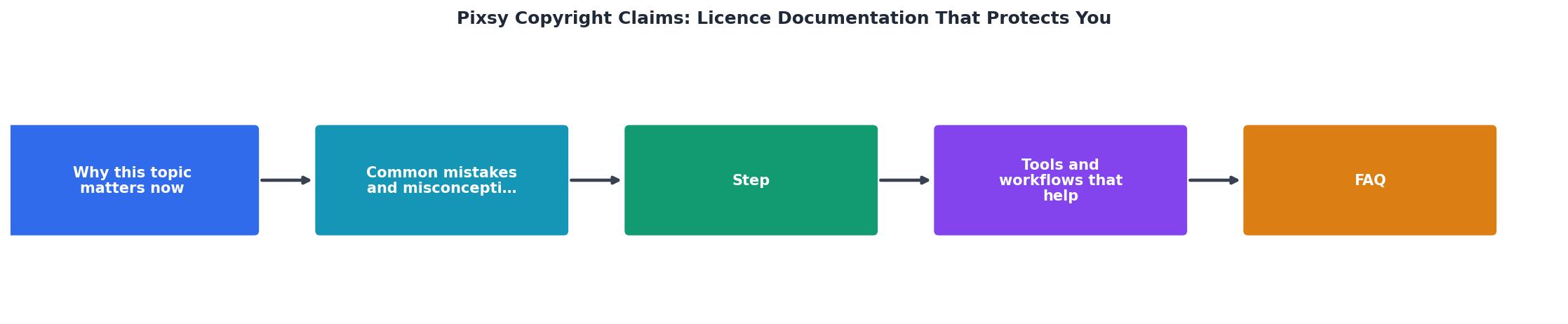
When a Pixsy claim arrives, follow these steps: Identify Image, Find Licence, Verify Terms, Respond with Proof, and Archive Everything.
Identify Image. The claim letter includes the image in question and usually a URL where it was found. Match this to your records. Check which platform you downloaded it from and under which account.
Find Licence. Log into the platform and locate the licence certificate or proof of purchase for that specific image. On Adobe Stock, this is in your licence history. On Shutterstock, check your download history and licence details. On Freepik, look under your downloads section.
Verify Terms. Confirm the licence type covers the actual use. A standard licence on Shutterstock covers most commercial uses up to 500,000 copies. An extended licence covers more. Check whether the specific use (web, print, merchandise, social ads) falls within the licence scope.
Respond with Proof. Send the licence certificate, purchase receipt, and a brief explanation to the contact provided in the claim letter. Be factual. Include the licence ID, purchase date, platform, and licence type.
Archive Everything. Save the claim letter, your response, and all supporting documents in a dedicated folder. If the same image triggers another claim later, you have everything ready.
Build a Licence Archive That Works
The best time to prepare for a Pixsy claim is before it arrives. Here is a practical system:
- Create a folder structure by client and project. Inside each project folder, keep a subfolder called
licenceswith every certificate for every stock asset used. - Download the licence certificate immediately after purchasing or downloading any stock image. Do not wait. Platforms change, subscriptions expire, and download histories get purged.
- Use consistent naming. Name each certificate file with the platform, image ID, and date:
shutterstock-1234567-2026-08-09.pdf. This makes searching trivial. - Back up to cloud storage. Google Drive, Dropbox, or any cloud service with search. If your local drive fails, the backup saves you.
The following example shows what a well-organized licence archive dashboard might look like for a typical freelance designer managing three active platform subscriptions:
Licence Archive Status
Preventing Future Claims
Prevention beats response every time. A few habits eliminate most Pixsy risk:
- Audit your live assets quarterly. Check your website and active social posts against your licence archive. Remove anything you cannot document.
- Include licence delivery in your client workflow. When you hand off final files, include a folder of licence certificates. This protects both you and the client.
- Track attribution requirements. Free-tier images from Canva and Freepik often require visible attribution. Log where attribution is needed and verify it stays in place after the client edits the page.
- Keep receipts alongside certificates. A payment receipt from your credit card or PayPal, combined with the platform licence certificate, creates a strong paper trail.
Pixsy Claim Defence Checklist
Your progress is saved automatically in your browser.
FAQ
Frequently Asked Questions
Additional Resources
- Pixsy: Image Theft Protection | Find and Fight Image Theft - Protect your images from theft with Pixsy. Search where your content is being used, then we can help issue takedowns & recover compensation.
- Submit & Resolve Copyright Infringement Claims - Pixsy can help monitor & protect you images, and enforce your copyrights worldwide. You can monitor 500 images for free (forever)!
- Warning - An image or website marked with 'Protected by Pixsy' warns that the owner of that work actively protects it. Unauthorized use of this work may result in legal ...