
A client emails you on a Friday afternoon asking for proof that every stock image in their brand kit is properly licensed. You open six different platform dashboards, dig through download histories, and realize half the receipts are buried in confirmation emails from two years ago. Brand protection platforms like Red Points catch infringers at scale, but the evidence pack you need to defend your own legitimate usage is a completely separate problem that most freelancers ignore until it becomes urgent.
Photo by Guzel Sadykova from Pexels
TL;DR:
- Red Points automates brand protection by detecting counterfeits, unauthorized sellers, and IP infringement across the web.
- An evidence pack is the organized collection of licence certificates, purchase receipts, and usage records that proves your assets are legitimately sourced.
- Building your own evidence pack protects you from false positives in automated enforcement systems and gives you instant proof when clients or legal teams ask.
What Red Points Actually Does
Red Points is an AI-driven brand protection platform used by companies to detect and remove counterfeit products, unauthorized resellers, and intellectual property violations online. It scans marketplaces, social media, websites, and app stores to find infringements, then automates takedown requests.
The platform processes millions of data points daily. Brands like Guess, Ralph Lauren, and hundreds of others rely on it to protect revenue and reputation. The detection engine flags content that matches protected trademarks, logos, and product images.
"Through Red Points' tech, the people and the team, we've been able to reach a 95% automation rate, detecting 110 fraud sites in peak seasons on a monthly basis.">, Red Points' AI Brand Protection Platform
Here is the catch for freelance designers: automated enforcement systems sometimes flag legitimate licensed usage. If a brand you work with uses Red Points (or a similar service), and your client's social post or website triggers a match, you need to prove your usage is authorized. Fast.
Why Evidence Packs Matter Now

Three trends make evidence packs non-negotiable in 2026:
- Automated enforcement is everywhere. Red Points, Corsearch, MarkMonitor, and similar platforms scan billions of pages. False positives happen. Your licensed Shutterstock image on a client's Facebook ad can get flagged if the original photographer also filed a complaint through a different channel.
- Clients demand documentation. Legal teams at even small businesses now ask for licence proof before approving creative deliverables. No proof, no payment.
- Platform disputes require speed. When Meta or Google flags an ad, you have days to respond. Digging through email archives under pressure leads to mistakes.
The designers who survive these situations are the ones with organized evidence packs ready to go.
Common Mistakes That Cost You
Most freelancers make the same errors when it comes to licence documentation:
- Relying on email receipts alone. Email gets deleted, accounts get hacked, providers change formats. A confirmation email from Freepik in 2023 might not even open correctly today.
- Assuming the platform keeps records forever. Shutterstock, Adobe Stock, and Envato all have different data retention policies. Some download histories disappear after account changes or subscription lapses.
- Mixing personal and client assets. Using one stock account for multiple clients without tracking which licence covers which project creates a mess during audits.
- Ignoring free assets. "Free" images from Unsplash, Pexels, or Freepik Free still have licence terms. You still need proof of the licence type at the time of download, because terms change.
Build Your Evidence Pack Step by Step
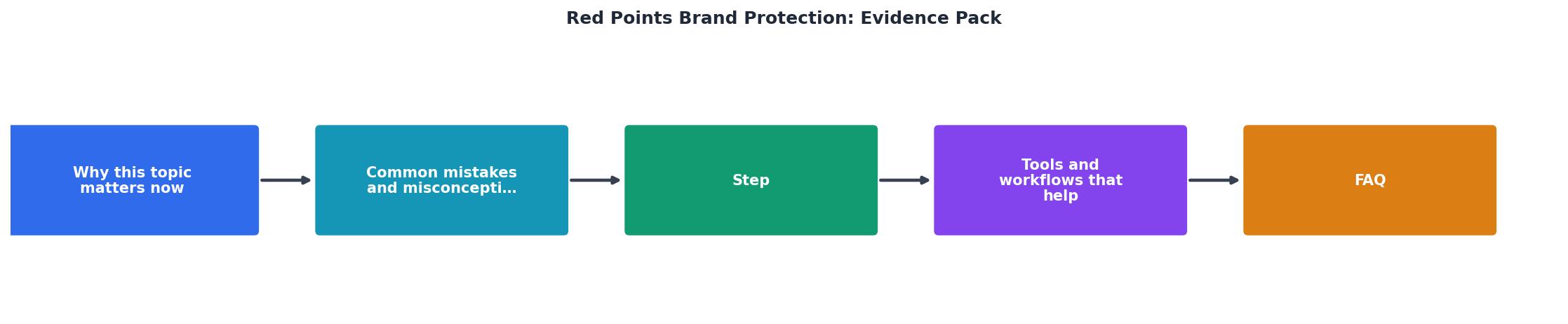
Follow these steps to create a complete evidence pack. The process diagram above shows the flow: Audit your assets, Download licence certificates, Organize by project, Store securely, and Review quarterly.
1. Audit your active stock accounts
List every platform where you hold a subscription or have purchased assets. Include free-tier accounts. For each one, note:
- Account email and username
- Subscription type (free, standard, extended)
- Number of assets downloaded in the last 12 months
2. Download every licence certificate
Each platform provides licence documentation differently:
- Shutterstock offers a licence certificate PDF per download in your download history.
- Adobe Stock provides licence info in the "Licencing history" section.
- Freepik shows licence type on each asset page, but bulk export is limited.
- Envato Elements generates a licence certificate per item, downloadable from your downloads page.
- iStock includes invoice and licence details in your purchase history.
- Canva Pro licence terms apply to all Pro content, but individual proof requires screenshots or export.
3. Organize by client and project
Create a folder structure that maps to your actual workflow:
/evidence-pack
  /client-name
    /project-name
      /assets
        image-12345.jpg
      /licences
        image-12345-licence.pdf
      /receipts
        shutterstock-invoice-2026-03.pdf
4. Store with redundancy
Keep copies in at least two locations. Cloud storage (Google Drive, Dropbox) plus a local backup. If you use a project management tool like Notion or Basecamp, link the evidence folder to each project record.
5. Review quarterly
Set a calendar reminder. Every three months, check for new downloads that lack licence documentation, expired subscriptions that need archiving, and client projects that have concluded (archive their evidence packs separately).
Tools and Workflows That Help

No single tool solves every part of this problem. Here is what a practical workflow looks like:
| Manual Approach | Automated Approach |
|---|---|
| Visit each platform individually | Bulk-download licences from multiple platforms at once |
| Screenshot licence pages one by one | Export structured PDF certificates |
| Search email for purchase receipts | Centralized download history |
| Hours per quarter | Minutes per quarter |
| Easy to miss assets | Comprehensive coverage |
A realistic workflow for a freelance designer handling 50-200 stock assets per quarter:
- Weekly: Download licence certificates for new assets as you acquire them. Takes 2 minutes if you batch it.
- Per project delivery: Include a licence summary document with your client deliverables. One page listing each stock asset, its source, licence type, and certificate reference.
- Quarterly: Run a full audit using Licence Downloader or manual checks. Verify nothing is missing.
Evidence Pack Status Dashboard
Six missing certificates out of 137 is manageable. Discovering 60 missing certificates the day a client's lawyer calls is not.
How This Connects to Brand Protection
Red Points and similar platforms protect brands from the outside. Your evidence pack protects you from the inside. They are complementary:
- A brand uses Red Points to find unauthorized use of their images online.
- The system flags a website or social post that contains a matching image.
- If that flagged usage is your client's legitimate, licensed deployment, your evidence pack is the proof that stops the takedown.
Evidence Pack Assembly Checklist
Your progress is saved automatically in your browser.
FAQ
Frequently Asked Questions
Additional Resources
- Red Points' AI Brand Protection Platform - Our AI platform takes down counterfeits, fake websites, social media fraud accounts, and piracy. Safeguard your brand, protect your revenue, and secure
- The complete guide to brand protection (2026) - Explore the 2026 guide to brand protection, covering threats, lifecycle phases, and ROI with scalable strategies for detection, validation, ...
- 7 Best Brand Protection Tools for 2026: Ranked Comparison - Red Points combines unlimited takedowns, AI-powered detection, and proven enforcement outcomes to protect brands at any scale without cost ...