

A single unlicensed product photo on your Shopify store can trigger a demand letter for thousands of dollars. E-commerce brands use hundreds of stock images across listings, ads, and social posts, yet most have zero system for tracking which images are licensed and where the proof lives. This guide walks you through running a proper stock photo licence audit so you can hand over documentation in minutes instead of panicking for days.
Photo by https://kaboompics.com/ from Pexels
TL;DR:- Most e-commerce brands cannot produce licence proof for the stock images on their sites, leaving them exposed to copyright claims.
- A licence audit means cataloguing every stock image in use, matching each one to a valid licence certificate, and filling the gaps.
- Tools like Licence Downloader let you bulk-pull certificates from Freepik, Shutterstock, Adobe Stock, and others in one pass instead of clicking through each platform manually.
Why licence audits matter now
Copyright enforcement against online retailers has accelerated. Image rights holders and their enforcement agencies use reverse-image-search crawlers to scan product pages, Facebook ads, and Amazon listings at scale. When they find an unlicensed match, the demand letter arrives fast.
The financial exposure is real. A standard demand for a single image ranges from $750 to $5,000, depending on the rights holder and jurisdiction. Multiply that across dozens of product pages and seasonal ad campaigns, and the total risk climbs quickly.
If you design for e-commerce clients, this is your problem too. Clients will come back months after a project wraps and ask for proof that the hero banner image was properly licensed. Without a system, you are digging through old emails and expired browser sessions.
"Many retailers mistakenly believe they own the rights to supplier-provided images, but without explicit licensing agreements, they remain at risk.">, E
Common mistakes and misconceptions
E-commerce teams make the same errors repeatedly. Knowing them upfront saves you from building an audit process that misses the point.
- "I paid for it, so I own it." Stock licences grant usage rights, not ownership. The photographer or agency still owns the copyright. Your licence defines where, how, and for how long you can use the image.
- Assuming Canva Pro covers everything. Canva Pro gives you a licence for assets used inside Canva designs. Download a raw image and use it outside that context, and the terms shift. The same applies to Freepik Premium, Envato Elements, and others.
- Relying on the designer's account. If a freelancer licensed an image under their personal subscription and then you part ways, your right to use that image may expire with their subscription. Always get the licence certificate transferred or re-licence under your own account.
- Keeping no records at all. The most common mistake. Teams download images, drop them into a shared drive, and never save the licence PDF. Six months later, nobody remembers which platform the image came from.
- Ignoring supplier-provided images. Product manufacturers send "official" photos for listings. Those images are often stock photos the manufacturer licensed for their own use, not yours. Without a sub-licence or separate agreement, you are exposed.
Step-by-step audit process

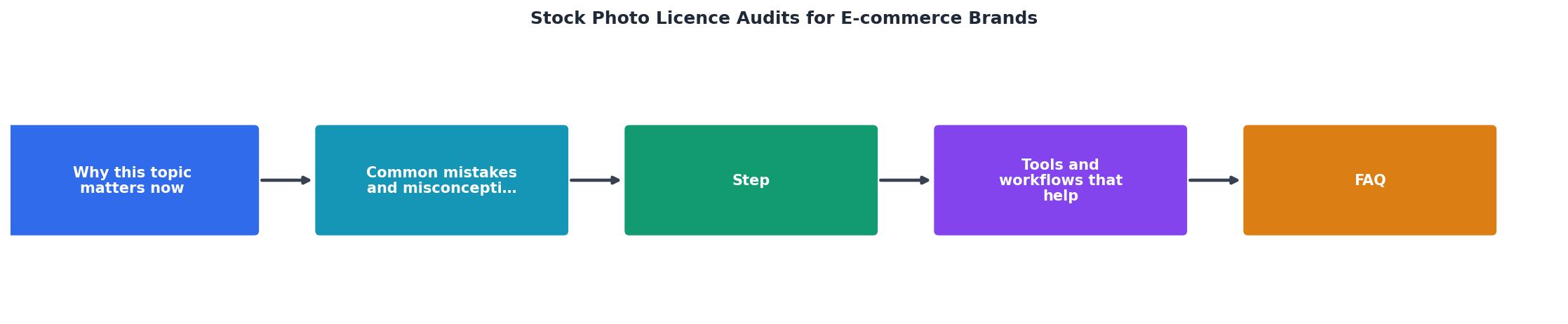
Here is a concrete process you can run quarterly or before any major product launch. The diagram below shows the flow at a glance.
1. Inventory all images
Crawl your live site, ad accounts, and social profiles. Export a list of every image URL. For Shopify stores, the product CSV export includes image URLs. For WordPress/WooCommerce, a plugin like Media Library Assistant can export your full media list.
2. Classify each image
Tag every image as one of:- Original photography (shot by you or commissioned with full rights transfer)
- Stock image (downloaded from a platform)
- Supplier-provided (sent by a manufacturer or partner)
- User-generated content (customer photos, influencer posts)
- Unknown origin
3. Match to licence certificates
For every stock image, locate the corresponding licence certificate or invoice. Each platform stores this differently:- Shutterstock: Download History page, licence certificate PDF per image
- Adobe Stock: Licence History, downloadable PDF
- Freepik: My Downloads section, licence details per asset
- Envato Elements: Download history with licence code per item
- iStock: Purchase/download history with licence agreement
- Canva: Content licence section in account settings
4. Fill the gaps
Images without matching certificates need action. Either re-download the certificate from the platform, re-licence the image under a current subscription, or replace the image entirely with one you can document.
5. Archive and organize
Store every certificate in a single folder structure: licences/[platform]/[image-id].pdf. Link each certificate to the image in a simple spreadsheet tracking file name, platform, licence type, expiry date (if applicable), and the project or page where it appears.
Most teams reach about 85% coverage on their first pass. The remaining 15% usually involves images from cancelled subscriptions or assets uploaded by former team members. Those require re-licensing or replacement.
Tools and workflows that help

Manual audits work for a store with 20 product images. They fall apart at 200. Here is where tooling makes the difference.
Licence Downloader connects to your accounts on Freepik, Shutterstock, Adobe Stock, Envato, iStock, Canva, and other platforms. It bulk-downloads every licence certificate tied to your account in one operation. Instead of clicking through each platform's download history page by page, you get a folder of organized PDFs in minutes. For freelancers delivering to e-commerce clients, this turns a half-day chore into a 10-minute task.
Beyond certificate retrieval, a few complementary tools round out the workflow:
- TinEye or Google Reverse Image Search for identifying unknown-origin images
- Screaming Frog or Sitebulb for crawling your site and extracting all image URLs
- Google Sheets or Airtable for the master tracking spreadsheet
- Google Drive or Dropbox for the certificate archive folder
Example Audit: 350-Product Shopify Store
| Manual Audit | Audit with Bulk Tools |
|---|---|
| Click each platform individually | Pull all certificates in one batch |
| 15-30 min per platform per session | 2-5 min per platform |
| Easy to miss expired subscriptions | Flags missing certificates automatically |
| No standardized file naming | Organized folder structure by default |
| ~18 hours for 400 images | ~4 hours for 400 images |
E-commerce Stock Photo Licence Audit Checklist
Your progress is saved automatically in your browser.
FAQ
Frequently Asked Questions
What does your current image documentation process look like? If you have run an audit before, share what tripped you up in the comments.
Additional Resources
- E-Commerce Image Compliance: Protecting Product ... - Learn how to protect your e-commerce business from copyright claims by ensuring compliance with image usage rights and documentation.
- Audit Your Website's Image Licenses to Avoid Legal Headaches - If your developer used stock photos, icons, or graphics, you are the one legally responsible for having those licenses on file. Why You Should Act Now Copyright ...
- If you want your brand to look like this, you'll love the Haute Stock ... - Stock photos are quietly killing a LOT of e-commerce brands. Not just because they look generic. Not just because customers can spot them immediately. But ...