Archiving Old Shutterstock Licences Efficiently
Your agency downloaded 4,000 Shutterstock images over the past three years. Two team members who handled those purchases have since left. Now a client's legal department wants proof of licence for assets used in a 2023 campaign, and nobody can find the records. This scenario plays out at agencies every week, and the fix is straightforward: build a structured digital archive for old Shutterstock licences before the next fire drill hits.


Your agency downloaded 4,000 Shutterstock images over the past three years. Two team members who handled those purchases have since left. Now a client's legal department wants proof of licence for assets used in a 2023 campaign, and nobody can find the records. This scenario plays out at agencies every week, and the fix is straightforward: build a structured digital archive for old Shutterstock licences before the next fire drill hits.
TL;DR:- Archive old Shutterstock licences in a document management system or cloud storage with consistent folder structures and naming conventions.
- Categorize expired and active licences by client, project, date, and licence type so retrieval takes seconds, not hours.
- Use automation tools like licencedownloader.com to bulk-export licence certificates instead of clicking through Shutterstock's dashboard one by one.
Why archive old licences?
Shutterstock licences do not expire in the traditional sense. Once you purchase a Standard or Enhanced licence, the usage rights persist. But the proof that you hold that licence can vanish. Team members leave. Shared accounts get reorganized. Shutterstock's own download history interface changes. Without a local, agency-controlled archive, you are one platform update away from losing access to your records.
Legal and compliance reasons drive most archiving efforts. Client contracts increasingly include indemnification clauses that require you to produce licence documentation on demand. Copyright holders and their enforcement agents send takedown notices that need a fast, documented response. An organized archive turns a two-day scramble into a five-minute lookup.
"I have a question about the Shutterstock License.">, Shutterstock License: All You Can Do With Stock Photos
That question gets asked constantly, and the answer matters most when you need to prove your rights. Archiving is how you make the answer retrievable.
Digital archiving solutions

Three categories of tools handle licence archiving well. Pick based on your agency's size and existing infrastructure.
Document management systems
SharePoint, Confluence, or Notion databases work when your agency already runs on one of these platforms. Create a dedicated licence database with fields for image ID, licence type, purchase date, purchaser, client project, and a file attachment for the PDF certificate. The search and filter capabilities make retrieval fast.
Cloud storage with structure
Google Drive, Dropbox Business, or OneDrive are simpler. They lack database features but compensate with familiarity. The key is enforcing a rigid folder hierarchy and naming convention. Without that discipline, cloud storage becomes a dumping ground.
Dedicated licence management
Tools built specifically for this problem, like licencedownloader.com, pull licence certificates in bulk from Shutterstock and other platforms. They eliminate the manual export step entirely. For agencies managing hundreds of assets per month, this category saves the most time.
| Feature | Cloud Storage | Document Management | Dedicated Tool |
|---|---|---|---|
| Setup time | Low | Medium | Low |
| Search capability | Basic | Advanced | Advanced |
| Bulk import | Manual | Manual | Automated |
| Multi-platform support | N/A | N/A | Yes |
| Cost | Low | Medium | Low-Medium |
Categorize expired licences

Categorization is where most agencies fail. They dump PDFs into a folder and call it done. Six months later, nobody can find anything. A solid categorization scheme uses four dimensions:
- Client name - The top-level grouping. Every licence ties back to a client project.
- Project or campaign - Within each client, group by the specific deliverable or campaign.
- Purchase date - Use
YYYY-MMformat for sorting. This matters when subscriptions change or when you need to prove the licence was active at the time of use. - Licence type - Standard vs. Enhanced vs. Editorial. This determines what usage rights you can prove.
Licences/ClientName/2024-03-SpringCampaign/Standard/shutterstock_123456789.pdf
Naming conventions that scale
Use the Shutterstock image ID as the base filename. It is unique and searchable. Append the licence type: SS-123456789-standard.pdf. Avoid descriptive names like blue-mountain-hero.pdf because those are ambiguous and unsearchable across thousands of files.
Set up a digital archive
This is the step-by-step process for building your archive from scratch. The diagram below shows the flow at a glance.
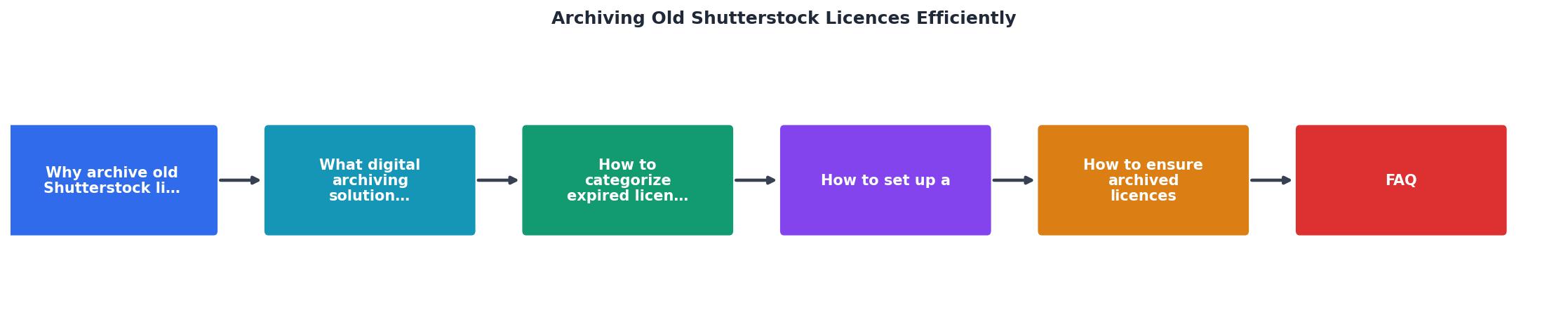
Follow these steps, matching the labels in the diagram:
- Audit existing licences - Export your full Shutterstock download history. Go to your account, find the download history section, and export everything available. Note any gaps where team members used personal accounts.
- Choose storage - Pick your tool based on the comparison above. If you already use Google Workspace, start with Google Drive. If you need cross-platform bulk export, add a dedicated tool.
- Create folder structure - Build the hierarchy before importing anything. Client > Project > Licence Type. Create a template folder you can duplicate for new clients.
- Bulk export certificates - Download the actual licence PDFs. Shutterstock lets you access individual certificates from your download history. For bulk work, a tool that automates this step saves hours.
- File and tag - Place each certificate in the correct folder. Update your index spreadsheet. Add metadata tags if your storage platform supports them.
- Verify completeness - Cross-reference your download history against your archive. Flag any missing certificates and resolve them before the trail goes cold.
- Set ongoing process - Archive new licences as part of your regular workflow, not as a quarterly cleanup. Assign ownership to a specific role.
Example: Agency Licence Archive Status
Keep archived licences accessible

An archive nobody can search is just organized clutter. Accessibility means two things: the right people can find records fast, and the wrong people cannot access them at all.
Retrieval speed
Your index spreadsheet or database should support search by image ID, client name, and date range. These are the three queries that come up in real audit scenarios. If a client's lawyer emails asking for proof, you need the answer within the hour, not by end of week.
Access controls
Limit write access to one or two people responsible for the archive. Give read access to project managers and account leads. Avoid giving every team member full access because files get accidentally moved or deleted. Cloud platforms like Google Drive and SharePoint handle permissions natively.
Backup strategy
Your archive needs its own backup. If it lives in Google Drive, mirror it to a secondary location quarterly. If it lives in a document management system, ensure the system's backup policy covers your licence database. Losing your archive defeats the entire purpose.
Shutterstock Licence Archive Setup Checklist
Your progress is saved automatically in your browser.
FAQ
Frequently Asked Questions
SS- for Shutterstock, AS- for Adobe Stock) and include a platform column in your index spreadsheet. A unified archive across all platforms is far more useful than separate systems. Tools like licencedownloader.com support multiple platforms, which simplifies the bulk-export step when you are consolidating licences from different sources into one archive.Additional Resources
- Shutterstock License: All You Can Do With Stock Photos - In this comprehensive guide, you'll find an exploration of Shutterstock's licensing terms and usage rights, providing clarity on royalty-free, enhanced, and ...
- Shutterstock Terms of Service & License Agreements - The following is a legal agreement between you or the employer or other entity on whose behalf you are entering into this agreement and Shutterstock.
- Shutterstock Editorial Launches Rights And Clearance ... - Shutterstock Editorial's in-house Rights and Clearance team secures permissions for commercial use across intellectual property, talent and more.
Need to Download Your Licences?
Save hours of manual work. We download all your stock photo licence certificates for you.
Get Started“Thanks to LicenceDownloader.com, I was able to download more than 1,000 Freepik licences and receive them all at once via ZIP.”
Marlon Mainardy