Check copyrights: Practical Guide
A single unlicensed stock photo buried in a client deliverable can trigger a four-figure demand letter months after the project wraps. The problem is not that designers ignore copyright on purpose. The problem is that checking copyrights across multiple platforms, projects, and years is genuinely tedious, and most people skip it until a scare forces their hand. This guide gives you a concrete, repeatable process for verifying copyright status and keeping licence proof organized before trouble arrives.

A single unlicensed stock photo buried in a client deliverable can trigger a four-figure demand letter months after the project wraps. The problem is not that designers ignore copyright on purpose. The problem is that checking copyrights across multiple platforms, projects, and years is genuinely tedious, and most people skip it until a scare forces their hand. This guide gives you a concrete, repeatable process for verifying copyright status and keeping licence proof organized before trouble arrives.
Photo by Towfiqu barbhuiya from Pexels
TL;DR:- Every image, icon, or video you use commercially needs verifiable licence proof you can produce on demand.
- Check copyrights by cross-referencing the asset against its source platform, confirming the licence type, and archiving the certificate.
- Automate the tedious parts with bulk-download tools and a consistent folder structure so you spend minutes, not hours, staying compliant.
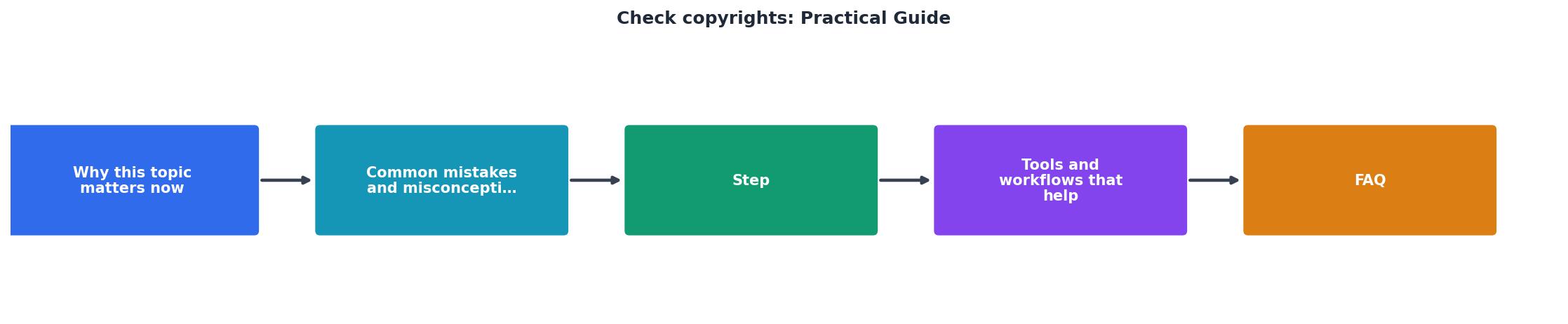
Why copyright checks matter now
Stock-image copyright enforcement has shifted from occasional manual takedowns to automated detection at scale. Services like PicRights and Copytrack scan the open web, social feeds, and ad platforms continuously. When their crawlers match an image to a rights holder, the demand letter goes out automatically. You do not get a friendly warning first.
Most copyright infringement claims never reach a courtroom. They settle, often for amounts between $500 and $5,000 per image. For a freelance designer billing $60 an hour, one missed licence can wipe out an entire project's profit.
The shift also affects platforms directly. Meta, Amazon, and Etsy all have automated IP complaint systems. A single valid DMCA notice can pull your ad, delist your product, or flag your account. Having licence proof ready turns a potential crisis into a five-minute email reply.

Common mistakes that cost money
Assuming "I paid for it" is enough. Paying for a Freepik Premium subscription does not mean every asset on Freepik is covered under your licence. Some files require an extended licence for certain uses (print-on-demand, templates for resale). The receipt alone does not prove which licence tier you hold for a specific file.
Relying on browser history or email search. Digging through two years of Gmail for a Shutterstock confirmation email is not a copyright-check workflow. It is a panic response. Emails get deleted, platforms change their receipt formats, and search results get buried.
Mixing personal and client accounts. If you download an image under your personal Adobe Stock plan and use it in a client project, the licence technically covers you, not the client. When the client's legal team asks for proof, you are stuck explaining a grey area.
Ignoring free assets. "Free" does not mean "no licence." Unsplash, Pexels, and Pixabay each have their own licence terms. Some prohibit using images in ways that imply endorsement. Others restrict redistribution. Checking copyrights on free assets is just as important as checking paid ones.
Step-by-step copyright check process
This is the workflow that keeps you covered without eating your entire afternoon.
1. Inventory your assets
Open your project folder and list every image, icon, illustration, video clip, and font that did not originate from your own camera or pen. Include assets from free platforms. A simple spreadsheet works: columns for filename, source platform, asset ID (if available), and licence type.
2. Trace each asset to its source
For each item, identify the exact platform and account used to download it. Stock platforms assign unique asset IDs. Shutterstock uses numeric IDs in the filename (e.g., shutterstock_1234567890.jpg). Adobe Stock embeds metadata. Freepik includes the asset slug in the download URL. Use these identifiers to locate the original listing.
3. Verify the licence type
Log into the platform and confirm the licence tier. Check whether the licence covers your specific use case: web only, print, editorial, commercial, extended. Compare the licence scope against how the asset actually appears in your deliverable.
"The Copyright Public Records System (CPRS) provides copyright registration and recordation data with advanced search capabilities, filters, and improved interfaces.">, U.S. Copyright Office
For assets where you need to verify the original copyright holder (not just your licence), the U.S. Copyright Office's CPRS is a free, searchable database.
4. Download the licence certificate
Every major stock platform lets you download a licence certificate or proof-of-purchase PDF. Shutterstock has a "Download licence history" option. Adobe Stock shows licence details in your account's download history. Freepik provides a certificate link per asset. Download these files and store them alongside the asset.
5. Archive with a consistent structure
Use a folder structure that mirrors your projects:
/licences
  /client-name-project-2026
    shutterstock_1234567890_licence.pdf
    adobestock_9876543_licence.pdf
    asset-inventory.xlsx
This way, when someone asks for proof six months from now, you open one folder and send the file.

Tools and workflows that help
Manual copyright checks work for a handful of assets. Once you are juggling 20+ images per project across three platforms, you need automation.
Reverse image search tools like Google Images or TinEye let you check whether an image you found online has a known rights holder. Upload the file, review the results, and look for stock platform listings that confirm the original source.
Platform download history exports vary in quality. Shutterstock offers CSV exports. Adobe Stock lets you filter by date range. Freepik's history page is paginated and slow for large accounts. Knowing each platform's export quirks saves time.
Licence Downloader (licencedownloader.com) automates the most painful part: bulk-downloading licence certificates from multiple stock platforms into one organized archive. Instead of logging into five dashboards and clicking through hundreds of pages, you pull all your proof into a single folder. For freelancers handling multiple client projects, this turns a half-day chore into a few minutes.
Here is an example of what a typical freelancer's copyright-check dashboard might look like after running a bulk licence download across three platforms:
Copyright Check Summary (3 Platforms)

| Manual Copyright Checks | Automated with Licence Downloader |
|---|---|
| Log into each platform separately | Connect all platforms once |
| Click through paginated history | Bulk export in one action |
| Save PDFs one by one | Certificates organized by project |
| 2-4 hours per audit | Under 15 minutes per audit |
| Easy to miss assets | Comprehensive scan across accounts |
Copyright Check Workflow
Your progress is saved automatically in your browser.
FAQ
Frequently Asked Questions
Additional Resources
- Copyright - Search Copyright Records. Search our online records, learn about our searching and retrieval services, and view educational videos and materials. Learn More ...
- Copyright: A Practical Guide - Developing a Copyright Policy: Why is a policy important, what should be in a copyright or IPR policy and how to make your policy work. Carrying out a rights ...
- The Copyright Book: A Practical Guide (Sixth Edition) - An accessible and comprehensive guide to copyright law, updated to include new developments in infringement, fair use, and the impact of digital technology.
Need to Download Your Licences?
Save hours of manual work. We download all your stock photo licence certificates for you.
Get Started“Thanks to LicenceDownloader.com, I was able to download more than 1,000 Freepik licences and receive them all at once via ZIP.”
Marlon Mainardy