Documentation for Legal Review of Licences
When a legal team requests documentation for your stock media licences, you need more than vague recollections and scattered emails. A comprehensive audit trail proves you acted in good faith, protects you from copyright claims, and demonstrates compliance to clients or regulators. Without organized records, even legitimate purchases become liabilities, you cannot verify which image was licensed when, under which terms, or by whom. The difference between a clean legal review and a stressful one lies in preparation: maintaining detailed records from the moment you acquire a licence through its entire lifecycle.


Photo by Kampus Production from Pexels
When a legal team requests documentation for your stock media licences, you need more than vague recollections and scattered emails. A comprehensive audit trail proves you acted in good faith, protects you from copyright claims, and demonstrates compliance to clients or regulators. Without organized records, even legitimate purchases become liabilities, you cannot verify which image was licensed when, under which terms, or by whom. The difference between a clean legal review and a stressful one lies in preparation: maintaining detailed records from the moment you acquire a licence through its entire lifecycle.
TL;DR
- Essential records include licence purchase confirmations, digital certificates, usage logs, renewal dates, and platform download history.
- Organization matters: group documents by platform, asset type, or client project; use a consistent naming system and centralized storage.
- An audit trail documents the timeline: when each licence was acquired, by whom, terms of use, and any modifications or renewals.
- Verify compliance before a review: cross-check licence types against actual usage, confirm extended licences for commercial work, and flag expired or renewal-pending assets.
- Automated tools accelerate the process: bulk-download and organize licence data across platforms instead of manual export-by-export work.
Why documentation is critical for legal compliance

A legal review of your stock media licences serves multiple purposes. Clients may request proof that every asset in a final deliverable is properly licensed before they launch a campaign or publish work. Your own legal team may conduct an internal audit to assess risk and ensure compliance across all active projects. Copyright holders or their representatives occasionally challenge usage, and you need immediate access to documentation proving your licence was valid at the time of use.
The stakes are real. Without records, you cannot defend yourself against a copyright claim. With records, you demonstrate good faith and legal compliance. Courts and platforms alike recognize that organized documentation is the hallmark of a professional who respects intellectual property rights. Even a small gap, a missing purchase confirmation or unclear terms, can cast doubt on your entire position and force expensive legal review or settlement discussions.
Documentation also accelerates resolution. A legal team reviewing your assets wants to see clear evidence: when the licence was purchased, confirmation that it covers the intended use, proof that you have the right to grant sublicences to clients if applicable, and any renewal or expiration dates. The easier you make it to verify this information, the faster the review completes and the sooner you can move forward with confidence.
What records to keep for a licence review
Before a legal review begins, gather these core document types. Each serves a specific purpose in demonstrating compliance and protecting your interests.
Purchase confirmations and invoices. These are your primary proof of acquisition. They show the date you bought the licence, the platform (Freepik, Shutterstock, Adobe Stock, Canva, Envato, iStock, or others), the asset identifier, and the price tier you purchased. Invoices often include a transaction ID or order number, which helps trace the licence if a platform ever questions it.
Digital licence certificates. Many platforms generate downloadable certificates or PDF documents that explicitly state the licence type, permitted use, restrictions, and expiration date. These are gold-standard proof. If your platform offers them, download and archive them immediately upon purchase. Some platforms bury this option in account settings or require a special export; don't skip this step.
Platform account export data. Most platforms allow you to export your download history, licence records, or account activity in bulk. This export typically includes metadata like asset ID, title, date downloaded, licence type, and sometimes expiration. Keep these exports as timestamped records of your account state at key moments (end of quarter, before a client handoff, when a legal concern arises).
Usage logs and asset registries. Create your own record of how each asset was used: which project it appeared in, which client received it, whether it was modified, and in which final deliverables it was placed. If a copyright holder ever questions your use, this internal log proves you used the asset only within the scope of your licence.
Renewal and expiration notices. Some licences expire or must be renewed. Archive any renewal confirmations, expiration warnings, or automatic renewal receipts from the platform. This proves you stayed compliant and didn't accidentally let a licence lapse mid-project.
Correspondence and clarifications. If you ever emailed a platform to clarify licence terms, for example, whether an image is safe for commercial use, or whether you can sublicense it to a client, keep that correspondence. Email confirmations from platform support add credibility to your interpretation of licence terms.
How to organize licence documentation effectively

Without a coherent organizational system, records become noise. You need a structure that lets you retrieve the proof you need in seconds, not hours. The goal is simple navigation so a lawyer or auditor can verify any claim without asking for clarification.
Organize by platform first. Create a top-level folder for each platform you use: Freepik, Shutterstock, Adobe Stock, Canva, Envato, iStock, and so on. Within each platform folder, add subfolders for different licence types (free, standard, extended) or time periods (Q1 2025, Q2 2025). This structure mirrors how most creatives think about their assets, by the source where they acquired them.
Add a secondary folder structure by project or client. Keep a parallel set of folders organized by client name or project code. When a client or legal team requests documentation for a specific deliverable, you navigate to the project folder and find every asset and its licence records together. This view is crucial for demonstrating that every element in a final product is properly licensed.
Use consistent file naming. Name each document with a date prefix (YYYY-MM-DD), platform name, asset ID, and brief description. For example: 2025-01-15_Freepik_asset-9834_landscape-photo-licence.pdf or 2025-01-15_ShutterStock_invoice_order-2847.pdf. Consistent naming makes sorting and searching trivial; inconsistent naming creates confusion.
Store digitally with backups. Never rely on email or browser downloads. Use a cloud service (Google Drive, Dropbox, OneDrive) or a dedicated document management system so documents are backed up, version-controlled, and accessible from anywhere. Include a local backup on an external drive in case you need to prove document authenticity or timeline.
Create a master index or spreadsheet. Maintain a single spreadsheet listing every asset you hold a licence for: asset name, platform, licence type, purchase date, expiration date (if applicable), client or project, and location in your file system. This index becomes your quick-reference guide during a review and helps you spot gaps or expiring licences at a glance.
How to create an audit trail for your licences
An audit trail is a chronological record showing exactly what happened and when. It answers these questions: When was this licence acquired? Who purchased it? What were the original terms? Have those terms changed or been renewed? Has the licence ever expired or been modified? A strong audit trail is the backbone of a defensible legal position.
Start with the acquisition date. Every licence has a moment of purchase. Document it with the purchase confirmation or invoice timestamp. If you downloaded an asset on a trial or free plan and later purchased a licence, record both dates and clarify which licence governs current use.
Record the licence type and terms explicitly. Write down: Is this a personal-use-only licence, or does it allow commercial use? Can you modify the asset? Are you permitted to sublicense it to clients? Does it allow use in print, digital, video, or all of the above? Some platforms offer multiple licence tiers for the same asset; you must record which tier you purchased. If the terms are ambiguous, email the platform support and attach their reply to your trail.
Log access and use. Each time you use the asset in a project or pass it to a client, add a record: date, project name, deliverable type (website, print, social media, video), and whether you modified the asset. This shows continuous valid use under the licence.
Track renewals and expirations. If a licence expires or requires renewal, document the renewal date or the expiration confirmation. If you let a licence lapse and then re-purchased it, record both events. This proves you were intentional about compliance.
Verify compliance status before a review
Before a legal team or auditor arrives, conduct your own review to catch and fix problems early. This self-audit prevents surprises and demonstrates professionalism.
Cross-check licence types against actual use. Go through your asset inventory and ask: For each asset, what licence did I purchase? How was it actually used? Does the use match the licence terms? If you bought a "personal use" licence but later used that asset in a commercial client project, you have a compliance gap. Catch this now and either re-license the asset or replace it with a properly licensed one.
Verify commercial use authorization. If any asset was used for commercial purposes (client work, paid advertising, e-commerce products), confirm that your licence explicitly permits commercial use. Free or personal-use licences do not. Check your platform accounts now; many platforms flag whether an asset is commercial-safe directly in the download history.
Confirm extended-licence compliance. Some platforms offer "extended licences" that allow broader use (e.g., resale rights, modifications for resale). If you purchased standard licences but are using assets in ways that require extended licences, you are out of compliance. Audit your usage against your licence tier.
Check expiration and renewal status. Go through your licence list and note any that expire within the next 90 days. For long-lived projects that may remain in circulation (websites, evergreen content), ensure licences do not expire while the project is still in use. Renew early if needed.
Look for gaps in documentation. Identify any assets you use but cannot find purchase records for. If you cannot prove you licensed it, treat it as non-compliant and replace it immediately. This is a legal emergency and a reputation risk.
Assess sublicensing compliance. If you deliver assets to clients or allow them to use your deliverables, confirm your licences permit this. Some licences restrict sublicensing or require permission. If your client needs to retain the right to use an asset after your engagement ends, your licence must allow it.
Examples of well-organized licence portfolios
Real-world examples show how organized teams handle complexity at scale. A freelance designer working with three stock platforms might maintain a simple structure: one folder per platform, subfolders for licence type, and a master spreadsheet listing 50-100 active assets. A mid-sized agency managing hundreds of assets across multiple teams might use a dedicated digital asset management (DAM) system or database, with automated licence expiration alerts and compliance reporting.
One best practice: timestamp all exports and documentation snapshots. If you export your Shutterstock account history on January 15, name the file with that date. Six months later, if a legal question arises about an asset used in March, you can produce the January export as evidence of your state of knowledge at that time. This timeline is invaluable in demonstrating good faith compliance.
Another: maintain a "licence review" document that you update quarterly. List the total number of assets you hold licences for, the platforms you use, any compliance concerns discovered, and actions taken to resolve them. This proactive document shows an auditor that you take compliance seriously and review your position regularly.
Your Compliance Status (Example Dashboard)
This example dashboard shows what a compliance review might look like. By tracking your licences in a central system with clear status indicators, you can quickly identify which assets need attention and demonstrate to an auditor that you actively monitor compliance. The three expiring assets flag a need for renewal before they lapse, preventing mid-project disruptions.
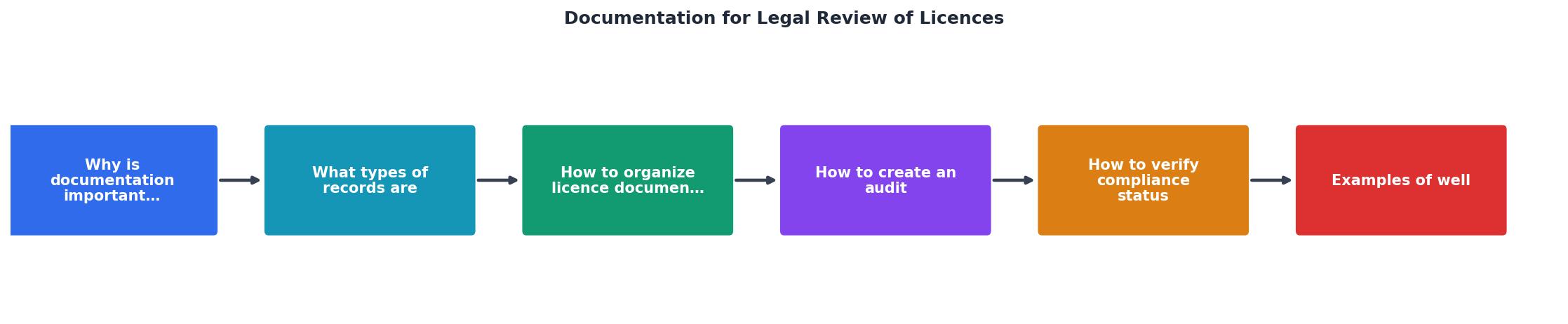
Steps to Create an Effective Licence Audit Trail
Your progress is saved automatically in your browser.
FAQ
Frequently Asked Questions
When a legal review is announced, the confidence you feel depends entirely on how well you prepared. A thoughtfully maintained audit trail turns a stressful event into a straightforward handoff. Take time now to gather, organize, and verify your records, what matters most is demonstrating that you respect intellectual property rights and govern your use of stock media with care and intention.
Additional Resources
- Legal due diligence review template: Licensing agreements) - It is a general template that can be used for licenses that cover copyright, patents, trade marks, registered designs, software or trade secrets.
- Due Diligence Summary Template: Licence Agreements) - A summary template to be used when reviewing and summarizing licence agreements as part of a legal due diligence review in connection with a merger or ...
- License Agreement Review Procedures - Step One Review the License Agreement Checklist to become familiar with the problems you'll be looking for in your agreement. Step Two Read the ...
Need to Download Your Licences?
Save hours of manual work. We download all your stock photo licence certificates for you.
Get Started“Thanks to LicenceDownloader.com, I was able to download more than 1,000 Freepik licences and receive them all at once via ZIP.”
Marlon Mainardy