Steps to Download Licences from Getty Images
You bought images from Getty Images for your online store or Facebook ads, and now someone is asking you to prove it. Maybe it is a marketplace like Amazon requesting documentation, or maybe you got a scary email about copyright. The problem is you have no idea where Getty Images keeps your licence records. This guide walks you through every click, from login to organized proof files sitting safely on your computer.


You bought images from Getty Images for your online store or Facebook ads, and now someone is asking you to prove it. Maybe it is a marketplace like Amazon requesting documentation, or maybe you got a scary email about copyright. The problem is you have no idea where Getty Images keeps your licence records. This guide walks you through every click, from login to organized proof files sitting safely on your computer.
Photo by Pavel Danilyuk from Pexels
TL;DR:- Log into your Getty Images account, go to the Download history page, and locate the image you need proof for.
- Each downloaded asset has a licence agreement tied to it. Save the receipt email and the download confirmation page as a PDF.
- Organize files by date and project in a single folder so you can pull proof in under a minute during an audit or dispute.
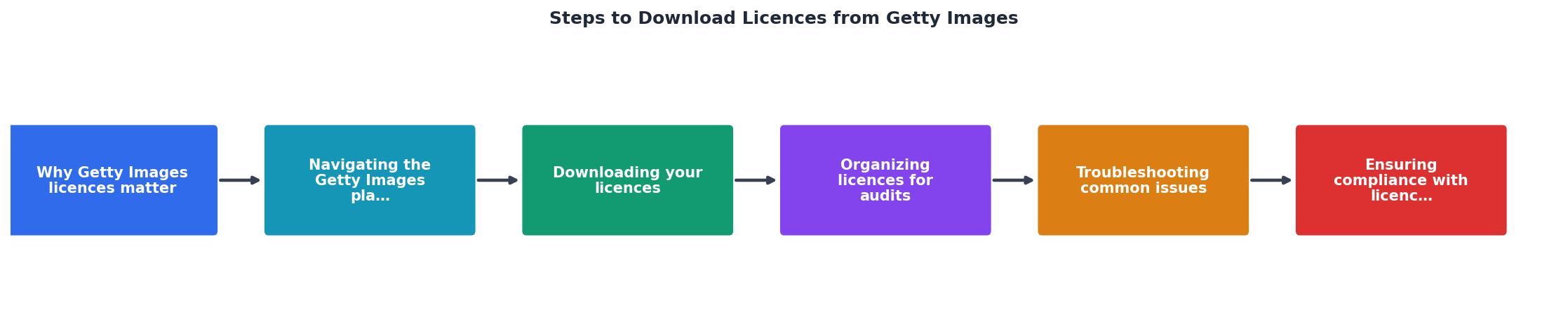
Why Getty Images Licences Matter
Stock image licences are not just paperwork. They are your legal shield. When you download an image from Getty Images, you receive a specific licence type that defines exactly what you can and cannot do with that file. Without proof of that licence, you have zero defense if someone files a copyright claim against your ad, product listing, or website banner.
Getty Images is one of the most aggressive enforcers of image copyright in the industry. Their compliance team actively scans the web for unlicensed usage. Small-business owners are frequent targets because they often lack organized documentation. A single claim can cost anywhere from a few hundred to several thousand dollars in settlement fees.
Keeping your licence documents accessible is not optional. It is basic business protection.
Navigating the Getty Images Platform

Getty Images stores your licence information inside your account dashboard. Here is how to get there:
- Go to gettyimages.com and click Sign In in the top-right corner.
- Enter your email and password. If you purchased through a team account, use the credentials tied to the original purchase.
- Once logged in, click your profile icon in the top-right corner.
- Select Download history from the dropdown menu.
If you purchased images through Getty Images iStock (their sister platform), those records live in a separate iStock account. Do not confuse the two dashboards.
A common mistake is assuming your purchase receipt email is enough. It is not. The email confirms payment, but the actual licence terms are tied to the specific download event in your account. You need both.
Downloading Your Licence Proof
This is the core process. Follow these steps exactly.
Step 1: Open Download History. Navigate to your Download history page as described above.
Step 2: Find the asset. Use the search bar or scroll to locate the specific image. You can filter by date range if you have a large history.
Step 3: Click the image entry. This opens the detail view showing the full licence agreement, the image ID, the resolution downloaded, and the licence scope.
Step 4: Save the page as PDF. In your browser, press Ctrl + P (or Cmd + P on Mac), then select "Save as PDF" as the destination. This captures the licence details, the image ID, and the timestamp in one document.
Step 5: Save your purchase confirmation email. Search your inbox for the Getty Images order confirmation. Save it as a PDF or forward it to a dedicated email folder.
Step 6: Note the image ID. Every Getty Images asset has a unique numeric ID. Write it in your file name so you can match the proof document to the image instantly.
getty-[imageID]-[date].pdf. For example: getty-1284567-2026-03-15.pdf. This makes searching trivial.Here is an example dashboard showing what a typical small-business licence collection might look like after following this process:
Getty Licence Tracker
Example: e-commerce store with 6 months of purchases
Organizing Licences for Audits
Downloading the proof is half the job. The other half is putting it somewhere you can actually find it six months from now.
Create a folder structure like this:
/Licences
  /Getty-Images
    /2026-Q1
      getty-1284567-2026-01-10.pdf
      getty-1301244-2026-02-22.pdf
    /2026-Q2
      getty-1398012-2026-04-05.pdf
Group by quarter or by project, whichever matches how your business works. If you use images across multiple campaigns, a simple spreadsheet mapping image IDs to projects saves enormous time later.
Keep a backup copy in cloud storage. Google Drive, Dropbox, or OneDrive all work. The point is redundancy. If your laptop dies, your licence proof should not die with it.
For businesses managing licences across multiple stock platforms (not just Getty Images), a tool like licencedownloader.com can pull licence records from several services into one organized archive. That eliminates the per-platform scavenger hunt entirely.
Troubleshooting Common Issues

Things do not always go smoothly. Here are the problems small-business owners hit most often and how to fix them.
Download history is empty. This usually means you are logged into the wrong account. If you purchased through a company email or a different personal email, try those credentials instead. Getty Images does not merge accounts automatically.
The image was purchased by someone else. If a contractor or former employee bought the image on your behalf, the licence lives in their account. You need them to export the proof, or you need to contact Getty Images support to transfer the record.
You cannot find the purchase email. Search your inbox for "Getty Images" or "order confirmation." Check spam and trash folders. If the email is truly gone, the Download history page in your account is your primary backup.
The licence type looks wrong. Getty Images offers different licence tiers. If you see "Editorial Use Only" on an image you used commercially, that is a real problem. Editorial licences do not cover ads, product pages, or promotional materials. You may need to repurchase under a commercial licence.
Getty Images sent a demand letter. Do not panic. Gather your licence proof (the PDF you saved, the purchase email, the image ID). Respond with documentation showing you hold a valid licence for the specific usage. If you cannot find proof, consult a lawyer before responding.
Staying Compliant With Licence Terms
Downloading the licence is not the finish line. You also need to follow what the licence says.
Getty Images Royalty-Free licences allow broad commercial use, but they still have limits. You cannot resell the image as a standalone file. You cannot use it on merchandise where the image is the primary value (like a poster or t-shirt). You cannot use it in a way that implies endorsement by the people in the photo.
Rights-Managed licences are even more specific. They restrict usage to a defined time period, geographic region, and medium. Using the image outside those boundaries requires a new licence.
Read the licence summary on your Download history page carefully. If you are unsure whether your usage qualifies, Getty Images has a usage calculator on their website that helps clarify.
Getty Images Licence Management Checklist
Your progress is saved automatically in your browser.
| Manual Licence Tracking | Organized System |
|---|---|
| Searching inbox for 20 minutes | Opening one folder |
| Missing proof during audits | PDF ready in seconds |
| No backup if email is deleted | Cloud copy always available |
| Panic when a claim arrives | Calm, documented response |
| Guessing at licence type | Clear terms on file |
FAQ
Frequently Asked Questions
What is your current system for keeping track of stock image licences? Drop a comment if you have found a method that works well for your business.
Additional Resources
- Getty Images Content License Agreement - This is a license agreement between you and Getty Images that explains how you can use photos, illustrations, vectors, and video clips
- Licensing - Every file you download from Getty Images comes with a license, which allows you to use your image, illustration or video for a wide variety of uses.
- Purchasing - Just enter the name of the person or company you want to transfer the file to in the Licensee name box found in the Reference information section during ...
Need to Download Your Licences?
Save hours of manual work. We download all your stock photo licence certificates for you.
Get Started“Thanks to LicenceDownloader.com, I was able to download more than 1,000 Freepik licences and receive them all at once via ZIP.”
Marlon Mainardy