Steps to Download Shutterstock Licence Proof
Navigating the world of stock media can be overwhelming, especially when it comes to managing licences. For many creators, having proof of licence is not just a formality, it’s a necessity. This guide will walk you through the steps to download your Shutterstock licence proof, ensuring that you’re always audit-ready and protected against copyright claims.

Navigating the world of stock media can be overwhelming, especially when it comes to managing licences. For many creators, having proof of licence is not just a formality, it’s a necessity. This guide will walk you through the steps to download your Shutterstock licence proof, ensuring that you’re always audit-ready and protected against copyright claims.
Photo by Bhavishya :) from Pexels
TL;DR:
Log into your Shutterstock account, access the licence history section, and download the proof for each licensed item. Ensure these documents are stored safely to maintain compliance.
Having a comprehensive understanding of your stock media licences is crucial. Whether you’re a freelance designer delivering projects to clients or a small business owner using images for marketing, knowing how to download and organize your Shutterstock licence proofs can save you time and protect you from potential legal issues. This guide will take you step-by-step through the process, from logging into your account to maintaining your licence records effectively.
Why is Shutterstock Licence Proof Important?

In an industry where copyright claims can disrupt your workflow, having proof of your Shutterstock licences is essential. It acts as a safeguard against disputes, proving that you have the legal right to use the images in your projects. Without this proof, you risk facing legal challenges that could damage your reputation and incur unnecessary costs.
Obtaining licence proofs is not just about compliance; it's about peace of mind. In today's digital age, where content is rapidly shared and repurposed, ensuring that you have the right to use specific images is vital. This documentation provides a clear trail of your rights, making it easier to defend your use of an image if its ownership is ever questioned.
Logging into Shutterstock
Accessing your Shutterstock account is the first step in retrieving your licence proofs. Simply visit the Shutterstock website and click on the "Login" button located at the top right corner. Enter your credentials, and you’ll be directed to your account dashboard.
For those new to Shutterstock, setting up an account is straightforward. You will need to provide some basic information and choose a subscription plan that fits your needs. This account not only allows you to purchase and download images but also keeps track of your licence history, which is invaluable when managing multiple projects.
Finding Your Licence Records on Shutterstock

Once logged in, navigate to the "Licences" section in your account settings. Here, you’ll find a comprehensive list of all the assets you’ve licensed. This section is crucial for auditing your licences and ensuring all your assets are accounted for.
The licences section is organized to make it easy for you to find specific assets. You can search by date, type, or keyword, which is particularly useful when dealing with a large volume of files. This feature is designed to help you quickly verify that your usage rights are in order, thus avoiding any potential disputes.
Downloading and Organizing Your Licence Proof

To download your licence proofs, select the desired asset from your licence history. Click on the download icon next to the asset to save a copy of the licence proof to your device. It’s advisable to organize these files in a structured manner, perhaps by project or date, to ensure easy retrieval later.
Organizing your licence proofs is an often-overlooked step that can prevent future headaches. Consider using a folder structure that mirrors your project management system, or employ tagging and metadata to enhance searchability. This systematic approach not only aids in quick retrieval but also ensures that all stakeholders have access to the necessary documentation when needed.
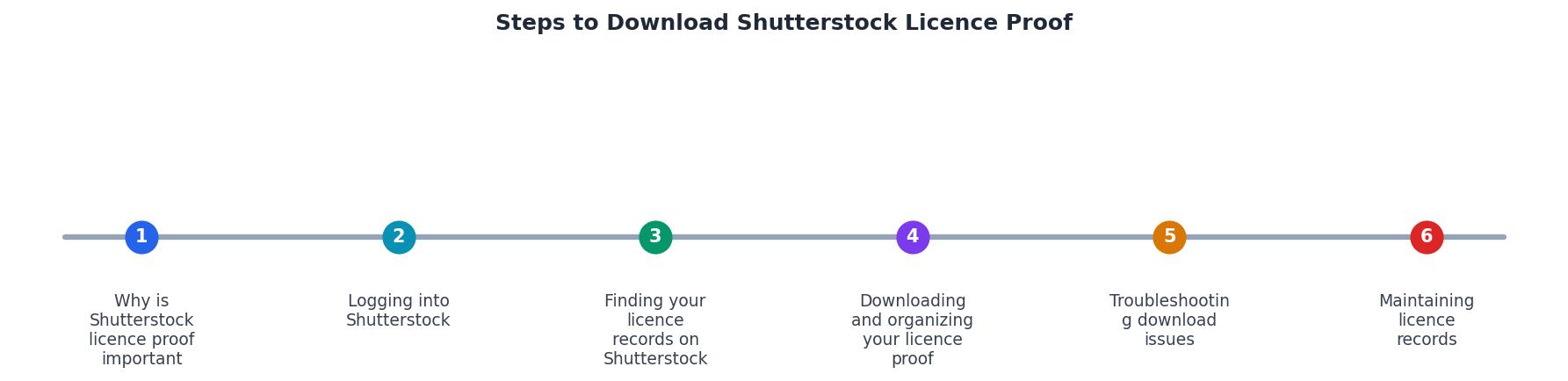
Troubleshooting Download Issues
Occasionally, you might encounter issues while downloading your licence proofs. Common problems include browser compatibility issues or server downtimes. Ensure your browser is up to date and try accessing the site during off-peak hours. If problems persist, contacting Shutterstock support can provide additional assistance.
Browser issues are often resolved by clearing your cache or trying a different browser altogether. Shutterstock's support team is also equipped to handle more complex issues, such as account discrepancies or technical glitches. Having a contact point at Shutterstock can expedite the resolution of any problems, ensuring your workflow remains uninterrupted.
Maintaining Licence Records
Maintaining a well-organized archive of your licence proofs is as important as downloading them. Use cloud storage solutions or dedicated software to keep these documents safe and accessible. Regular backups can prevent data loss and ensure you’re always compliant with legal requirements.
Digital asset management (DAM) systems can automate much of this process, providing a central repository for all your licences and related documentation. These systems not only enhance security but also improve collaboration among team members, as licences can be easily shared and accessed as needed.
FAQ
Frequently Asked Questions
Licence Management Metrics
Keeping track of your licences can be streamlined by using a simple dashboard like the one above. It helps visualize your licence management efforts and ensures you’re on top of your game.
Steps to Access and Download Shutterstock Licence Proofs
Your progress is saved automatically in your browser.
If you have any thoughts or additional questions about managing Shutterstock licences, feel free to share them in the comments below.
Additional Resources
- How do I get proof that I licensed Shutterstock content? - Customers who are part of a Team account or an organization can contact their account representative to request a proof of license document.
- Shutterstock Terms of Service & License Agreements - THIS IS A SINGLE SEAT LICENSE AUTHORIZING ONE NATURAL PERSON TO ACCESS YOUR ACCOUNT, USE THE SHUTTERSTOCK TOOLS AND SERVICES, AND LICENSE, DOWNLOAD AND USE ...
- HOW TO REQUEST A PROOF OF LICENSE FROM ... - The most efficient way to request a license confirmation letter from Shutterstock is: Go to the Legal Centre hub and select Proof of License ...
Need to Download Your Licences?
Save hours of manual work. We download all your stock photo licence certificates for you.
Get Started“Thanks to LicenceDownloader.com, I was able to download more than 1,000 Freepik licences and receive them all at once via ZIP.”
Marlon Mainardy