Ensuring Team Updates Licence Records Regularly
Last quarter a mid-size agency lost a client contract because they could not produce licence certificates for 14 stock images used in a campaign deck. The images were licensed, the subscriptions were active, but nobody on the team had saved the proof. That gap between having a licence and being able to prove it is where agencies get hurt. This guide walks through concrete strategies for making licence record updates a routine part of your team's workflow, not a fire drill.

Last quarter a mid-size agency lost a client contract because they could not produce licence certificates for 14 stock images used in a campaign deck. The images were licensed, the subscriptions were active, but nobody on the team had saved the proof. That gap between having a licence and being able to prove it is where agencies get hurt. This guide walks through concrete strategies for making licence record updates a routine part of your team's workflow, not a fire drill.
Photo by Alena Shekhovtcova from Pexels
TL;DR:- Schedule recurring licence audits (weekly or bi-weekly) tied to your sprint or project cycle.
- Use collaborative tools like Slack reminders, shared spreadsheets, and project management boards to keep updates visible.
- Automate the bulk of the work with tools like Licence Downloader and workflow triggers so humans only handle exceptions.
- Track completion rates and flag gaps before a client or legal team asks.
The real cost of outdated records
Stock licence compliance is not a theoretical risk. Agencies that handle hundreds of assets per month across Shutterstock, Adobe Stock, Freepik, Envato Elements, and iStock accumulate licence debt fast. Every downloaded image without a saved certificate is a liability sitting in your project folders.
When a client's legal team sends a documentation request, you need answers in hours, not days. Outdated or missing licence records turn a simple email reply into a multi-day scavenger hunt across platforms, old email threads, and former employees' accounts.
The financial exposure is real too. A single copyright infringement claim can cost anywhere from a few hundred dollars in settlement fees to tens of thousands in legal costs. Multiply that by the number of untracked assets in your archive and the risk profile becomes uncomfortable.
"The right choice can significantly cut costs without compromising functionality.">, Software license management: 2026 Guide to cut SaaS spend
Why records go stale

Before fixing the problem, it helps to understand why licence records drift out of date in the first place. The usual culprits:
- No single owner. Designers download assets, producers manage budgets, account managers talk to clients. Nobody owns the licence file.
- Platform fragmentation. Each stock platform stores licence proof differently. Shutterstock has a download history page. Freepik emails a certificate. Adobe Stock buries it in the order history. Keeping up with five or six different workflows is exhausting.
- Freelancer turnover. When a contractor finishes a project and moves on, their download history goes with them unless someone extracted the certificates first.
- No visible accountability. If updating licence records is not on a board, in a checklist, or tied to a deliverable, it does not happen.
Only about a third of agencies have any formal process for tracking licence records. The rest rely on tribal knowledge and good intentions. That works until it does not.
Run regular licence audits

A licence audit is a scheduled review where someone checks that every asset used in recent projects has a corresponding licence certificate on file. Here is how to make it work without eating your entire Friday afternoon.
Pick a cadence that matches your workflow
- Weekly: Best for high-volume agencies shipping multiple campaigns per week.
- Bi-weekly: Works for most mid-size teams running two-week sprints.
- Monthly: Minimum viable cadence. Anything less frequent and gaps compound.
Define what "complete" looks like
Each asset in a project folder should have:
- The licence certificate PDF or screenshot
- The platform name and order/transaction ID
- The date of purchase or download
- The licence type (standard, extended, editorial)
- The project or client it was used for
Assign a rotating auditor
Rotate the audit responsibility across team members each cycle. This spreads the knowledge of how each platform works and prevents a single point of failure. Use a simple rotation list in your project management tool.
Collaborative tools that keep updates visible

The best process in the world fails if it lives in a document nobody opens. Use the tools your team already uses daily to make licence updates visible.
Slack or Microsoft Teams channels
Create a dedicated #licence-records channel. Post audit results there. Set up a recurring Slack reminder (e.g., /remind #licence-records "Time for the bi-weekly licence audit. Check the board." every 2 weeks) so the prompt shows up automatically.
Shared spreadsheets or Airtable bases
A shared Google Sheet or Airtable base works as a lightweight central repository for agency licences. Columns for asset name, platform, licence type, certificate link, project, and last-verified date give you a filterable, sortable single source of truth.
Project management boards
Add a "Licence Records Updated" checkbox or subtask to your project completion template in Asana, Monday.com, ClickUp, or whatever your team uses. A project is not done until the licence records are filed. This is the single most effective change you can make because it ties the update to a deliverable, not a calendar date.
| Manual Tracking | Tool-Assisted Tracking |
|---|---|
| Relies on memory | Automated reminders |
| Scattered across email/folders | Single shared repository |
| No visibility into gaps | Dashboard shows completion % |
| Breaks when people leave | Persists across team changes |
| Hours per audit cycle | Minutes per audit cycle |
Automate the heavy lifting
Manual certificate downloads across five platforms for hundreds of assets per month is not sustainable. Automation is where you reclaim the most time.
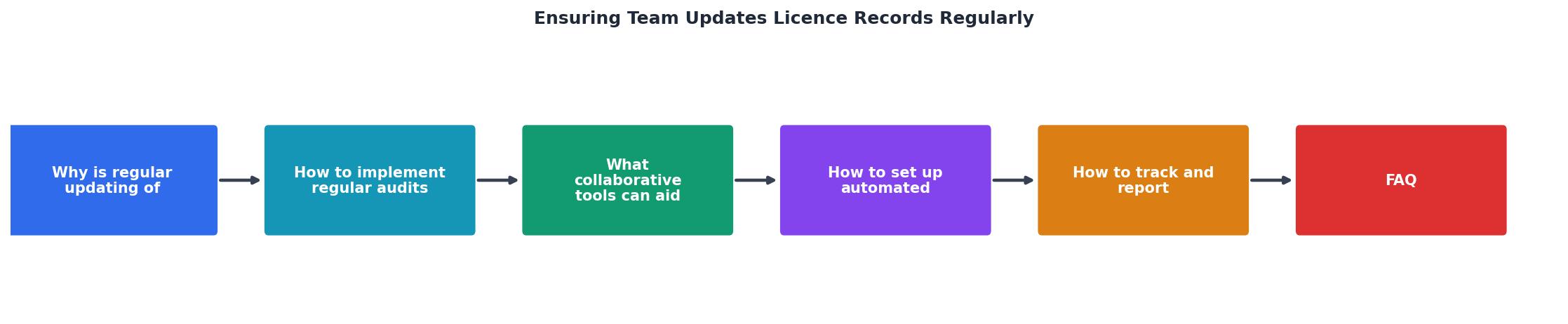
The diagram above shows the core loop: Download Asset, Save Certificate, Log Record, Verify in Audit, Flag Gaps, Resolve. Each step can be partially or fully automated.
Bulk certificate downloads
Tools like licencedownloader.com let you bulk-find and download licence certificates from platforms like Freepik, Shutterstock, Adobe Stock, Envato Elements, iStock, and Canva in one pass. Instead of logging into six dashboards and clicking through order histories, you pull everything at once. That alone eliminates the biggest friction point.
Workflow triggers
Connect your download tool to your file storage using simple automation:
- Zapier or Make (Integromat): When a new file lands in a specific Google Drive or Dropbox folder, create a row in your tracking spreadsheet with the filename, date, and a "certificate pending" status.
- Slack notifications: Trigger a message to the
#licence-recordschannel when a new asset is added without a matching certificate. - Calendar reminders: Use Google Calendar or Outlook recurring events as a fallback for teams that do not use Slack.
Expiration tracking
Some licences have time limits or usage caps. Set up automated alerts for tracking licence expiration across multiple platforms so renewals do not slip through the cracks.
Track and report on updates
What gets measured gets done. Build a simple reporting layer on top of your tracking system so gaps are visible to leadership, not just the person running the audit.
Here is an example dashboard layout for a typical agency tracking licence records across a quarter:
Q2 Licence Record Compliance
Metrics worth tracking
- Compliance rate: Certificates on file divided by total assets downloaded. Target 95%+.
- Average resolution time: How long it takes to fill a gap once flagged. Under 48 hours is good.
- Overdue items: Assets older than one audit cycle without a certificate. This is your risk number.
- Per-platform breakdown: Identifies which platform causes the most gaps so you can focus automation there.
Handle missed updates gracefully
People miss things. Deadlines slip. A designer forgets to save a certificate before closing a browser tab. The system needs to handle that without blame.
Build a grace period into your process. If a record is not updated within the audit cycle, it moves to a "pending" queue. The next auditor picks it up. If it stays pending for two cycles, it escalates to the team lead.
For freelancers and contractors, include licence record handoff in your offboarding checklist. Before final payment, confirm that all certificates for assets they downloaded are in the shared repository. This is not about trust. It is about making sure the proof exists somewhere accessible after they move on.
Licence Record Update Process Checklist
Your progress is saved automatically in your browser.
FAQ
Frequently Asked Questions
Additional Resources
- Software license management: 2026 Guide to cut SaaS ... - Regular updates ensure the software meets evolving needs. Training is vital for effective license management. Ensure staff understand usage policies and ...
- 10 Best Practices for Software License Management For IT ... - Regularly tracking license usage helps you catch discrepancies before they become compliance issues. Without it, audits can expose untracked ...
- #20 - Voting records regularly show that people over 65 - Voting records regularly show that people over 65 vote in the highest percentages Premise 2: Voting records also regularly show that young adults are the least ...
Need to Download Your Licences?
Save hours of manual work. We download all your stock photo licence certificates for you.
Get Started“Thanks to LicenceDownloader.com, I was able to download more than 1,000 Freepik licences and receive them all at once via ZIP.”
Marlon Mainardy