Evaluating Software for Team-Based Licence Management
Your agency downloads hundreds of stock assets every month across Shutterstock, Adobe Stock, Freepik, Envato, and iStock. Three designers, two freelancers, and a project manager all pull images from shared accounts. When a client's legal team asks for licence proof on 47 assets used in last quarter's campaign, nobody knows where to look. This guide walks you through a structured evaluation process for choosing licence management software that actually solves that problem at team scale.


Your agency downloads hundreds of stock assets every month across Shutterstock, Adobe Stock, Freepik, Envato, and iStock. Three designers, two freelancers, and a project manager all pull images from shared accounts. When a client's legal team asks for licence proof on 47 assets used in last quarter's campaign, nobody knows where to look. This guide walks you through a structured evaluation process for choosing licence management software that actually solves that problem at team scale.
Photo by Yan Krukau from Pexels
TL;DR:- Evaluate team licence management software on five core criteria: multi-platform support, role-based permissions, bulk operations, audit trail depth, and integration with your existing project tools.
- Use a weighted decision matrix to score each option objectively before committing budget.
- The right tool eliminates fire-drill audits, prevents licence knowledge from walking out the door with departing team members, and scales with your agency's growth.
Why team licence management breaks down
Agencies operate differently from solo creators. A freelance designer tracks maybe 20-50 assets per month across two platforms. An agency with 15 people producing content for eight clients? That number jumps to 300-800 assets monthly, spread across four or five stock platforms, downloaded by people who may not even be full-time employees.
The breakdown happens in predictable ways:
- Licence fragmentation across platforms, seats, and individual accounts
- Staff turnover that erases institutional knowledge about which assets were licensed where
- Freelancer access that creates gaps when contractors finish projects and lose account access
- Audit lag where weeks pass between a legal request and a complete response
"The average organization carries $19.8M in annual license waste, with utilization stuck at 54%.">, Best Software License Management Software for IT & SAM in 2026
That 54% utilization figure covers all software licensing, but the pattern holds for stock media. Agencies pay for seats and subscriptions that go partially unused, while licence certificates sit scattered across dashboards nobody checks.
Key criteria for evaluation

Not every licence management tool fits an agency workflow. Here are the five criteria that separate useful software from shelfware:
Multi-platform coverage
The tool must support the platforms your team actually uses. If your designers pull from Shutterstock and Adobe Stock but your social media team uses Canva Pro and Freepik, a solution that only covers two of those four creates the same fragmentation you started with. Check for support across:
- Shutterstock, Adobe Stock, iStock/Getty
- Freepik, Envato Elements, Canva
- Any niche or editorial platforms your team relies on
Role-based permissions
An intern downloading social media templates should not have the same access level as the ops lead running a compliance audit. Look for granular permission controls: viewer, downloader, admin, and auditor roles at minimum. Bonus points for project-level scoping, where a freelancer sees only the assets tied to their assigned client.
Bulk operations
Downloading licence certificates one at a time from five different platform dashboards is exactly the manual work you are trying to eliminate. The software should handle bulk export of licence proof across hundreds of assets in a single operation. Tools like licencedownloader.com exist specifically for this: pulling licence certificates in bulk from multiple stock platforms so your archive stays current without manual effort.
Audit trail and reporting
Every download, every assignment, every licence expiration should be logged. When a client's legal counsel sends a request, you need to generate a report that shows: asset ID, platform, licence type, download date, downloading user, and the associated project or client. If the tool cannot produce this report in under five minutes, it fails the audit-readiness test.
Integration capabilities
Your team already uses project management tools (Asana, Monday, Basecamp), DAM systems (Bynder, Brandfolder), or cloud storage (Google Drive, Dropbox). The licence management tool should connect to at least some of these. API access matters for custom workflows. Native integrations matter for adoption speed.
Build a decision matrix
Gut feelings and vendor demos produce bad purchasing decisions. A decision matrix forces your team to score each option against the same criteria with explicit weights. Here is how to build one:
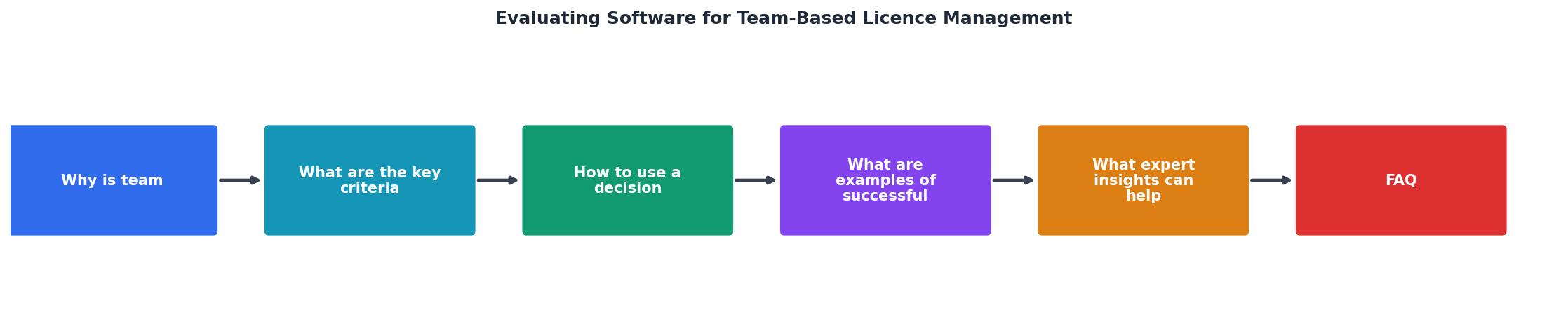
Step 1: List criteria. Use the five from above, plus any agency-specific needs (e.g., SSO support, GDPR compliance, specific platform coverage).
Step 2: Assign weights. Not every criterion matters equally. If your biggest pain is audit response time, weight "Audit trail" at 30% and distribute the rest. Weights must total 100%.
Step 3: Score candidates. Rate each tool 1-5 on every criterion. Use real data from trials, not marketing pages. Run a 10-asset test: can the tool actually pull licence certificates from Shutterstock and Freepik in one batch?
Step 4: Calculate weighted scores. Multiply each score by its weight. Sum the results per tool.
Step 5: Compare and decide. The highest total score wins, but review any criterion where the winner scored below 3. A tool that scores 5 on everything except permissions (score: 1) is a liability for a 20-person team.
Here is an example matrix for a mid-size agency evaluating three options:
The following interactive card shows how a weighted decision matrix looks in practice for a typical agency comparing three licence management tools:
Decision Matrix Example
| Criterion (Weight) | Tool A | Tool B | Tool C |
|---|---|---|---|
| Multi-platform (25%) | 4 → 1.00 | 5 → 1.25 | 3 → 0.75 |
| Permissions (20%) | 3 → 0.60 | 4 → 0.80 | 5 → 1.00 |
| Bulk ops (25%) | 5 → 1.25 | 4 → 1.00 | 2 → 0.50 |
| Audit trail (20%) | 4 → 0.80 | 4 → 0.80 | 4 → 0.80 |
| Integrations (10%) | 3 → 0.30 | 3 → 0.30 | 5 → 0.50 |
| Total | 3.95 | 4.15 | 3.55 |
In this example, Tool B wins on overall score because it covers the most platforms and handles bulk operations well. Tool C scores highest on permissions and integrations but falls short on bulk operations, which this agency weighted heavily. The matrix makes the trade-offs visible.
Real-world implementation patterns

Agencies that successfully adopt licence management software share a few common patterns:
The centralized archive approach
A 25-person digital marketing agency in London consolidated all stock licence certificates into a single cloud folder structure organized by client and quarter. They used a bulk licence downloader to pull certificates from Shutterstock, Adobe Stock, and Envato every Friday afternoon. The result: audit response time dropped from 3-5 business days to under 2 hours.
The project-scoped model
A branding agency with 12 full-time staff and 8 rotating freelancers tied licence records directly to project folders in their DAM. Every asset uploaded to a project required an attached licence certificate. Freelancers could only access their assigned projects. When a freelancer left, their licence trail stayed intact inside the project.
The automated pipeline
A content production studio integrated their licence management tool with their project management system via API. When a designer marked an asset as "final" in Monday.com, an automated workflow pulled the licence certificate and attached it to the task. No manual steps. No forgotten certificates.
Each of these patterns solves a different primary pain. The centralized archive fixes scattered records. The project-scoped model fixes freelancer turnover risk. The automated pipeline fixes human forgetfulness. Your agency likely needs elements of all three.
Expert tips for choosing well
Vendor demos are designed to impress. Here is how to cut through the polish:
- Run a real trial with real assets. Pick 50 assets your team actually used last month. Can the tool retrieve licence proof for all of them? How long does it take?
- Test the worst case. Simulate an audit: "Show me every licence for Client X from Q1." Time it. If it takes more than 15 minutes, the tool is not audit-ready.
- Check offboarding. Remove a test user. Can you still access everything they downloaded? If licence records disappear with the user account, that is a dealbreaker.
- Ask about platform additions. Stock platforms change. New ones emerge. How quickly does the vendor add support for new platforms? Is there a public roadmap?
- Calculate total cost per seat. Include setup, training, and the time your team spends maintaining the system. A tool that costs $50/seat/month but saves 4 hours of admin time per person per month pays for itself at any reasonable hourly rate.
Decision Matrix Evaluation Checklist
Your progress is saved automatically in your browser.
FAQ
Frequently Asked Questions
What criteria does your agency weight most heavily when evaluating licence management tools? Share your experience in the comments.
Additional Resources
- Best Software License Management Software for IT & SAM ... - Compare the top software license management software for mid-market and enterprise companies, including Zylo, Zluri, Flexera, and ServiceNow ...
- Software license management: 2026 Guide to cut SaaS ... - Evaluate software solutions based on key criteria. Consider features such as automated tracking, reporting capabilities, and ease of integration.
- Scalable License Management Software for Complex ... - VOSS License Management offers an automated, analytics-driven license management software solution to optimize license usage while ensuring ...
Need to Download Your Licences?
Save hours of manual work. We download all your stock photo licence certificates for you.
Get Started“Thanks to LicenceDownloader.com, I was able to download more than 1,000 Freepik licences and receive them all at once via ZIP.”
Marlon Mainardy