Finding Your Canva Pro Licence Details
Navigating the complexities of stock media licences can be daunting, especially when you're trying to ensure the legal use of images for your business. If you've ever wondered how to locate and manage your Canva Pro licence details, you're not alone. This guide will walk you through accessing your licence information, understanding the terms, and ensuring you're using Canva's resources legally and effectively.

Navigating the complexities of stock media licences can be daunting, especially when you're trying to ensure the legal use of images for your business. If you've ever wondered how to locate and manage your Canva Pro licence details, you're not alone. This guide will walk you through accessing your licence information, understanding the terms, and ensuring you're using Canva's resources legally and effectively.
Photo by Kampus Production from Pexels
TL;DR
- Log into Canva and navigate to your account settings to find your licence details.
- Understand the licence terms to ensure safe and legal use in business.
- Securely store these details for future reference.
What are Canva Pro Licences?
Canva offers a range of licences tailored to different user needs. Understanding these licences can help you make the most of Canva's offerings while ensuring compliance with legal requirements.
Types of Canva Licences
Canva provides several types of content licences:
- Free Content: Available to everyone, with limited usage rights. This content is primarily for personal use and has restrictions on commercial applications.
- Pro Content: Exclusive to Canva Pro subscribers, offering broader usage rights, including the ability to use content for various commercial purposes. This includes marketing materials, social media posts, and more, without the need for additional permissions.
- Education Content: Tailored for educational purposes, with specific restrictions that make it ideal for classroom use but not necessarily for commercial projects.
- Branded Content: Content that includes trademarks or logos, which may have additional restrictions. This type of content often requires careful consideration to avoid infringing on brand rights.
"The Content categories, from most to least restrictive, are: Education Content, Branded Content, Pro Content, and Free Content."
— Canva's Content License Agreement, Canva's Content License Agreement
Understanding these categories is essential for using Canva content appropriately in your projects. Each type of licence has its own set of rules regarding what can be done with the content, so it's crucial to familiarize yourself with these before use.
Accessing Canva Pro Account Settings
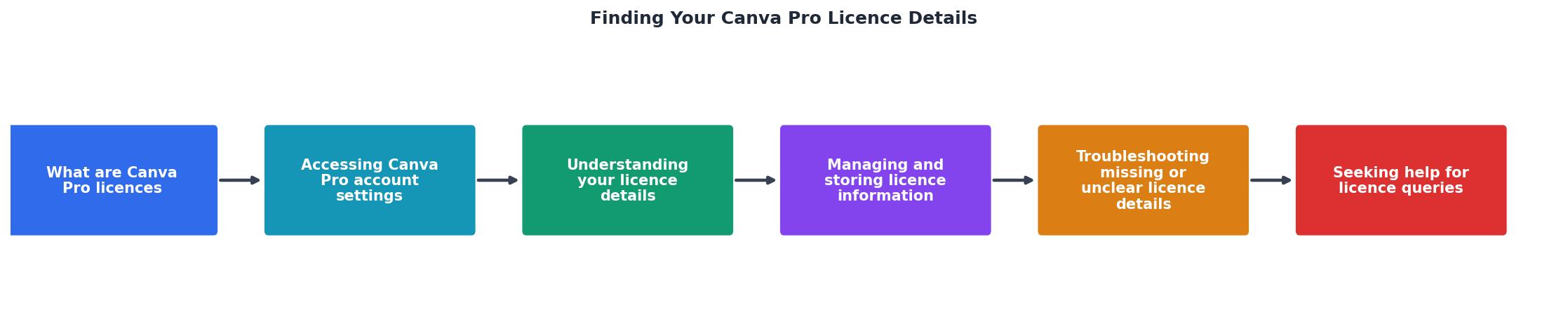
To access your Canva Pro licence details, you first need to log into your account and navigate to the appropriate section.

Steps to Access Your Licence Details
- Log into Canva: Use your credentials to access your Canva account. Ensure that you are using the correct login details associated with your Pro account.
- Navigate to Account Settings: Click on your profile picture or initials at the top-right corner of the screen. From the dropdown menu, select "Account Settings" to proceed.
- Locate the Licences Section: Within the settings menu, find the "Licences" tab. This section will display all the licences associated with your account, allowing you to review and manage them.
Understanding Your Licence Details
Once you have accessed your licence details, it's important to understand the terms and conditions attached to each type of content.
Key Terms and Conditions
- Usage Rights: Know where and how you can use the content. For example, Pro Content can be used in both digital and printed media, including social media posts, advertisements, and marketing materials.
- Limitations: Be aware of any restrictions, such as the prohibition of resale or distribution of the content as a standalone file. This is crucial to ensure that you're not unknowingly violating any terms.
- Duration: Some licences may have time limitations, meaning the rights to use the content may expire after a certain period. It's important to keep track of these dates to avoid any legal issues.
Managing and Storing Licence Information
Keeping your licence information organized is just as important as understanding it. Proper management can save you time and protect your business from legal complications.
Tips for Organizing and Securing Licence Details
- Digital Storage: Use cloud storage solutions such as Google Drive, Dropbox, or OneDrive to back up your licence details. This ensures that you can access them from anywhere and protects them from being lost.
- Physical Copies: Keep printed copies of your licences in a secure location for quick reference. This can be particularly useful during audits or when internet access is unavailable.
- Regular Updates: Review and update your licences regularly to ensure they are current. This involves checking for any changes in terms or conditions and ensuring that all licences are still valid.
Troubleshooting Missing or Unclear Licence Details
Sometimes, you may encounter issues with finding or understanding your licence details. Here are some common solutions.

Common Issues and Solutions
- Missing Licences: Double-check your account login and ensure you're viewing the correct account. It's easy to accidentally log into a different account, especially if you manage multiple ones.
- Unclear Terms: If the terms and conditions are confusing, consult Canva's official documentation or reach out to their support for clarification. They can provide detailed explanations and help clear up any misunderstandings.
Seeking Help for Licence Queries
If you're still unsure about your licence details, Canva offers several resources for support.
Where to Find Support
- Canva Help Center: Access a wealth of articles and FAQs that cover a wide range of topics related to Canva and its licences.
- Community Forums: Engage with other users to share experiences and solutions. These forums can be a great resource for finding answers to common questions and learning from others' experiences.
- Customer Support: Contact Canva directly for personalized assistance. Their support team can help resolve specific issues and provide guidance tailored to your needs.
Licence Management Stats
FAQ
Frequently Asked Questions
Do you have any other questions about managing your Canva Pro licence? Let us know in the comments!
Additional Resources
- Canva's Content License Agreement - You may transfer a Canva Design containing Content (Free or Pro) to a client for the client's own use, subject to the following terms: You will enter into a ...
- Canva's licensing explained - Our Free and Pro Content licenses cover all of the content we offer (except for Popular Music!) from photos, icons and illustrations, to videos, audio, fonts ...
- Canva Pro | Your all-in-one design solution - Your all-in-one solution for designing and managing your work. Access premium content, brand tools, and AI features to reach your goals faster.
Need to Download Your Licences?
Save hours of manual work. We download all your stock photo licence certificates for you.
Get Started“Thanks to LicenceDownloader.com, I was able to download more than 1,000 Freepik licences and receive them all at once via ZIP.”
Marlon Mainardy