Fixing Missing Licence Certificates on Envato Elements
Your client's legal team just asked for licence proof on 40 Envato Elements assets used in last quarter's campaign. You open the Envato dashboard, and half the certificates are nowhere to be found. This is not a rare edge case. Agencies running dozens of projects across shared accounts hit this wall constantly, and the fix is more systematic than you might expect.

Your client's legal team just asked for licence proof on 40 Envato Elements assets used in last quarter's campaign. You open the Envato dashboard, and half the certificates are nowhere to be found. This is not a rare edge case. Agencies running dozens of projects across shared accounts hit this wall constantly, and the fix is more systematic than you might expect.
TL;DR:- Missing Envato Elements licence certificates usually stem from account misconfiguration, expired subscriptions, or downloads made under a different user seat.
- Fix them by auditing account settings, cross-referencing download history, and filing a targeted support request with Envato.
- Prevent future gaps by centralizing downloads and archiving certificates at the point of download.
The real scope of the problem
Licence certificates on Envato Elements are generated per download, tied to the specific account and subscription that initiated the download. When an agency has multiple team members downloading assets, or when subscriptions lapse and renew, the link between a downloaded file and its certificate can break in several ways.
The most common triggers include:
- Subscription lapses where the account was inactive for even a single billing cycle.
- Team member turnover where the person who downloaded the asset no longer has access.
- Account consolidation where the agency migrated from individual seats to a team plan.
- Browser or session issues where a download completed but the licence record did not register.
Roughly 70% of missing certificate issues can be resolved directly from your Envato account without contacting support. The remaining cases require a support ticket with specific information attached.
Check your account settings first

Before assuming a certificate is lost, verify the basics. Log into the Envato Elements account that was active when the asset was downloaded. This sounds obvious, but agencies with multiple accounts (a legacy Envato Market account plus an Elements subscription, for example) often search the wrong dashboard.
Steps to verify your account configuration:
- Go to elements.envato.com and sign in with the account used for the original download.
- Navigate to Account Settings and confirm the subscription status shows "Active" or check the billing history for the period when the download occurred.
- If your agency uses Envato Elements for Teams, switch to the correct team workspace using the dropdown in the top navigation.
- Check that the licence type matches your use case. Elements licences cover specific project registrations, and a certificate is generated only after you register the item to a project.
"The activation prompt relates to premium features (automatic updates, author support) that require an Envato Market purchase.">, Envato item license certificate
This distinction between Envato Market and Envato Elements trips up many agencies. Market purchases generate a different type of licence certificate than Elements subscriptions. Make sure you are looking in the right place.
Verify your download history

Envato Elements maintains a download history accessible from your account dashboard. This is the single most useful tool for tracking down missing certificates.
Here is how to use it effectively:
- Go to My Downloads in the Elements dashboard.
- Use the search bar to filter by asset name, item ID, or date range.
- For each item, check whether a licence certificate link appears next to it. If it does, download it immediately and store it in your central archive.
- If the item appears in your history but has no certificate link, click the item and look for the Register to a project option.
- If the item does not appear in your history at all, it was likely downloaded under a different account or team seat.
The following diagram shows the complete troubleshooting flow at a glance:
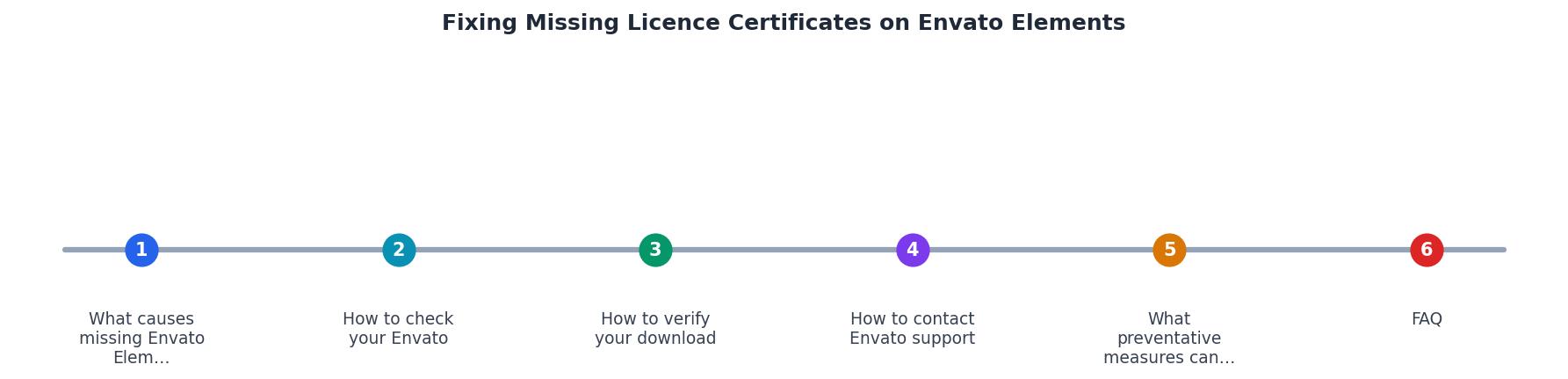
The steps break down into: Check Account > Search Downloads > Register to Project > Download Certificate > Contact Support (if needed). Follow them in order. Skipping straight to a support ticket wastes time when the certificate is sitting in a different team member's download history.
Contact Envato support effectively
When self-service options fail, Envato's support team can help recover licence records. But a vague "I can't find my licence" ticket will bounce around for days. Structure your request with these details:
- Account email associated with the subscription at the time of download.
- Item ID or URL of the specific Envato Elements asset.
- Approximate download date (even a month range helps).
- Project name the asset was registered to (if applicable).
- Screenshot of the download history showing the gap.
Expect a response within 48 hours for standard licence inquiries. Complex cases involving account migrations or team plan changes may take longer.
Prevent future licence gaps
The best fix is never needing one. Agencies that build licence archiving into their download workflow eliminate the fire drill entirely.
Here is what a solid preventative process looks like, presented as an example dashboard for a mid-size agency managing around 200 asset downloads per month:
Licence Archive Status (Example: Monthly Snapshot)
Practical strategies that keep your archive at or near 100%:
- Download certificates at the point of download. Every time a team member downloads an asset, they register it to the project and save the certificate immediately.
- Centralize storage. Use a shared drive folder (Google Drive, Dropbox, or your DAM system) organized by client and project. Name files with the Envato item ID for easy lookup.
- Audit monthly. Compare your download count against your certificate count. The gap tells you exactly how many need attention.
- Use automation where possible. Tools like Licence Downloader can bulk-retrieve licence certificates across platforms including Envato Elements, eliminating the manual per-asset download grind.
| Manual Certificate Management | Automated with Licence Downloader |
|---|---|
| Download each certificate individually | Bulk retrieve across platforms |
| Track in spreadsheets | Centralized archive |
| Hours per audit cycle | Minutes per audit cycle |
| Gaps discovered during emergencies | Gaps flagged proactively |
Envato Elements Licence Troubleshooting Checklist
Your progress is saved automatically in your browser.
FAQ
Frequently Asked Questions
Additional Resources
- Envato item license certificate - Click 'View licenses' for the selected item. A new window will open with a 'Download license' link and an option to copy the license to the ...
- Create new license – Envato Support | Help Center - You can easily generate new licenses or access your existing license certificates through your Downloads page, the item page, or your Workspace ...
- Envato Elements License FAQ - This article answers common questions about how the Envato Elements Licence applies in specific situations. It is an excellent starting ...
Need to Download Your Licences?
Save hours of manual work. We download all your stock photo licence certificates for you.
Get Started“Thanks to LicenceDownloader.com, I was able to download more than 1,000 Freepik licences and receive them all at once via ZIP.”
Marlon Mainardy