Freepik certificate export checklist
A client emails you three months after a project wraps up asking for proof that the hero image on their landing page is properly licensed. You know you downloaded it from Freepik, but the certificate is buried somewhere in your account, and you have forty other assets from that same project. This checklist gives you a repeatable, step-by-step process to export every Freepik licence certificate you need so you never scramble for proof again.

A client emails you three months after a project wraps up asking for proof that the hero image on their landing page is properly licensed. You know you downloaded it from Freepik, but the certificate is buried somewhere in your account, and you have forty other assets from that same project. This checklist gives you a repeatable, step-by-step process to export every Freepik licence certificate you need so you never scramble for proof again.
Photo by olia danilevich from Pexels
TL;DR:- Freepik stores licence certificates in your download history, but they are not grouped by project or client.
- Export each certificate as a PDF immediately after downloading an asset, or batch-export them using a structured workflow.
- A consistent naming convention and local backup folder turn scattered proof into an audit-ready archive in minutes.
Why licence certificates matter now
Stock image copyright claims are not theoretical. Platforms like Meta, Amazon, and Etsy regularly flag listings and ads when automated content-matching systems detect unlicensed imagery. If you cannot produce a valid licence certificate within a few business days, the asset gets pulled and your account takes a hit.
Freepik's Premium and free-with-attribution licences each come with specific usage rights. The certificate is the document that ties a specific download to your account, the date, and the licence type. Without it, you are relying on screenshots and memory. Neither holds up well in a dispute.
For freelance designers juggling multiple stock subscriptions, Freepik certificates tend to be the ones that slip through the cracks. The platform redesigned its download history interface in late 2025, and the export flow changed. If your old workflow stopped working, this checklist brings you up to speed.
Common mistakes that cost time

Most designers make the same handful of errors when managing Freepik certificates. Recognizing them saves hours of cleanup later.
- Assuming the download itself is proof. Having the
.jpgor.epsfile on your hard drive does not prove you licensed it. The certificate is a separate document. - Relying on browser bookmarks. Freepik URLs change. A bookmarked link to your download history page can break after a platform update.
- Mixing free and Premium downloads. Free Freepik assets require attribution. Premium assets do not. If you grab the wrong certificate type, your attribution line (or lack of one) is wrong.
- Waiting until a client asks. By then, you may have changed your Freepik plan, lost access to old downloads, or simply forgotten which assets went into which project.
- No naming convention. A folder full of files named
licence.pdf,licence (1).pdf,licence (2).pdfis useless when you need to match a certificate to a specific deliverable.
That number is low. Most people only think about certificates after a problem surfaces.
Step-by-step export process
Here is the exact workflow to export a Freepik licence certificate for any asset, whether you downloaded it today or six months ago.
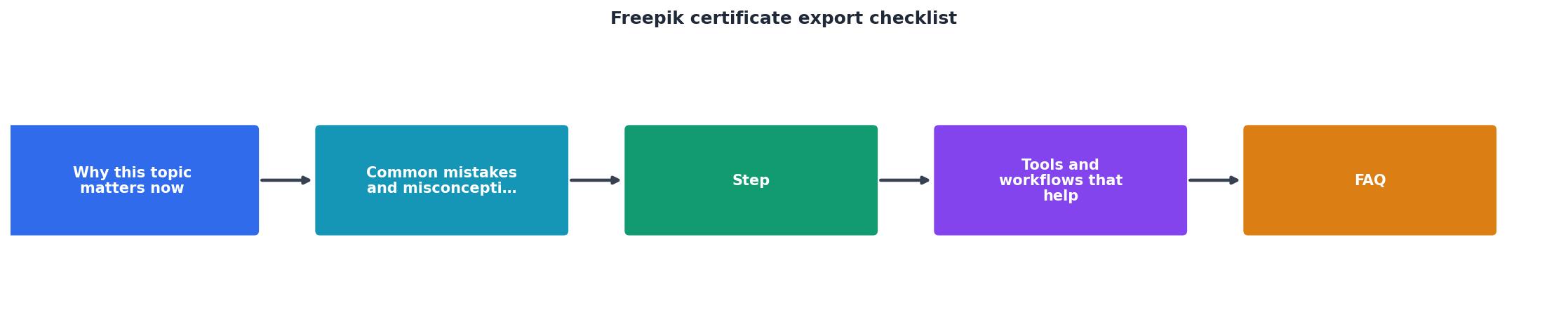
The diagram above shows five steps: Log in, Open downloads, Find asset, Export PDF, File locally. Here is each one in detail.
Log in to your Freepik account
Go to freepik.com and sign in with the account that originally downloaded the asset. This matters if you use separate accounts for different clients or if you share a team subscription.
Open your download history
Click your profile avatar in the top-right corner, then select My downloads (or Downloads depending on your interface language). This page lists every file you have downloaded, sorted by date.
Find the specific asset
Use the search bar within the downloads page or scroll by date. Freepik shows a thumbnail, the asset title, the download date, and the licence type (Free or Premium). If you downloaded hundreds of files, filtering by date range narrows the list fast.
Export the certificate as PDF
Click the three-dot menu (or the Licence certificate link) next to the asset. Select Download certificate. Freepik generates a PDF that includes:
- Your account name and email
- The asset ID and title
- The download date and time
- The licence type and permitted uses
- A unique certificate reference number
File it locally with a clear name
Rename the file using a consistent pattern. A format that works well:
YYYY-MM-DD_freepik_assetID_clientname.pdf
Example: 2026-08-15_freepik_28374651_greenleaf-bakery.pdf
Drop it into a dedicated folder structure like Licences/Freepik/2026/ or Licences/ClientName/Freepik/.
"To help all new exporters, here is the most complete, step-by-step export documentation checklist you need in 2025.">, Complete Export Document Checklist for Beginners Starting an export business i
Tools and workflows that help

Manual export works fine for five or ten assets. Once you are handling dozens of downloads per week across Freepik, Adobe Stock, Shutterstock, and others, the manual approach breaks down.
| Manual Export | Automated / Bulk Export |
|---|---|
| One certificate at a time | Batch-download all certificates |
| Rename each file by hand | Auto-naming with asset ID and date |
| Works for small volumes | Scales to hundreds of assets |
| Free (just your time) | Tool cost, but saves hours monthly |
| Easy to miss assets | Catches every download in history |
Cloud backup integration. After exporting, sync your Licences/ folder to Google Drive, Dropbox, or OneDrive. If your laptop dies, the certificates survive. A shared cloud folder also lets you hand off proof to a client without re-exporting.
Spreadsheet tracker. A simple Google Sheet with columns for asset ID, platform, client, project, download date, and certificate file path gives you a searchable index. When a client asks for proof, you search the sheet instead of digging through folders.
Bulk certificate tools. If you use multiple stock platforms, licencedownloader.com can bulk-find and download licence certificates across Freepik, Shutterstock, Adobe Stock, and more in one pass. It eliminates the per-asset clicking and handles the naming automatically.
Twelve minutes for twenty certificates sounds manageable until you multiply it by every project, every month, across every platform.
Building a repeatable habit

The best system is one you actually follow. Here are three approaches, ranked by effort:
- Same-day export. Every time you download a Freepik asset, immediately grab the certificate and file it. Takes 30 seconds per asset. Works if you are disciplined.
- Weekly batch. Set a recurring 15-minute calendar block (Friday afternoon works well). Open your Freepik download history, export all certificates from the past week, rename and file them.
- Project close-out. Before you send final deliverables to a client, export certificates for every stock asset used in that project. Attach them to the project folder or include them in your handoff package.
The following interactive card summarizes what a healthy Freepik certificate archive looks like for a typical freelancer handling around 15 projects per quarter:
Example: Quarterly Certificate Archive
That is the goal: every asset covered, minimal weekly effort, and zero panic when a client or platform asks for documentation.
The complete checklist
Use this checklist every time you start or close a project that includes Freepik assets.
Freepik Certificate Export Checklist
Your progress is saved automatically in your browser.
FAQ
Frequently Asked Questions
Additional Resources
- How to upload Id document on freepik | Tax residency ... - In this video, I want to show you, How to submit an ID document in freepik ... Tax residency certificate apply online: Vector file setup. ...
- Complete Export Document Checklist for Beginners ... - Some common certificates: Phytosanitary Certificate. Fumigation Certificate Lab Test Reports ISO Certificates FDA Approval
- Paresh Solanki's Post - To help all new exporters, here is the most complete, step-by-step export documentation checklist you need in 2025. Some common certificates: ...
Need to Download Your Licences?
Save hours of manual work. We download all your stock photo licence certificates for you.
Get Started“Thanks to LicenceDownloader.com, I was able to download more than 1,000 Freepik licences and receive them all at once via ZIP.”
Marlon Mainardy