Handling Rejected Freepik Licence Proof by Platforms
You uploaded your Freepik licence certificate to fight a copyright claim on Facebook, Amazon, or Etsy, and the platform came back with a flat rejection. Now you are staring at a potential listing removal or ad suspension with no clear next step. This guide walks you through exactly why platforms reject Freepik licence proof, how to fix the documents, and what alternative evidence you can submit to keep your business running.

You uploaded your Freepik licence certificate to fight a copyright claim on Facebook, Amazon, or Etsy, and the platform came back with a flat rejection. Now you are staring at a potential listing removal or ad suspension with no clear next step. This guide walks you through exactly why platforms reject Freepik licence proof, how to fix the documents, and what alternative evidence you can submit to keep your business running.
Photo by Andrea Piacquadio from Pexels
TL;DR:- Platforms reject Freepik licence proof when the document lacks a matching asset ID, shows a free-tier licence for commercial use, or arrives in an unreadable format.
- Fix rejections by downloading the original invoice from your Freepik account, matching the exact asset URL, and writing a clear cover letter to the platform's support team.
- If the standard certificate fails, provide purchase receipts, PayPal/Stripe confirmations, and screenshots of your Freepik download history as alternative proof.
Why Platforms Reject Licence Proof
The rejection email rarely tells you the real reason. Most of the time, the platform's review team is not staffed with licensing experts. They follow a checklist, and if your document does not tick every box, it gets bounced.
Here are the most common triggers:
- Mismatched asset ID or URL. You downloaded a generic Freepik Premium certificate, but the platform needs proof tied to the specific image file they flagged. A certificate that says "Premium subscription active" without referencing the exact asset is not enough.
- Free-tier licence submitted for commercial use. Freepik's free licence requires attribution. If your ad or product listing does not include attribution (and most don't), the platform sees a mismatch between the licence terms and your usage.
- Wrong file format or unreadable scan. Some sellers submit blurry phone screenshots of their Freepik dashboard. Review teams reject anything they cannot verify.
- Expired subscription at time of review. Your subscription was active when you downloaded the image, but it lapsed before the dispute. The platform may question whether the licence is still valid.
- Name mismatch. The Freepik account is under your personal name, but the store or ad account is under your business name.
How to Verify Licence Authenticity

Before you resubmit anything, confirm that your licence actually covers the usage in question. Freepik has two main licence tiers: Free (requires attribution, limited to certain uses) and Premium (broader commercial rights, no attribution needed). Mixing these up is the fastest way to get rejected again.
Steps to verify:
- Log into your Freepik account and go to My Downloads.
- Find the exact asset that was flagged. Note the resource ID visible in the download URL (it looks like
freepik.com/free-vector/xxxxxorfreepik.com/premium-vector/xxxxx). - Check whether the download was made under a free or premium session. Premium downloads show a "Premium" badge.
- Download the licence certificate directly from the asset's detail page if available, or from your subscription invoice page.
- Cross-reference the download date with your subscription billing history. Make sure your Premium plan was active on that date.
"The Customer will need a unique password and/or another credential (jointly referred to herein as API keys) to initiate a session in its account and access and use the API Services.">, Terms of use
This quote from Freepik's own terms highlights that account-level access is tied to credentials. Your proof needs to show that your authenticated account downloaded that specific file.
Communicating With Platform Support

Platform support teams on Amazon, Meta, and Etsy process hundreds of copyright disputes daily. Your goal is to make their job easy. A clear, structured response gets resolved faster than a long emotional paragraph.
Structure your reply like this:
- Subject line: Include the case/claim number and the words "Licence Proof Resubmission."
- Opening sentence: State the asset in question (file name, URL on the platform, and the Freepik resource ID).
- Body: Attach the licence certificate, the purchase invoice, and a screenshot of your Freepik download history showing the asset. Explain in two sentences how the licence covers your specific use.
- Closing: Ask for confirmation of receipt and a timeline for review.
Here is a quick comparison of what works versus what gets ignored:
| What Gets Accepted | |
|---|---|
| Invoice PDF + asset-specific certificate | |
| Clean PDF export from Freepik dashboard | |
| Download history showing exact asset + date | |
| Case ID in subject line and body |
Alternative Proof Methods

Sometimes the standard Freepik certificate is not enough. Platforms like Amazon Brand Registry or Meta's IP team may want additional evidence. Here is what you can gather:
- Payment receipt from PayPal, Stripe, or your bank. This proves you paid for a Premium subscription on the relevant date.
- Freepik download history export. Go to your account, screenshot or export the full download list filtered by date. Highlight the flagged asset.
- Email confirmation from Freepik. When you first subscribed or renewed, Freepik sent a confirmation email. Forward it as-is (do not edit it).
- Freepik API access logs. If you used the Freepik API to download assets, your API call logs serve as timestamped proof.
- A signed declaration. As a last resort, write a short statement declaring that you hold a valid licence, attach all supporting documents, and sign it. Some platforms accept this as supplementary evidence.
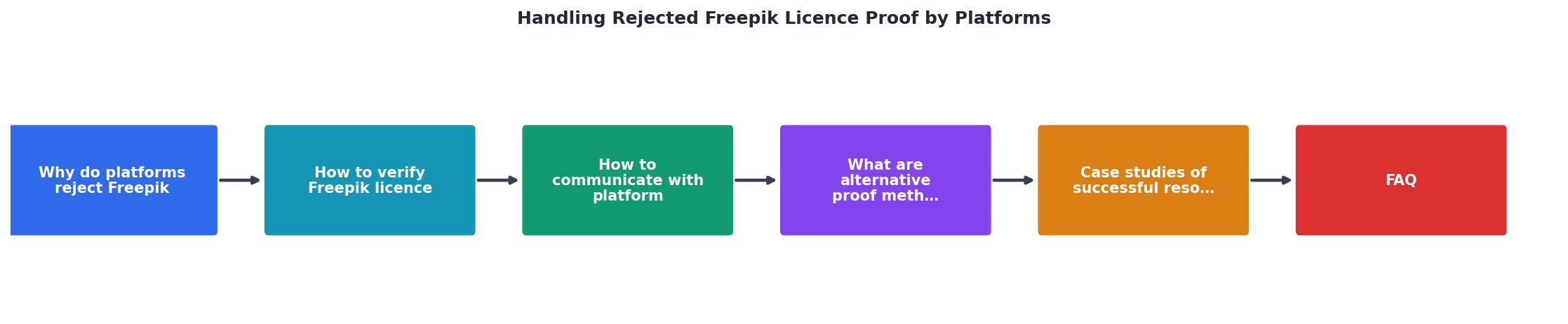
The steps in the diagram: Identify flagged asset → Log into Freepik → Match asset ID → Download certificate + invoice → Bundle as PDF → Submit to platform → Follow up.
Tools like Licence Downloader can speed up the "Download certificate + invoice" step by bulk-exporting your Freepik licence records into a single audit-ready folder, so you are not manually screenshotting each asset.
Lessons From Successful Resolutions
Here is an example dashboard showing how a typical small-business owner's licence dispute resolution breaks down across platforms:
Example: Dispute Outcomes for a Small E-commerce Store
A few patterns stand out from real-world cases:
- Amazon responds fastest when you include the ASIN, the Freepik resource ID, and a PDF bundle. Their IP team cross-checks the asset visually, so a clear certificate with a thumbnail helps.
- Meta (Facebook/Instagram ads) often requires you to submit through the specific "Request Review" flow in Ads Manager. Attaching documents via email to a generic support address rarely works.
- Etsy treats DMCA counter-notices seriously. If you file a counter-notice with proper licence proof, the claimant has 10 business days to file a lawsuit or the listing gets restored.
Freepik Licence Proof Resubmission Checklist
Your progress is saved automatically in your browser.
FAQ
Frequently Asked Questions
licences/freepik/). Use a tool like Licence Downloader to bulk-export certificates so nothing slips through the cracks. When you use an asset on a platform, note the resource ID next to the listing or ad in a simple spreadsheet. This way, if a claim arrives six months later, you already have everything ready.What has your experience been with licence disputes on platforms like Amazon or Meta? Share what worked for you in the comments.
Additional Resources
- Freepik Terms of use - These terms of use ("Terms") govern the access, browsing and use by the users ("User" or "Users", as applicable) of https://www.freepik.com/
- Video - Reasons for rejection - Reason: The metadata provided for the video is incorrect, incomplete, or does not meet platform requirements. Make sure the title and keywords clearly ...
- How I Downloaded Almost 1000 Freepik Licenses At Once - Your licence certificate is your only proof you had the right to use that image. ... It supports 10 platforms: Freepik, Shutterstock, Adobe ...
Need to Download Your Licences?
Save hours of manual work. We download all your stock photo licence certificates for you.
Get Started“Thanks to LicenceDownloader.com, I was able to download more than 1,000 Freepik licences and receive them all at once via ZIP.”
Marlon Mainardy