Implementing a Licence Tracking System in Agencies
Stock media licences at a busy agency live in spreadsheets nobody updates, email threads nobody reads, and platform dashboards nobody bookmarks. When a client's legal team asks for proof that a hero image was properly licensed, the scramble begins and billable hours evaporate. A dedicated licence tracking system eliminates that scramble, turning compliance from a fire drill into a background process that runs itself.


Stock media licences at a busy agency live in spreadsheets nobody updates, email threads nobody reads, and platform dashboards nobody bookmarks. When a client's legal team asks for proof that a hero image was properly licensed, the scramble begins and billable hours evaporate. A dedicated licence tracking system eliminates that scramble, turning compliance from a fire drill into a background process that runs itself.
Photo by Calvin Seng from Pexels
TL;DR:- A licence tracking system gives agencies a single source of truth for every stock media licence across platforms, seats, and projects.
- Choosing the right tool, integrating it into existing creative workflows, and training the team are the three pillars of a successful rollout.
- Automated renewal alerts and compliance checks cut audit response time from days to minutes and prevent costly lapses.
Why agencies need licence tracking
Every creative agency juggles multiple stock platforms. One team member downloads from Shutterstock, another grabs assets from Adobe Stock, a freelancer uses their personal Envato Elements subscription. Multiply that by dozens of client projects per quarter, and you get hundreds of licence records scattered across accounts that may not even belong to the agency.
The cost of this chaos is real. Expired licences used in live campaigns create legal exposure. Duplicate purchases waste budget. And when someone leaves the company, their licence knowledge walks out with them.
"Gartner reports that some organizations lose as much as 30% of their IT budget to this inefficiency.">, Essential Software License Tracking Practices for Cost Savings and Compliance
That statistic covers software licences broadly, but the pattern applies directly to stock media. Agencies that lack visibility into what they have licensed, where, and for how long, bleed money and accumulate risk without realizing it.
A licence tracking system is a centralized tool or process that records every licence acquisition, links it to the asset and the project it was used in, tracks expiration dates, and surfaces compliance gaps before they become problems.
Benefits of a tracking system
Agencies that implement licence tracking see improvements across four areas:
- Audit readiness - Every licence certificate is stored, indexed, and retrievable in seconds. When a client's legal counsel sends a request, you respond the same day instead of spending a week digging through inboxes.
- Cost control - Visibility into existing licences prevents duplicate purchases. If a team member already licensed an image on Shutterstock last month, the system flags it before someone buys it again on iStock.
- Risk reduction - Expired or mismatched licences (using a personal licence for a commercial client project, for example) get caught early, not after a takedown notice arrives.
- Scalability - As the agency grows, adds seats, or onboards more freelancers, the system scales without requiring more manual effort.
Agencies that move from spreadsheet-based tracking to a dedicated system typically cut audit response time by 80-90%. That alone justifies the implementation effort.
Selecting the right software

Not every tool fits every agency. The selection process should start with your actual pain points, not a feature comparison chart. Here are the criteria that matter most:
Multi-platform support - The tool must pull licence data from every platform your agency uses. Shutterstock, Adobe Stock, Freepik, Envato, iStock, Canva, and others each store licence information differently. A tool like Licence Downloader handles bulk retrieval of licence certificates across these platforms, which eliminates the biggest bottleneck: manually logging into each dashboard.
Centralized storage - Licence certificates, invoices, and usage metadata should live in one searchable repository. Cloud-based storage with folder structures mapped to clients or projects works best for agencies.
User management - The system needs to handle multiple seats, roles, and permissions. Producers need full access. Designers need read access. Freelancers need temporary, scoped access that expires when their contract ends.
Integration capability - Can it connect to your project management tool (Asana, Monday, Basecamp) or DAM system (Bynder, Brandfolder, Canto)? Native integrations reduce friction. API access is a bonus for agencies with in-house dev resources.
Reporting and alerts - Automated expiration warnings, usage reports, and compliance dashboards turn passive storage into active governance.
Here is a quick comparison of common approaches:
| Feature | Spreadsheet Tracking | Dedicated Licence Tool |
|---|---|---|
| Multi-platform support | Manual entry only | Automated retrieval |
| Audit response time | Hours to days | Minutes |
| Expiration alerts | None (unless manually set) | Automated |
| Scalability | Breaks at ~100 assets | Handles thousands |
| Freelancer access | Share link (risky) | Scoped permissions |
| Cost | Free (but time-expensive) | Subscription-based |
Integrating into existing workflows

A tracking system that sits outside the creative workflow will be ignored. The goal is to embed licence tracking into the steps your team already follows, so compliance happens as a side effect of doing the work.
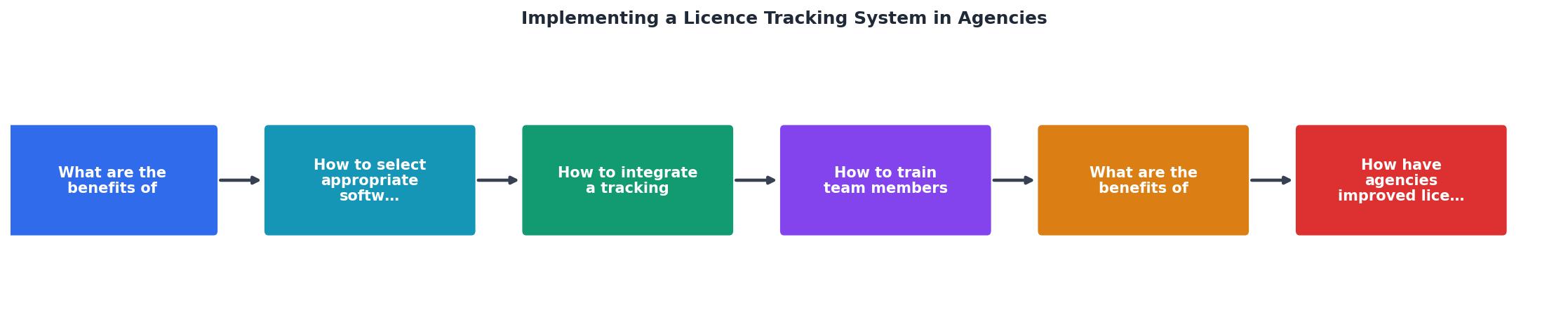
The diagram above shows the core flow: Asset Download → Licence Capture → Central Storage → Project Linking → Expiration Monitoring → Audit Response. Each step maps to an existing moment in the creative process.
Here is how to wire it in:
Map the current asset workflow
Document how assets move through your agency today. Who downloads them? Where do they go? How are they delivered to clients? Interview two or three team members from different roles. You will find that everyone has a slightly different process, and that is exactly the problem you are solving.
Insert licence capture at the download step
The moment someone downloads a stock asset, the licence certificate should be captured automatically. Tools like Licence Downloader can bulk-retrieve certificates after the fact, but the ideal state is capturing them at the point of download. If your DAM system supports metadata tagging, attach the licence file as metadata to the asset itself.
Link licences to projects
Every licence record needs a project association. This is what makes audits fast. When a client asks "show me the licence for the image on our Q3 campaign landing page," you search by project name, not by scrolling through a flat list of 2,000 licence files.
Automate the handoff
When a project wraps, the licence archive for that project should be exportable as a single package. Some agencies include this in their final deliverable to the client. Others keep it internal but ready to send on request. Either way, automate the packaging so it does not depend on someone remembering to do it.
The following interactive card shows what a typical agency's licence tracking dashboard might look like after implementation, based on a mid-size agency handling around 15 active client projects:
Agency Licence Tracking Dashboard
Training your team effectively

A tracking system is only as good as the people using it. Training does not mean a one-hour all-hands meeting with a slide deck. It means building habits.
Role-based training - Designers need to know one thing: where to save the licence file when they download an asset. Producers need to know how to run reports, check compliance status, and export licence packages. Account managers need to know how to respond to client audit requests using the system. Train each role on their specific tasks, not on the entire system.
Embed it in onboarding - Every new hire and every new freelancer gets a 15-minute walkthrough of the licence tracking process as part of their first-day setup. Include it in the onboarding checklist right next to "set up email" and "get Slack access."
Create a one-page cheat sheet - A single document (or a pinned Slack message) that answers: Where do licences go? How do I tag them to a project? Who do I ask if something looks wrong? Keep it short enough that people actually read it.
Assign a licence champion - One person (often the ops lead or a senior producer) owns the system. They review the dashboard weekly, follow up on flagged items, and answer questions. Without an owner, the system decays within months.
Run quarterly spot checks - Pick three random projects each quarter. Verify that every asset used in those projects has a matching licence record. Share the results with the team. This keeps compliance visible and creates gentle accountability.
Agencies that follow structured, role-based training see about 70% adoption within the first month. That number climbs to 90%+ by month three if the licence champion stays active.
Automated alerts for renewals
Manual calendar reminders for licence renewals do not scale. An agency with 500+ active licences across six platforms cannot rely on someone checking a spreadsheet every Friday.
Automated expiration alerts notify the right person (the project owner, the ops lead, or both) when a licence is approaching its renewal date. Most tracking tools allow you to set thresholds: 90 days, 30 days, 7 days before expiry.
Here is what automation handles:
- Renewal reminders - Subscriptions like Shutterstock annual plans or Envato Elements memberships get flagged before they lapse, preventing gaps in coverage.
- Usage-based warnings - If a licence covers a specific number of impressions or a specific time period, the system alerts you when you are approaching the limit.
- Compliance checks - Automated scans compare active project assets against the licence database. Any asset without a matching licence gets flagged immediately.
- Freelancer access expiry - When a freelancer's contract end date arrives, their access to the licence system is automatically revoked or flagged for review.
Agencies using automated alerts report on-time renewal rates above 90%, compared to roughly 60% with manual tracking. The difference is not just convenience. A lapsed licence on a live campaign is a legal liability.
Real-world implementation examples
Three patterns emerge from agencies that have successfully rolled out licence tracking:
Pattern 1: The DAM-integrated approach. A 25-person branding agency connected their Bynder DAM to a licence tracking layer. Every asset uploaded to Bynder required a licence file attachment. No licence, no upload. This "gate" approach forced compliance at the point of entry. Within six months, they had 100% licence coverage on new projects and were backfilling older ones.
Pattern 2: The bulk-retrieval catch-up. A digital marketing agency with 40 employees had three years of stock assets with no centralized licence records. They used Licence Downloader to bulk-retrieve certificates from Shutterstock, Adobe Stock, and Freepik, then organized them by client project in a shared Google Drive structure. The initial catch-up took two weeks. Ongoing maintenance takes about 30 minutes per week.
Pattern 3: The freelancer-first model. A small agency (12 people) that relies heavily on freelancers built their tracking system around contractor workflows. Each freelancer receives a shared folder for their project. When they download a stock asset, they drop the licence certificate into that folder. The ops lead reviews submissions weekly. Simple, low-tech, and effective for their scale.
Each pattern works because it matches the agency's size, tooling, and team structure. There is no universal "right" setup. The right setup is the one your team will actually use.
Licence Tracking System Setup Checklist
Your progress is saved automatically in your browser.
FAQ
Frequently Asked Questions
Additional Resources
- Track License Applications with Confidence and Accuracy - An automated licensing system creates a defensible audit trail that documents every decision, timestamp and verification. This level of ...
- Software License Tracking: Best Practices for Avoiding ... - In this article, we discuss the key practices of tracking software licenses and how software asset management (SAM) can be used to streamline the license ...
- Software License Tracking Guide 2026: Process And Tools - The process in three steps: take inventory of all software assets, centralize license data in one platform, and monitor usage and compliance ...
Need to Download Your Licences?
Save hours of manual work. We download all your stock photo licence certificates for you.
Get Started“Thanks to LicenceDownloader.com, I was able to download more than 1,000 Freepik licences and receive them all at once via ZIP.”
Marlon Mainardy