Licence proof playbook #11: Freelancer licence vault setup
A client emails you eight months after a project wrapped, asking for proof that the hero image on their homepage is properly licensed. You dig through three different stock platform dashboards, two email inboxes, and a folder called "misc receipts 2025" before you find something that looks right. That scramble costs you an hour you cannot bill. A licence vault eliminates that scramble entirely by giving every certificate a permanent, searchable home.

A client emails you eight months after a project wrapped, asking for proof that the hero image on their homepage is properly licensed. You dig through three different stock platform dashboards, two email inboxes, and a folder called "misc receipts 2025" before you find something that looks right. That scramble costs you an hour you cannot bill. A licence vault eliminates that scramble entirely by giving every certificate a permanent, searchable home.
Photo by Nataliya Vaitkevich from Pexels
TL;DR:- A licence vault is a single, organized folder structure (local or cloud) where every stock-media licence certificate lives, named consistently and backed up automatically.
- Set it up once with a clear naming convention, sync it to cloud storage, and populate it using bulk-download tools like Licence Downloader.
- The result: any licence proof request answered in under 60 seconds instead of an hour-long scavenger hunt.
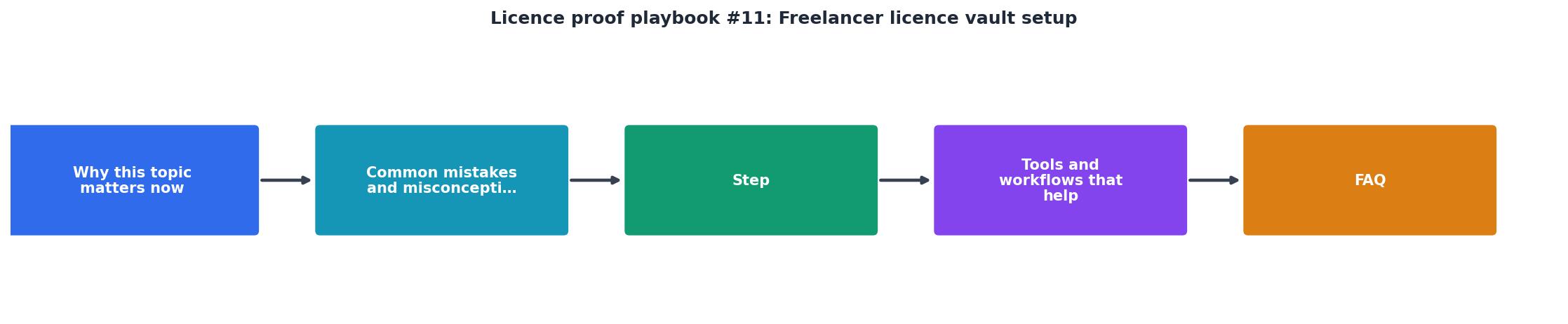
Why freelancers need a vault
Stock licence certificates are scattered by design. Freepik stores them in your download history. Adobe Stock buries them inside order confirmations. Shutterstock generates a PDF only if you know where to click. Envato Elements ties proof to your active subscription status. When you work across two or three of these platforms, the certificates live in completely different formats, in completely different places, behind completely different login screens.
That fragmentation creates real risk. A single copyright dispute can cost thousands in legal fees, even when you hold a valid licence. The problem is never the licence itself. The problem is finding it fast enough to shut down the claim before it escalates.
A licence vault solves this by centralizing every certificate into one structured location you control. Think of it as a filing cabinet with exactly one job: answer the question "do I have a licence for this asset?" in seconds.
Common mistakes that cost time

Before building your vault, recognize the traps most freelancers fall into:
- Relying on platform dashboards. Platforms change their UI, archive old downloads, or restrict access when a subscription lapses. Your proof disappears with your login.
- Saving certificates to the Downloads folder. That generic dump becomes unsearchable within weeks. File names like
licence_28374.pdfmean nothing six months later. - Mixing licences with project files. When you archive or delete a project folder, the licence proof goes with it.
- Skipping free assets. Free-tier downloads from Freepik or Pixabay still come with licence terms. No certificate means no defence if the asset's status changes later.
- No backup strategy. A single hard drive failure wipes out years of proof.
Step-by-step vault setup

Here is the exact process, broken into five steps you can finish in a single afternoon.
1. Choose your vault location
Pick a cloud-synced folder. Google Drive, Dropbox, or OneDrive all work. The key requirement: automatic sync so a local hardware failure never destroys your archive. Create a root folder called Licence-Vault.
2. Define your folder structure
Inside Licence-Vault, create one subfolder per stock platform:
Licence-Vault/Freepik/Licence-Vault/Adobe-Stock/Licence-Vault/Shutterstock/Licence-Vault/Envato/Licence-Vault/iStock/Licence-Vault/Canva/
_Misc folder for one-off purchases from smaller marketplaces.
3. Set a naming convention
Every certificate file follows one pattern:
YYYY-MM-DD_AssetID_PlatformShortName.pdf
Example: 2026-05-14_IMG8837291_Freepik.pdf
This format sorts chronologically by default, includes the asset ID for instant lookup, and identifies the source platform at a glance. Stick to it without exceptions.
4. Bulk-download existing certificates
Going back through months or years of downloads manually is brutal. This is where a bulk-download tool pays for itself immediately. Licence Downloader connects to platforms like Freepik, Shutterstock, Adobe Stock, and Envato, then pulls every available licence certificate in one batch. Drop the exported files into the correct platform subfolder and rename them to match your convention.
"The moment you set up License Vault, a new team is added to your organization profile.">, Getting started
5. Build the ongoing habit
From this point forward, every time you download a stock asset, download the licence certificate in the same session. Drag it into the vault, rename it, done. The entire habit takes under 30 seconds per asset.
Tools and workflows that help

Your vault is a folder structure. The tools around it make the difference between a system you actually maintain and one you abandon after two weeks.
| Manual Approach | Vault + Automation |
|---|---|
| Log into each platform separately | Bulk-pull certificates from all platforms at once |
| Search email for order confirmations | Search one folder by asset ID |
| Hope the platform still has your history | Own the files locally and in the cloud |
| Rename files one by one | Batch-rename with a consistent convention |
| No backup unless you remember | Cloud sync handles backup automatically |
Recommended tool stack for freelancers:
- Cloud storage: Google Drive (15 GB free) or Dropbox (2 GB free, upgradeable)
- Bulk certificate retrieval: Licence Downloader for batch exports across platforms
- File renaming: PowerRename (Windows, built into PowerToys) or Automator (macOS) for batch renaming downloaded certificates
- Spreadsheet index (optional): A simple Google Sheet with columns for date, asset ID, platform, project name, and client. Link each row to the certificate file in your vault for instant cross-referencing.
The spreadsheet index is optional but valuable once your vault holds more than a few hundred certificates. It lets you answer questions like "show me every Shutterstock licence used for Client X" without opening a single folder.
Here is an example of what a freelancer's vault dashboard might look like after six months of consistent use:
Example: 6-Month Freelancer Vault
Keeping the vault alive long-term
A vault only works if you maintain it. Three habits keep it healthy:
- Download-and-file in the same session. Never tell yourself you will "do it later." Later never comes.
- Monthly audit. Cross-check your vault against platform download histories. Fill gaps immediately.
- Annual archive. At the end of each year, move that year's certificates into a dated subfolder (e.g.,
Freepik/2026/). This keeps folder sizes manageable and makes year-end accounting simpler.
If you work with clients who require licence documentation as part of deliverables, add a step to your project-close workflow: export the relevant certificates from your vault into the client's final delivery folder. That way the proof travels with the work.
Freelancer Licence Vault Setup Checklist
Your progress is saved automatically in your browser.
FAQ
Frequently Asked Questions
Additional Resources
- Getting started | License Vault Documentation - Your License Vault is now ready to issue licenses. Copy the License Vault URL from the License Vault settings page and share it with your users.
- Vault License Autoloading Installation FAQ - This article aims to quickly guide users to answers from frequently asked questions related to licenses. This FAQ is only for Vault Enterprise ...
- About License Types & Security Profiles | Veeva Vault Help - In Vault, each user has an assigned license type and security profile. Each security profile has one or more permission sets.
Need to Download Your Licences?
Save hours of manual work. We download all your stock photo licence certificates for you.
Get Started“Thanks to LicenceDownloader.com, I was able to download more than 1,000 Freepik licences and receive them all at once via ZIP.”
Marlon Mainardy