Licence proof playbook #7: Pixsy defence dossier
You open your inbox on a Tuesday morning and find a letter from Pixsy claiming you used a photograph without a licence. Your stomach drops. The image looks familiar because you actually paid for it on Shutterstock or Adobe Stock months ago. The problem is not whether you have a licence.

You open your inbox on a Tuesday morning and find a letter from Pixsy claiming you used a photograph without a licence. Your stomach drops. The image looks familiar because you actually paid for it on Shutterstock or Adobe Stock months ago. The problem is not whether you have a licence. The problem is whether you can prove it fast enough to make the claim disappear.
Photo by Coen Crevels from Pexels
TL;DR:- Pixsy sends automated copyright claims on behalf of photographers, and many of those claims target legitimately licensed images.
- A defence dossier is a pre-built folder containing your licence certificate, purchase receipt, platform download record, and usage context for every stock image you use commercially.
- Building one takes 15 to 30 minutes per project if you do it manually, or a few minutes if you bulk-export certificates with a tool like Licence Downloader.
What Pixsy actually does
Pixsy is a copyright enforcement platform. Photographers upload their images, Pixsy crawls the web looking for matches, and when it finds one it sends a demand letter to the person or company using the image. The letter typically requests a settlement fee ranging from a few hundred to several thousand dollars.
The catch: Pixsy's automated matching does not check whether you hold a valid licence. It flags usage, not infringement. That means freelance designers who legitimately purchased an image through Freepik, Shutterstock, Adobe Stock, or Envato can still receive a claim. Your defence is documentation, and the faster you produce it, the faster the claim gets dropped.
"Submitting a case for resolution is free - we only charge a fee if we can successfully resolve your case (50% of the recovery).">, Image Theft Protection
This fee structure means Pixsy has every incentive to send claims broadly. Photographers pay nothing upfront. Pixsy only earns when money changes hands. That is why your dossier matters so much.
Why most designers get caught off guard
The typical freelance workflow looks like this: download an image, drop it into a design file, deliver the project, move on. Nobody thinks about licence proof until someone asks for it. Here are the mistakes that make Pixsy claims painful:
- No saved licence certificate. Most stock platforms generate a certificate or licence agreement at download time. If you skip saving it, you are relying on the platform to keep that record accessible months or years later.
- Receipts buried in email. Payment confirmation emails get archived, deleted, or lost in spam filters. A PayPal receipt from 14 months ago is not easy to find under pressure.
- Wrong licence tier. You downloaded a free-tier image from Freepik but used it commercially without attribution. Pixsy's claim might actually be valid in that scenario.
- Client reused the image. You delivered a social media pack. The client cropped one image and put it on a billboard. The licence you purchased may not cover that extended use.
Roughly two out of three freelance designers have no organized system for storing licence proof. That is not a character flaw. Stock platforms make it inconvenient on purpose because they want you inside their dashboard, not exporting records elsewhere.
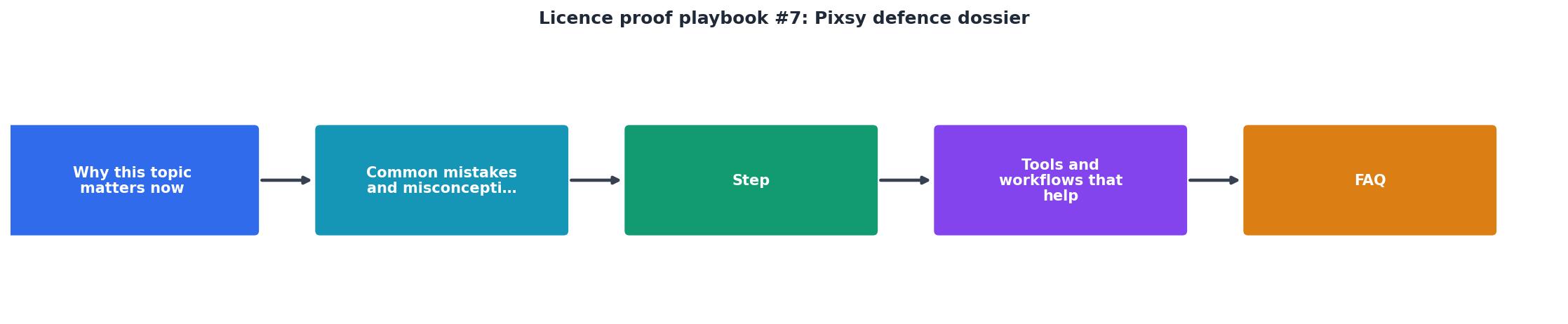
Build your defence dossier step by step

A defence dossier is a folder (physical or digital) that contains everything you need to respond to a copyright claim within 24 hours. Here is how to build one.
Step 1: Gather licence certificates
Go to each stock platform you use and download the licence certificate or agreement for every image in active commercial use. On Shutterstock, this lives under your download history. On Adobe Stock, check the licence history in your account. On Freepik, look for the download confirmation page. On Envato Elements, each download has a licence certificate PDF.
If you have dozens or hundreds of images across multiple platforms, doing this manually is brutal. This is where licencedownloader.com saves real time. It connects to your stock accounts and bulk-exports licence certificates into a single organized archive.
Step 2: Match receipts to images
For each licence certificate, attach the corresponding payment receipt. This creates a two-document chain: you paid for the image, and the platform granted you a licence. Credit card statements work as backup, but platform-generated invoices are stronger.
Step 3: Screenshot usage context
Take a screenshot of where and how you used each image. If it appeared on a client's website, capture the page. If it ran as a Facebook ad, screenshot the ad manager. This proves the usage falls within the licence scope (web, social, print, etc.).
Step 4: Record the licence type
Write down the specific licence tier for each image:- Standard/Regular covers most web and social uses
- Extended/Enhanced covers merchandise, print runs, and resale
- Editorial restricts usage to news and commentary only
- Free with attribution requires visible credit to the photographer
Step 5: Store and name consistently
Use a naming convention like [Platform]-[ImageID]-[LicenceType]. Example: shutterstock-2198374521-standard. Store everything in a cloud folder (Google Drive, Dropbox, OneDrive) so you can access it from anywhere when a claim arrives.
Responding to a Pixsy claim

When a Pixsy demand letter arrives, do not panic and do not ignore it. Here is the response workflow:
- Identify the image. Match the image in the claim to your records. Pixsy usually includes a thumbnail and the URL where they found it.
- Pull the dossier folder. Locate the licence certificate, receipt, and usage screenshot for that specific image.
- Draft a response. Write a short, factual reply stating that you hold a valid licence. Attach the certificate and receipt as PDF files. Do not apologize, do not admit fault, and do not offer to pay a reduced amount.
- Send it to Pixsy directly. Most claims include a case number and a reply email or portal link. Respond through the official channel, not through a random email address.
- Follow up after 14 days. If you do not hear back, send a polite follow-up referencing the case number and your original response date.
The vast majority of Pixsy claims against properly licensed images get dropped once proof is submitted. Pixsy is not a court. They cannot force you to pay. They can only escalate to actual legal proceedings, which is expensive and rare when the licence is legitimate.
| Without a Dossier | With a Dossier |
|---|---|
| Panic and scramble for proof | Open folder, pull documents |
| Days or weeks to respond | Respond within 24 hours |
| Risk paying a settlement out of fear | Confident, factual reply |
| May miss response deadline | Always ready |
| Looks unprofessional to clients | Protects your reputation |
Tools and workflows that help
You do not need expensive legal software. A simple cloud folder with consistent naming handles most freelance scenarios. But when you work across three or four stock platforms and download dozens of images per month, automation matters.
Here is a practical example of what a well-organized dossier dashboard might look like for a typical freelancer managing licences across three platforms:
Defence Dossier Status
Licence Downloader connects to platforms like Shutterstock, Adobe Stock, Freepik, Envato, iStock, and Canva to bulk-export your licence certificates into one archive. Instead of clicking through each platform's download history one image at a time, you get everything in a single batch. That turns a multi-hour chore into a few minutes of work.
Other tools that complement your dossier:- Google Drive or Dropbox for cloud storage with search
- A spreadsheet tracker mapping image IDs to projects and clients
- Screenshot tools like Greenshot or ShareX for capturing usage context
- PDF merge utilities to combine certificate + receipt into one file per image
Pixsy Defence Dossier Checklist
Your progress is saved automatically in your browser.
FAQ
Frequently Asked Questions
Additional Resources
- Pixsy: Image Theft Protection | Find and Fight Image Theft - Protect your images from theft with Pixsy. Search where your content is being used, then we can help issue takedowns & recover compensation.
- Pixsy Demand Letter? Here's What to Do (2026 Guide) - Generate a forensic evidence package that documents the image source, licensing status, usage context, and metadata. This Defense Kit becomes your negotiating ...
- Image Licensing | Find and Fight Image Theft with Pixsy - Find and fight image theft. Pixsy's reverse image search technology uncovers all uses of your images online. Simply submit cases of copyright ...
Need to Download Your Licences?
Save hours of manual work. We download all your stock photo licence certificates for you.
Get Started“Thanks to LicenceDownloader.com, I was able to download more than 1,000 Freepik licences and receive them all at once via ZIP.”
Marlon Mainardy