License download online: Practical Guide
Downloading license certificates for stock media you've purchased sounds straightforward until you're three platforms deep, hunting through account dashboards, trying to remember which Freepik subscription tier covers commercial use. Most creators and teams handle this reactively, scrambling when a client asks for proof or when a legal question comes up. This guide gives you a practical, step-by-step system for staying ahead of it, with real workflows that scale from solo freelancers to agencies managing hundreds of licenses across multiple platforms.

Photo by indra projects from Pexels
Downloading license certificates for stock media you've purchased sounds straightforward until you're three platforms deep, hunting through account dashboards, trying to remember which Freepik subscription tier covers commercial use. Most creators and teams handle this reactively, scrambling when a client asks for proof or when a legal question comes up. This guide gives you a practical, step-by-step system for staying ahead of it, with real workflows that scale from solo freelancers to agencies managing hundreds of licenses across multiple platforms.
TL;DR:- License certificates prove you have legal rights to use an asset; download and archive them immediately after purchase, not months later when you need them.
- Each platform (Freepik, Shutterstock, Adobe Stock, Canva, Envato, iStock) stores and exports license info differently; knowing where to find it on each one saves hours of digging.
- A centralized, named folder structure organized by client, project, or date is non-negotiable for fast retrieval and audit readiness.
- Automate bulk downloads where platforms offer it; manual downloads are error-prone and don't scale.
Why license documentation matters now
Copyright claims and licensing disputes used to be rare edge cases. They're not anymore. Platforms like YouTube, Instagram, TikTok, and Shopify flag images aggressively, and brand owners actively pursue unauthorized use. A single DMCA takedown or cease-and-desist letter can damage your reputation, pause your revenue streams, or land you in legal territory you can't afford.
The fix is simple: proof. A license certificate is a PDF or record proving you purchased the right to use an asset under specific terms. When a dispute arises, you pull that certificate and the issue dissolves. Without it, you're defending yourself with "I'm pretty sure I bought this", which won't hold up in any serious conversation.
This is why downloading and archiving licenses the moment you purchase them is not optional. It's the difference between a thirty-second email ("Here's my proof") and a legal nightmare.
Common mistakes and misconceptions
Before we dig into the system, let's clear up what people get wrong:
Mistaking a purchase receipt for a license certificate. You bought the asset. Great. That receipt proves you paid money, not that you have the right to use it commercially or modify it. The license certificate includes the specific terms: can you use it in client work? Resell the derivative? Use it on print materials? A receipt doesn't say. A certificate does.
Assuming all licenses are the same. They're not. Freepik's Standard license is different from Adobe Stock's single-use license, which is different from Canva's commercial license. A license that's fine for a social media post might not cover a book cover or a client billboard. You need the exact terms in writing.
Waiting until you need proof to download certificates. By then, the asset might be de-indexed from the platform, the certificate might be unavailable, or you might have forgotten which account purchased it. Download immediately. Archive forever.
Not organizing licenses by project or client. Shoving every certificate into a "Licenses" folder sounds efficient until a client asks for proof of all assets in their branding project and you're hunting through three years of mixed files. Naming and folder structure matter.
Relying on email receipts as your archive. Email gets deleted, inboxes get full, email providers shut down or change. Use email as a trigger to download and file; don't treat it as your system of record.
Step-by-step approach
Step 1: Understand your license terms before downloading
Before you download a certificate, know what you're licensing. Most platforms show license terms at the point of purchase or in your account library.
On Freepik, that's the license tier: Standard (personal/commercial use, no resale) vs Premium. On Adobe Stock, it's single-use or multi-use. On Canva, commercial use depends on whether you upgraded to Canva Pro. On Shutterstock, it's the license level: standard, enhanced, or extended.
If you're unclear, download the certificate and read the fine print. The certificate itself includes the restrictions. Knowing them before you build an entire campaign around an asset saves you from costly rework.

Step 2: Download certificates immediately after purchase
Don't wait. The moment you buy or add an asset to a project, go to your account library and download the certificate. Most platforms let you download certificates from your purchased assets or project history.
Here's where to find them on major platforms:
Freepik: Log in, go to Downloads or My Account > Licenses. Click the asset and select Download License Certificate or similar.
Shutterstock: Account > Subscriptions > Licensed images. Select an image and download the license certificate (often a PDF).
Adobe Stock: Library or Your assets. Each asset shows a download option and license info. Some licenses are on invoices; others are in your Library under Details.
Canva: Your account > Downloads or Projects. If commercial-use licensed, you can export projects. Canva doesn't always issue separate certificates, but your project file and purchase history are your proof.
Envato Elements: Account > Downloads. Each downloaded asset has a corresponding license; many are embedded in the downloaded folder or sent via email.
iStock: Account > Licenses. Select an image and download the certificate or view license details.
If a platform doesn't offer a download button, email support. Screenshot the purchase confirmation and license terms. Create your own record. This becomes your certificate.
Step 3: Create a centralized filing system
Dumping every license into one folder is the fast way to guarantee you'll never find the one you need.
Use this folder structure:
Licenses/
  ├── By_Client/
  │   ├── Client_Name_A/
  │   │   ├── Project_1/
  │   │   └── Project_2/
  │   └── Client_Name_B/
  ├── By_Platform/
  │   ├── Freepik/
  │   ├── Shutterstock/
  │   ├── Adobe_Stock/
  │   ├── Canva/
  │   └── Envato/
  └── By_Date/
      ├── 2026_Q1/
      └── 2026_Q2/
Choose the one that matches your workflow. Freelancers working across many clients often prefer By_Client. Agencies usually prefer By_Platform or a hybrid. Solo creators might prefer By_Date if volume is low.
Naming convention: Use a consistent, searchable format. Example: Freepik_BreakfastScene_Plate_License_2026-01-15.pdf or Adobe_Stock_Forest_Sunset_ID_12345678.pdf. Include platform, asset name or ID, and download date. Skip timestamps you can't search by.
Step 4: Use the process to stay consistent
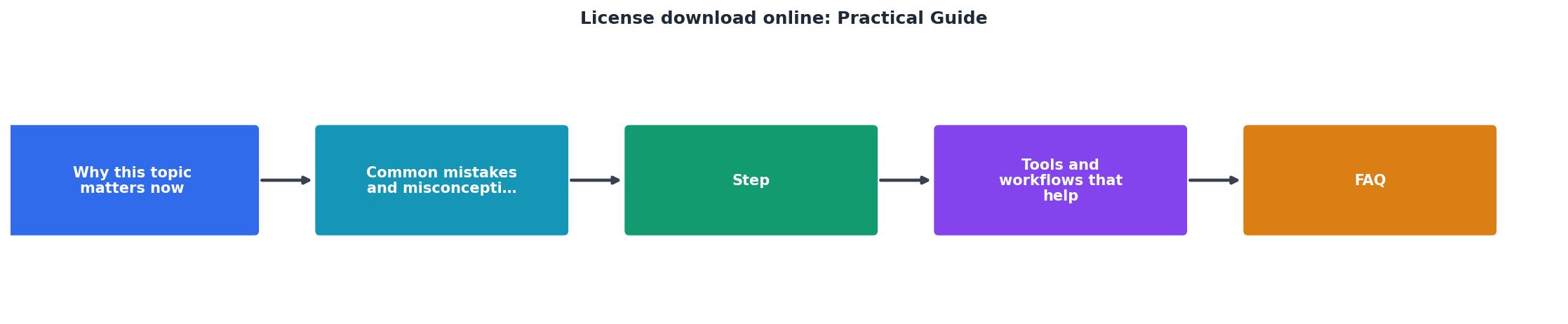
The steps are: Purchase or download asset → Download certificate immediately → File in correct folder with searchable name → Log in a simple spreadsheet (optional, but effective) → Archive a backup copy annually.
That spreadsheet doesn't need to be fancy. Columns: Asset Name, Platform, License Type, Client (if applicable), Project, Download Date, File Location, Notes. When a client asks for proof, you search the spreadsheet, open the file, and send it. When you need to audit your licenses, you open the sheet and see everything at a glance.
Step 5: Automate where possible
If you're managing dozens or hundreds of licenses, manual downloads become a bottleneck. Some platforms offer bulk export or API access:
Shutterstock offers a bulk license report in your account dashboard.
Adobe Stock allows you to export license information from your Library.
Freepik doesn't have bulk export yet, but you can download certificates one by one programmatically if you're comfortable with browser automation.
Envato bundles licenses with downloads, so archiving your download folder is part of your system.
If your platform doesn't offer bulk tools, consider using a tool like Licence Downloader to automate the collection and organization of licenses across multiple platforms. The time savings on a large portfolio is substantial.
Tools and workflows that help
Spreadsheet or database
A simple Google Sheet or Excel file tracking all your licenses takes five minutes to set up and saves hours when you need to find or report on licenses. Include: asset ID, platform, license type, client, project, date downloaded, file location.
Cloud backup
Store your licenses folder in Google Drive, Dropbox, or OneDrive. This gives you version history, backup redundancy, and access from anywhere. Local-only storage is a single hard-drive failure away from disaster.
Automated license collector
Platforms like Licence Downloader aggregate licenses from multiple platforms into one organized folder. Instead of logging into five platforms separately, you run a sync and get a consolidated archive. For agencies or high-volume freelancers, this is a game-changer.
Browser password manager with notes
Store login credentials for each platform plus their "download license" links in your password manager (1Password, Bitwarden, LastPass). Add notes: "Freepik licenses in Account > Downloads". You're building a knowledge base so switching devices or onboarding a team member doesn't reset your workflow.
License download checklist
License Download and Archive Workflow
Your progress is saved automatically in your browser.
Interactive license dashboard
Understanding your license portfolio at a glance helps you spot gaps and make better platform choices. Here's what a typical license collection looks like:
Example: Freelancer License Portfolio
This example shows a freelancer with a modest but diversified license library. Notice most assets come from Canva Pro (broad, affordable) and Freepik (specialized illustrations). The total of 282 means this person has 282 certificates to find if needed. With a system, it takes seconds. Without one, it's a weekend project.
FAQ
Frequently Asked Questions
Additional Resources
- Licensing Digital Content: A Practical Guide for Librarians ... - A Practical Guide for Librarians, MB • pdf • Download Primary. Her guide explains licensing terminology and discusses changes in technology, including ...
- Driver guides - Washington State Department of Licensing - Use the links below to download a PDF version of the driver guide, which is available in 17 different languages. Try a 5-question practice test.
- Free Insurance Exam Study Materials & Guide - Get access to free Insurance Licensing resources, including samples, tutorials, and OnDemand Webinars developed by insurance experts.
Need to Download Your Licences?
Save hours of manual work. We download all your stock photo licence certificates for you.
Get Started“Thanks to LicenceDownloader.com, I was able to download more than 1,000 Freepik licences and receive them all at once via ZIP.”
Marlon Mainardy