Managing Licences on Envato Market: A Step-by-Step Guide
Your agency bought 300 Envato Market items last quarter across six client projects and four team members. Now a client's legal department wants proof of licence for every asset used in their campaign. You have 48 hours. Without a system in place, that request turns into a full-blown fire drill with people digging through email inboxes and browser history.

Your agency bought 300 Envato Market items last quarter across six client projects and four team members. Now a client's legal department wants proof of licence for every asset used in their campaign. You have 48 hours. Without a system in place, that request turns into a full-blown fire drill with people digging through email inboxes and browser history.
Photo by KATRIN BOLOVTSOVA from Pexels
TL;DR:- Download licence certificates directly from your Envato Market Downloads page for every purchased item.
- Store them in a structured folder system organized by client, project, and date.
- Assign licence management ownership to one team member and integrate certificate retrieval into your project kickoff workflow.
- For agencies handling hundreds of assets monthly, tools like licencedownloader.com can bulk-retrieve certificates across platforms in minutes instead of hours.
Why Licence Management Matters
Every item purchased on Envato Market (ThemeForest, CodeCanyon, GraphicRiver, VideoHive, AudioJungle, PhotoDune, 3DOcean) comes with a licence certificate. That certificate is your legal proof of purchase and your shield against copyright claims. Lose it, and you lose the ability to prove you paid for the asset.
For agencies, the stakes multiply fast. You are not managing one person's downloads. You are managing purchases across multiple team members, freelancers, shared accounts, and client projects. A single unlicensed asset in a client deliverable can trigger a takedown notice, a legal dispute, or a lost account.
The cost of not having a system is not theoretical. Copyright holders actively monitor usage. Envato's own licence terms require you to keep proof of purchase for the duration of use. If you cannot produce that proof on demand, you are exposed.
Accessing Your Envato Account

Start at the source. Every licence certificate lives inside your Envato Market account. Here is how to get there:
- Go to market.envato.com and sign in with your Envato account credentials.
- Click your profile avatar in the top-right corner.
- Select Downloads from the dropdown menu.
- You will see a list of every item you have purchased, sorted by date.
https://themeforest.net/downloads (or the equivalent subdomain for GraphicRiver, CodeCanyon, etc.). Each Envato Market site has its own Downloads section, so you may need to check multiple subdomains if your agency buys across categories.For agencies with multiple Envato accounts or shared team logins, document which account purchased which items. A simple spreadsheet mapping account email to client project eliminates confusion when someone leaves the team.
Downloading Licence Certificates
The licence certificate is a plain-text file containing your purchase code, the item name, the licence type (Regular or Extended), the buyer username, and the purchase date. Here is the step-by-step process:
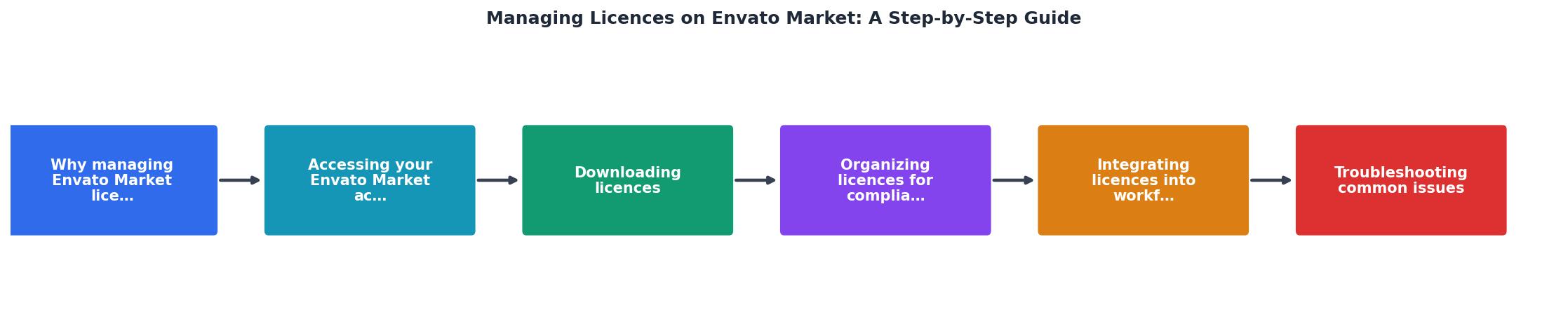
- Open Downloads on the relevant Envato Market subdomain.
- Locate the item using the search/filter or by scrolling.
- Click "Licence certificate & purchase code" beneath the item title.
- Choose the format: "Text" gives you a
.txtfile; "PDF" gives a formatted certificate. - Save the file to your designated licence storage folder.
"The license starts when you download and install the Item, and you can then use the Font or Add-on to create as many projects as you like.">, Envato Elements License
Note that Envato Market (ThemeForest, CodeCanyon, etc.) and Envato Elements have different licence models. Market licences are per-item purchases. Elements licences are subscription-based and require an active subscription to maintain coverage. Make sure your team knows which platform each asset came from.
Organizing Licences for Compliance
Downloading certificates is step one. Storing them so anyone on the team can find them in under 60 seconds is step two.
A folder structure that works for most agencies:
/Licences
  /[Client Name]
    /[Project Name]
      /[Platform - Envato Market]
        licence-certificate-itemname-purchasecode.pdf
Naming conventions matter. Include the item name and purchase code in the filename. The purchase code is unique and acts as a lookup key if you ever need to verify the licence with Envato support.
Best practices for organized licence storage:
- One folder per client project. Never dump all licences into a single "Licences" folder.
- Include the platform name in the path. Your agency likely uses Shutterstock, Adobe Stock, and Getty alongside Envato.
- Use cloud storage (Google Drive, Dropbox, SharePoint) with team access. Local folders on someone's laptop are a single point of failure.
- Tag or label files with the licence type: Regular or Extended. This matters because Regular licences cover a single end product, while Extended licences allow broader distribution.
- Back up quarterly. Export your entire licence folder to a secondary location.
Envato Licence Tracker
Those 28 missing certificates in the example above? That is exactly the kind of gap that causes panic during an audit. A weekly 15-minute check closes that gap before it becomes a problem.
Integrating Licences Into Workflows

Downloading and organizing certificates after the fact is reactive. The goal is to make licence retrieval part of the standard workflow so it happens automatically.
Here is where to insert licence steps into your existing agency processes:
During project kickoff:- Identify which stock platforms will be used for the project.
- Confirm which Envato account(s) will handle purchases.
- Create the client/project licence folder in your cloud storage.
- Every time a team member purchases an Envato item, they download the licence certificate immediately and drop it in the project folder.
- Add a "licence downloaded" checkbox to your project management tool (Asana, Monday, ClickUp, Jira) for each asset task.
- Include a licence summary document listing every stock asset, its source platform, purchase code, and licence type.
- Deliver the licence certificates alongside the final creative files.
- Transfer any licences purchased under personal accounts to the agency's records.
- Verify that all certificates from the departing person's work are in the shared folder.
| Manual Process | Structured Workflow |
|---|---|
| Certificates downloaded on request | Certificates downloaded at purchase |
| Stored on individual laptops | Stored in shared cloud folder |
| No naming convention | Consistent naming with purchase codes |
| Audit response: days | Audit response: minutes |
| Knowledge leaves with employees | Knowledge stays in the system |
For agencies processing hundreds of Envato purchases per month, even a structured manual workflow gets heavy. That is where bulk retrieval tools earn their keep. Licence Downloader can pull certificates across Envato and other platforms in a single batch, cutting retrieval time from hours to minutes.
Troubleshooting Common Issues
Even with a solid system, things go wrong. Here are the most frequent problems and their fixes:
Cannot find a purchased item in Downloads. Check that you are logged into the correct Envato account and on the correct subdomain (ThemeForest vs. CodeCanyon vs. GraphicRiver). Purchases only appear on the subdomain where they were made.
Licence certificate shows the wrong licence type. If you upgraded from Regular to Extended, the certificate should reflect the upgrade. If it does not, contact Envato support with your purchase code. Keep the original purchase confirmation email as backup.
A freelancer purchased items on their personal account. This is a common agency problem. The licence belongs to the account holder, not the agency. Going forward, require all purchases through agency-owned accounts. For existing items, ask the freelancer to transfer the licence certificate and confirm in writing that the purchase was made on behalf of the agency.
Purchase code is not accepted by a theme or plugin. Envato purchase codes are used both for licence verification and for product activation (especially WordPress themes and plugins). If a code is rejected, verify it has not been used on another installation. Regular licences cover one end product only.
Agency Licence Management Template
Use this checklist every time your team starts a new client project that involves Envato Market assets:
Envato Market Licence Management Checklist
Your progress is saved automatically in your browser.
FAQ
Frequently Asked Questions
Additional Resources
- Envato Elements License – Envato Support | Help Center - All stock items on Envato have the same simple license terms. You get broad commercial rights, so you can use items from our creative stock ...
- How to Create a New License on Envato - To change your licensing setting, open Preferences and use the drop-down menu under Licensing in the Account section. There are three licensing options ...
- Beginner's Guide to Selling on Envato - This guide helps you through the first steps of selling on Envato and provides resources for further guidance along the way. This includes the process to join, ...
Need to Download Your Licences?
Save hours of manual work. We download all your stock photo licence certificates for you.
Get Started“Thanks to LicenceDownloader.com, I was able to download more than 1,000 Freepik licences and receive them all at once via ZIP.”
Marlon Mainardy