Managing Shutterstock Licences Across Teams
Your agency downloads hundreds of Shutterstock assets every month across five, ten, maybe twenty people. When a client's legal team asks for proof that a hero image on their homepage is properly licensed, someone scrambles through email threads, old Slack messages, and three different Shutterstock logins. That scramble costs hours and creates real legal exposure. A structured licence management workflow eliminates the panic and keeps every asset traceable from download to deployment.


Your agency downloads hundreds of Shutterstock assets every month across five, ten, maybe twenty people. When a client's legal team asks for proof that a hero image on their homepage is properly licensed, someone scrambles through email threads, old Slack messages, and three different Shutterstock logins. That scramble costs hours and creates real legal exposure. A structured licence management workflow eliminates the panic and keeps every asset traceable from download to deployment.
Photo by Helena Lopes from Pexels
TL;DR:- Set up a centralized Shutterstock team account with defined roles instead of sharing individual logins.
- Assign a licence owner per project or client to maintain clear accountability.
- Track every download in a shared register (spreadsheet, DAM, or dedicated tool) that links each asset to its licence ID and project.
- Run quarterly audits to catch gaps before a client or legal team does.
Why team licence management breaks down
Most agencies start with one Shutterstock subscription. Then a second designer needs access. Then a freelancer joins for a campaign. Before long, assets live on personal accounts, licence certificates sit in random Downloads folders, and nobody can reconstruct which account licensed which image for which client.
Three problems show up repeatedly:
- Scattered accounts create duplicate purchases and orphaned licences when someone leaves.
- No project-to-licence mapping means audit requests turn into multi-day detective work.
- Freelancer offboarding leaves gaps because the licence proof lived on their personal machine.
Set up a shared Shutterstock account

Shutterstock offers Team plans (sometimes called Enterprise or Multi-Seat plans) that let you manage multiple users under one billing account. Here is how to structure it:
- Create a master agency account using a shared operations email (e.g.,
assets@youragency.com), not a personal address. - Add team members as sub-users through the Shutterstock admin panel. Each person gets their own login, but downloads roll up to the master account.
- Set download permissions based on role. Art directors might get unlimited access; junior designers might need approval for premium or editorial content.
- Disable personal account usage for agency work. Make it policy: if it is for a client, it goes through the team account.
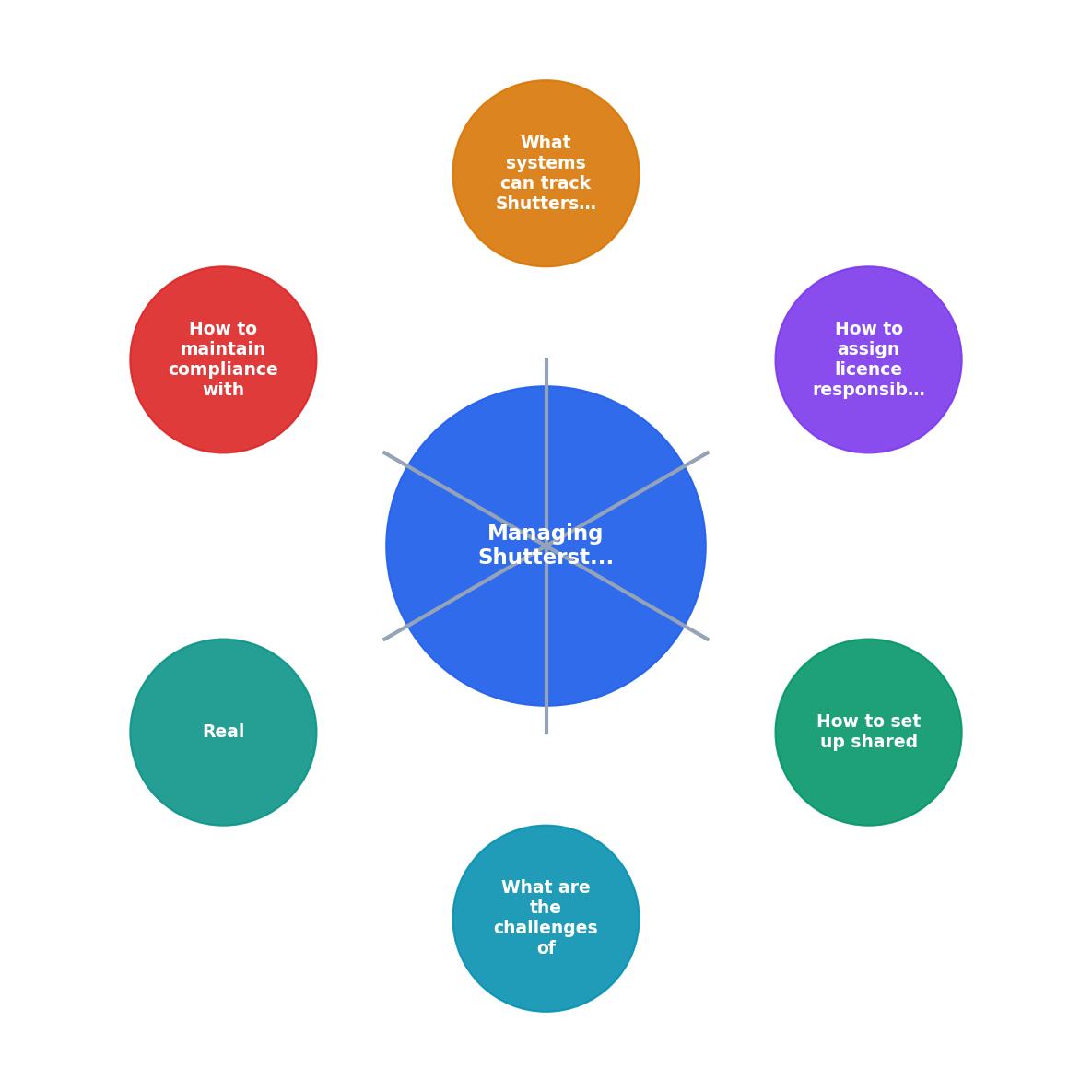
The workflow follows five steps: Create team account, Add sub-users, Set permissions, Track downloads, and Run audits. Each step feeds into the next, creating a closed loop where no licence falls through the cracks.
Assign licence responsibilities

A shared account solves the "where did this come from" problem. But you still need people accountable for licence hygiene. Two roles matter:
Licence Administrator (typically the ops lead or producer):- Owns the master account credentials
- Adds and removes team members
- Runs monthly download reports
- Responds to audit or legal requests
- Records which assets go into each deliverable
- Confirms licence type matches usage (Standard vs. Enhanced)
- Archives licence certificates alongside final project files
Agencies that assign these roles consistently report cutting audit response time from days to under an hour. The information already exists in the right place; someone just needs to pull it.
Track licence usage effectively
Shutterstock's built-in download history is a start, but it does not link assets to your projects or clients. You need a tracking layer on top. Here are three approaches, from simple to robust:
Spreadsheet register. A shared Google Sheet or Excel file with columns for: Asset ID, Licence ID, Download Date, Downloaded By, Client/Project, Usage Type, and Licence File Link. Low cost, works for teams under 15 people.
Digital Asset Management (DAM) system. Tools like Bynder, Brandfolder, or Canto let you tag assets with licence metadata and store certificates alongside the files. Better for agencies handling 500+ assets per month.
Licence Downloader. For bulk retrieval of licence certificates across Shutterstock and other platforms, licencedownloader.com pulls proof-of-licence documents in bulk so you can archive them without clicking through each asset individually.
| Spreadsheet | DAM System | Licence Downloader |
|---|---|---|
| Free / low cost | $200-2,000/mo | Per-use pricing |
| Manual entry | Semi-automated | Bulk automated |
| Works for small teams | Scales to enterprise | Scales to any size |
| No certificate storage | Stores files + metadata | Retrieves certificates |
| Error-prone at scale | Reliable with setup | Reliable out of the box |
Pick the approach that matches your team size and budget. Many agencies combine a DAM for asset management with Licence Downloader for certificate retrieval.
Maintain Shutterstock compliance
Staying compliant is not a one-time setup. Licence terms change, team members rotate, and projects evolve. Build these habits into your operations:
- Quarterly licence audits. Pull your Shutterstock download history, cross-reference it against your project register, and flag any assets without a matching licence record.
- Licence type verification. Shutterstock's Standard Licence covers most digital and print uses up to 500,000 copies. If a client campaign exceeds that, you need an Enhanced Licence. Check before launch, not after.
- Offboarding protocol. When a team member or freelancer leaves, transfer their active project licence records to the project owner. Remove their sub-user access the same day.
- Client handoff documentation. When delivering final assets, include a licence summary showing each stock asset, its licence ID, and permitted uses.
"The Standard License provides legal indemnification of up to $10,000, offering users a degree of protection.">, Shutterstock and License Transfer
That $10,000 indemnification only applies when you can prove the licence exists and covers the usage. Without documentation, you are on your own.
Real-world licence management in action
Consider a mid-size marketing agency running campaigns for eight retail clients. Each client generates 30-50 Shutterstock downloads per month. That is 240-400 assets monthly across the agency.
Before implementing a structured workflow, this agency spent an average of six hours per audit request tracking down licence proof. Two team members had personal Shutterstock accounts with client assets on them. One freelancer left with no handoff, and three months of licence records disappeared.
After switching to a team account, assigning project licence owners, and using a shared register backed by bulk certificate downloads, audit response dropped to 45 minutes. The agency also discovered they had been double-purchasing assets because designers could not see what colleagues had already licensed.
Here is an example dashboard showing what a typical agency's licence tracking looks like after implementing this workflow:
Agency Licence Tracker
Example: 8-client agency, monthly Shutterstock usage
The 8 pending certificates in this example are typically assets downloaded in the last 24-48 hours that have not yet been batch-processed. A weekly certificate retrieval run keeps that number near zero.
Shutterstock Licence Compliance Checklist
Your progress is saved automatically in your browser.
FAQ
Frequently Asked Questions
Additional Resources
- Shutterstock Terms of Service & License Agreements - The following is a legal agreement between you or the employer or other entity on whose behalf you are entering into this agreement and Shutterstock.
- Shutterstock: What License Allows Third - Party Transfer? - While the Standard and Enhanced Licenses do not allow for the transfer of content rights, the Premier License provides the option to transfer ownership.
- How do Shutterstock Team Plans work? - The terms of the Standard Image License control the use of Images licensed through the Team account. The terms of the Footage Use License ...
Need to Download Your Licences?
Save hours of manual work. We download all your stock photo licence certificates for you.
Get Started“Thanks to LicenceDownloader.com, I was able to download more than 1,000 Freepik licences and receive them all at once via ZIP.”
Marlon Mainardy