Obtaining Licence Documentation from Pixabay
You grabbed a great photo from Pixabay for your online store banner last year. Now a marketplace or ad platform is asking you to prove you had the right to use it. You dig through your email, your downloads folder, maybe even your browser history, and you find nothing. This guide walks you through exactly how to locate, download, and organize Pixabay licence documentation so you never get caught empty-handed again.

You grabbed a great photo from Pixabay for your online store banner last year. Now a marketplace or ad platform is asking you to prove you had the right to use it. You dig through your email, your downloads folder, maybe even your browser history, and you find nothing. This guide walks you through exactly how to locate, download, and organize Pixabay licence documentation so you never get caught empty-handed again.
Photo by Vitaly Gariev from Pexels
TL;DR:- Pixabay images use the Pixabay Content Licence, which allows free commercial use but does not generate a traditional licence certificate per download.
- Your proof of licence lives in your Pixabay account's download history, the licence terms page, and the individual image page URL.
- Saving a screenshot or PDF of each image page plus the licence terms gives you audit-ready documentation a marketplace or ad platform will accept.
What the Pixabay Licence Actually Covers
Pixabay does not sell images the way Shutterstock or Adobe Stock does. Every image on the platform is released under the Pixabay Content Licence, which permits commercial and non-commercial use without attribution. There is no per-download invoice or certificate because there is no per-download payment.
That sounds simple, but it creates a documentation gap. When Facebook flags your ad image, or Amazon asks for proof you own the rights to a product listing photo, saying "it was free on Pixabay" is not enough. You need tangible records.
The licence does have restrictions. You cannot:
- Sell unmodified Pixabay images as prints, posters, or digital wallpapers.
- Use identifiable people in images for sensitive or endorsement contexts without a model release.
- Redistribute images on other stock platforms.
Navigate Your Pixabay Account

If you downloaded images without logging in, you have a problem. Anonymous downloads leave zero trace on Pixabay's side. The single best habit you can adopt right now: always log in before downloading.
Here is how to access your download history:
- Go to pixabay.com and sign in.
- Click your profile avatar in the top-right corner.
- Select Downloads from the dropdown menu.
- You will see a chronological list of every image you downloaded while logged in.
If you use Pixabay's API for bulk downloads (common for e-commerce stores pulling product lifestyle images), the API response includes the image ID and the licence type. Store those API responses in a log file. They serve as machine-readable proof.
Download Your Licence Proof

Pixabay does not offer a "Download Licence PDF" button. You build your own documentation package from three pieces:
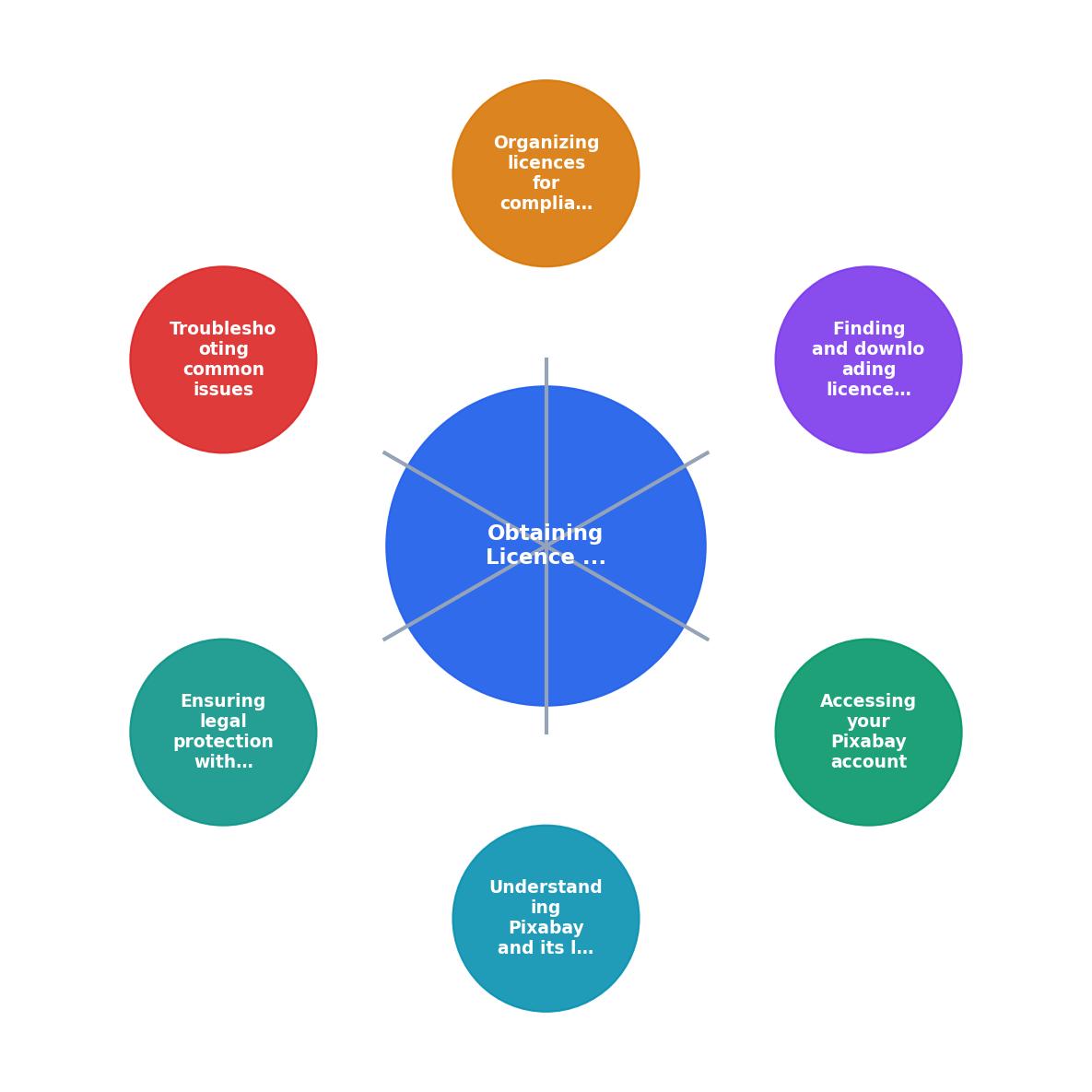
Follow the steps shown in the diagram:
- Open image page - Go to the specific image URL on Pixabay (e.g.,
pixabay.com/photos/example-12345). - Save page as PDF - Use your browser's Print > Save as PDF function to capture the image details, contributor, and the licence badge.
- Save licence terms - Visit
pixabay.com/service/license-summary/and save that page as PDF too. - Log download date - Record the date, image ID, and where you used the image in a simple spreadsheet.
- Store in project folder - File everything in a dedicated licence folder for that project or client.
Here is an example dashboard showing what a typical small-business licence archive might look like after following this process for a few months:
Example: Small E-commerce Store Licence Archive
Organize Licences for Compliance

Having 34 PDFs dumped into a single folder is better than nothing, but not by much. A clean folder structure makes retrieval instant when a platform or lawyer comes knocking.
A structure that works well for small businesses:
/licences
  /pixabay
    /2025-Q4
      image-12345.pdf
      image-67890.pdf
      licence-terms-2025-11.pdf
    /2026-Q1
      image-11111.pdf
      licence-terms-2026-01.pdf
  /canva
  /freepik
Key principles:
- One folder per platform. Pixabay, Canva, Freepik, and any others each get their own directory.
- Quarterly subfolders. Grouping by quarter keeps folders manageable and aligns with typical audit periods.
- Include the licence terms PDF in every quarter. Terms can change, so each quarter should have its own snapshot.
- Name files with the Pixabay image ID. The numeric ID (visible in the URL) is unique and searchable.
| Manual Tracking | Using Licence Downloader |
|---|---|
| Save each PDF by hand | Bulk-capture licence records |
| Build spreadsheet manually | Auto-generated index |
| Check each platform separately | All platforms in one dashboard |
| 45 seconds per image | Seconds for a batch |
If you use images from multiple stock platforms (Pixabay, Canva, Freepik, and others), a tool like licencedownloader.com can pull licence records from several platforms into one organized archive, which saves real time once your image library grows past a few dozen files.
Troubleshoot Common Issues
Three problems come up repeatedly:
"I downloaded images without logging in." You have no server-side record. Your best option: search your local Downloads folder for Pixabay filenames (they follow a pattern like cat-1234567_1920.jpg). The numeric ID in the filename maps to the image page. Visit that page, confirm the image is still on Pixabay under the Content Licence, and save the PDF now.
"The image was removed from Pixabay." Contributors can delete their uploads. If the image page returns a 404, check the Wayback Machine at web.archive.org for a cached version. A Wayback snapshot showing the image under the Pixabay Content Licence is reasonable evidence, though not bulletproof.
"A copyright troll sent me a demand letter." Do not panic. Pixabay images are contributor-uploaded, and occasionally someone uploads content they do not own. If you have your licence documentation (image page PDF, licence terms PDF, download date), you can demonstrate good faith. Consult a lawyer before responding to any demand letter.
Keep Your Protection Current
Licence compliance is not a one-time task. Build these habits:
- Quarterly review. Open your licence folder, compare it against images actively used on your website and ads, and fill any gaps.
- Screenshot live usage. When you place a Pixabay image on a product listing or ad, screenshot it with the date visible. This links the licence to the specific use.
- Track licence term changes. Pixabay updated its licence in January 2019. Save a fresh copy of the terms page at least once a year.
- Back up offsite. Google Drive, Dropbox, or any cloud storage. A hard drive crash should not wipe out your compliance records.
Pixabay Licence Management Checklist
Your progress is saved automatically in your browser.
FAQ
Frequently Asked Questions
sunset-1234567_1920.jpg), then visit the corresponding image page on Pixabay and save it as a PDF.web.archive.org) to find a cached version of the image page. If you can locate it, save that cached page as your proof. Going forward, always save the image page PDF at the moment of download so you are never dependent on the image staying online.Additional Resources
- Content License Summary - It is your responsibility to check whether you require the consent of a third party or a license to use Content. Over 6.2 million+ high quality stock images, ...
- FAQ - Can I get a license certificate for all tracks? License certificates are available for tracks registered with YouTube's Content ID. For other tracks, users ...
- How to clear a YouTube Content ID claim with ... - Dispute the claim via YouTube's built-in form and use a Pixabay License Certificate txt file for the audio track you downloaded from Pixabay.
Need to Download Your Licences?
Save hours of manual work. We download all your stock photo licence certificates for you.
Get Started“Thanks to LicenceDownloader.com, I was able to download more than 1,000 Freepik licences and receive them all at once via ZIP.”
Marlon Mainardy