Pointer / Lenstracer evidence worksheet
Stock images used in client projects carry a hidden liability that most freelance designers ignore until a dispute lands in their inbox. A pointer or lenstracer evidence worksheet is a structured document that maps every licensed asset back to its source, licence type, and proof file so you can respond to any copyright challenge in minutes instead of days. This guide walks through building that worksheet from scratch, filling it correctly, and keeping it current across every platform you use.

Stock images used in client projects carry a hidden liability that most freelance designers ignore until a dispute lands in their inbox. A pointer or lenstracer evidence worksheet is a structured document that maps every licensed asset back to its source, licence type, and proof file so you can respond to any copyright challenge in minutes instead of days. This guide walks through building that worksheet from scratch, filling it correctly, and keeping it current across every platform you use.
TL;DR:- A pointer/lenstracer evidence worksheet is a single spreadsheet or document that links each stock asset to its licence certificate, platform, and project.
- Building one takes about 30 minutes for your first batch of assets, then a few minutes per project going forward.
- Pair the worksheet with bulk-downloaded licence certificates to create audit-ready proof that protects you from copyright claims.
What the worksheet actually does
Think of the worksheet as an index. Every row represents one licensed asset. Columns capture the asset ID, the platform it came from, the licence type, the download date, the project it was used in, and the file path to the stored licence certificate. When a client or a platform flags an image, you open the worksheet, search the asset ID, and pull the proof file in seconds.
Without this index, you end up logging into three or four different stock platforms, scrolling through download histories, and hoping the receipt is still there. That process eats billable hours and creates panic.
A significant majority of freelance designers have no organized system for tracking their stock licences. The worksheet fixes that gap with minimal overhead.
Why this matters now

Copyright enforcement has gotten more aggressive. Automated crawlers scan websites, social feeds, and ad platforms for unlicensed images. If your client's Facebook ad gets flagged, the first thing their legal contact asks for is proof of licence. Responding with "I think I downloaded it from Freepik" is not proof.
Stock platforms also change their interfaces and retention policies. Shutterstock redesigned its download history page twice in the last three years. Adobe Stock moved licence PDFs behind a different menu. Envato Elements changed how subscription-based licences display after cancellation. Relying on platform dashboards as your only record is fragile.
A local worksheet that you control, backed by actual certificate files on your drive or cloud storage, removes that dependency entirely.
Common mistakes that create gaps

- Saving only the image, not the licence. The JPEG alone proves nothing. You need the certificate or receipt that ties your account to that specific download.
- Using vague file names. A folder full of files named
licence.pdfis useless. Name files with the asset ID and platform:shutterstock-2198437621-licence.pdf. - Skipping free assets. Freepik free-tier images still have attribution requirements. If you used one in a client deck, record it.
- Not linking assets to projects. Knowing you downloaded an image is half the story. Knowing which client project used it completes the chain of evidence.
- Treating the worksheet as a one-time task. It only works if you update it with every project delivery.
"Essentials for Ophthalmic Lens Finishing, Second Edition.">, Essentials for Ophthalmic Lens Finishing, Second Edition
The principle of traceability applies across disciplines. In optics, every lens must trace back to its specification. In design, every asset must trace back to its licence.
Step-by-step: build your worksheet
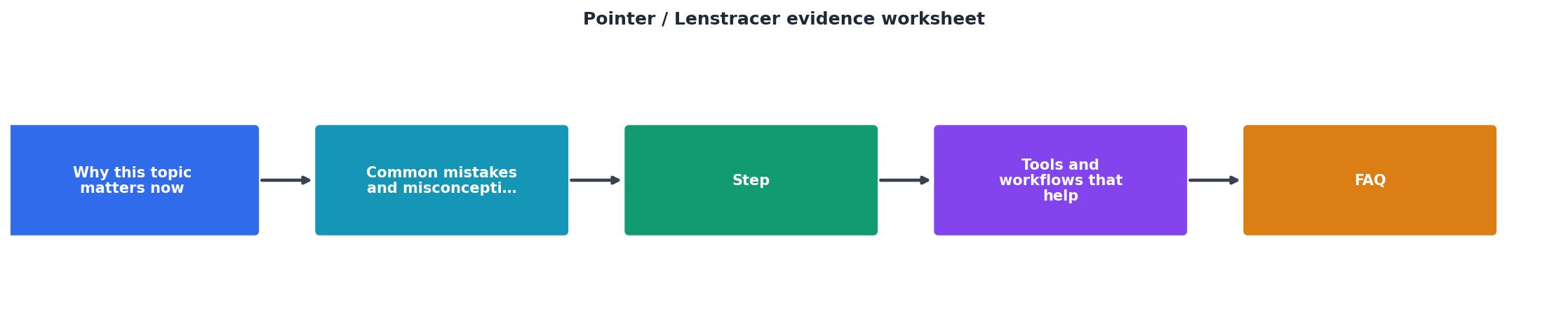
Follow these five steps to go from zero to a working evidence system:
Step 1: Create the spreadsheet. Open Google Sheets, Excel, or Notion. Create columns: Asset ID, Platform, Licence Type, Download Date, Project Name, Client, Certificate File Path, Notes.
Step 2: Audit existing assets. Go through your last 5-10 client projects. For each stock image or vector used, fill in a row. If you still have access to the platform, download the licence certificate now.
Step 3: Bulk-download certificates. Log into each platform and export every licence certificate you can find. Tools like licencedownloader.com let you bulk-download certificates from Freepik, Shutterstock, Adobe Stock, Envato, iStock, and Canva in one pass instead of clicking through each asset individually.
Step 4: Match certificates to rows. Rename each certificate file using the Asset ID and platform convention. Update the Certificate File Path column in your worksheet so every row points to a real file.
Step 5: Set a per-project habit. Before marking any project as delivered, add its assets to the worksheet and confirm the certificates are stored. This takes 2-5 minutes per project.
Tools and workflows that help

The worksheet itself is platform-agnostic. Use whatever you already live in:
- Google Sheets works well for solo freelancers. Share a read-only link with clients who request proof.
- Notion databases let you attach the certificate PDF directly to each row, keeping everything in one place.
- Airtable adds filtering and views so you can slice by client, platform, or date range.
- A simple folder structure on Google Drive or Dropbox, organized as
/Licences/{Platform}/{AssetID}-licence.pdf, paired with a CSV export of the worksheet.
| Manual Certificate Collection | Automated with Licence Downloader |
|---|---|
| Log into each platform separately | Connect all platforms once |
| Click through each asset's licence page | Bulk-export all certificates |
| 2-3 hours for 100 assets | Under 10 minutes for 100 assets |
| Easy to miss older downloads | Catches full download history |
| Repeated monthly effort | One-click refresh |
Here is an example of what a typical freelancer's evidence tracking dashboard might look like after setting up the worksheet for their active platforms:
Evidence Worksheet Summary
Keeping the worksheet current
The biggest risk is abandoning the worksheet after the initial setup. Two habits prevent that:
- Add to the worksheet before you invoice. Tie it to your billing workflow. No updated worksheet, no invoice sent. This creates a natural checkpoint.
- Run a quarterly audit. Once every three months, filter the worksheet for rows missing a certificate file path. Track those down before the platform purges them.
Pointer / Lenstracer Evidence Worksheet Setup
Your progress is saved automatically in your browser.
FAQ
Frequently Asked Questions
Additional Resources
- Essentials for Ophthalmic Lens Finishing, Second Edition - ... evidence of an ongoing, compliant program. Inspecting agencies consider anything not documented as not done.25. Documenting Training Documentation is ...
Need to Download Your Licences?
Save hours of manual work. We download all your stock photo licence certificates for you.
Get Started“Thanks to LicenceDownloader.com, I was able to download more than 1,000 Freepik licences and receive them all at once via ZIP.”
Marlon Mainardy