Pointerbrandprotection: Practical Guide
Pointer Brand Protection is a service that monitors the internet for unauthorized use of your brand assets, logos, and creative work. If you are a freelance designer delivering brand kits and visual identities to clients, understanding how brand protection monitoring works gives you a concrete edge. This guide breaks down exactly how to use Pointer Brand Protection in your workflow, avoid common pitfalls, and keep your clients covered with audit-ready documentation.

Pointer Brand Protection is a service that monitors the internet for unauthorized use of your brand assets, logos, and creative work. If you are a freelance designer delivering brand kits and visual identities to clients, understanding how brand protection monitoring works gives you a concrete edge. This guide breaks down exactly how to use Pointer Brand Protection in your workflow, avoid common pitfalls, and keep your clients covered with audit-ready documentation.
TL;DR:- Pointer Brand Protection scans online marketplaces, social platforms, and websites for unauthorized use of brand assets like logos, images, and designs.
- Pair it with proper licence documentation to build a complete brand defence system for your clients.
- Start with a brand asset audit, register your key visuals, set up monitoring alerts, and keep licence certificates organized for fast takedown requests.
Why Brand Protection Matters Now
Stock image misuse and logo theft are not hypothetical problems. They happen every week. A client hires you to design a logo, you deliver the brand kit, and three months later a competitor is running Facebook ads with a suspiciously identical mark. Or worse, someone files a trademark complaint against your client using a design that was clearly derived from your original work.
The scale of the problem keeps growing. Counterfeit goods, unauthorized logo use on dropshipping stores, and scraped social media content create a constant stream of brand integrity threats. Tools like Pointer Brand Protection exist specifically to automate the detection side of this equation.
For freelance designers, this matters because your reputation is tied to the work you deliver. When a client's brand gets ripped off and they have no monitoring or documentation in place, guess who they call first? You. Having a practical brand protection workflow turns a reactive panic into a proactive system.
Common Mistakes and Misconceptions

Most freelancers make the same handful of errors when it comes to brand protection. Here are the ones that cost the most time and money:
- Assuming the client handles it. Many designers deliver final files and walk away. The client rarely has a system for monitoring brand misuse. If you offer even basic guidance, you stand out.
- Ignoring licence documentation. You bought that hero image on Shutterstock for the brand kit. Six months later, the client gets a copyright claim. Without the licence certificate on file, proving legitimate use becomes a scramble.
- Confusing trademark registration with brand monitoring. A registered trademark gives you legal standing. Monitoring tools like Pointer Brand Protection give you awareness of infringement. You need both.
- Setting up alerts once and forgetting them. Brand protection is not a one-time task. New platforms, new marketplaces, and new social channels appear constantly. Review your monitoring scope quarterly.
- Not keeping visual fingerprints updated. If the brand evolves (new logo variant, updated colour palette), the monitoring tool needs the updated assets to match against.
Step-by-Step Approach
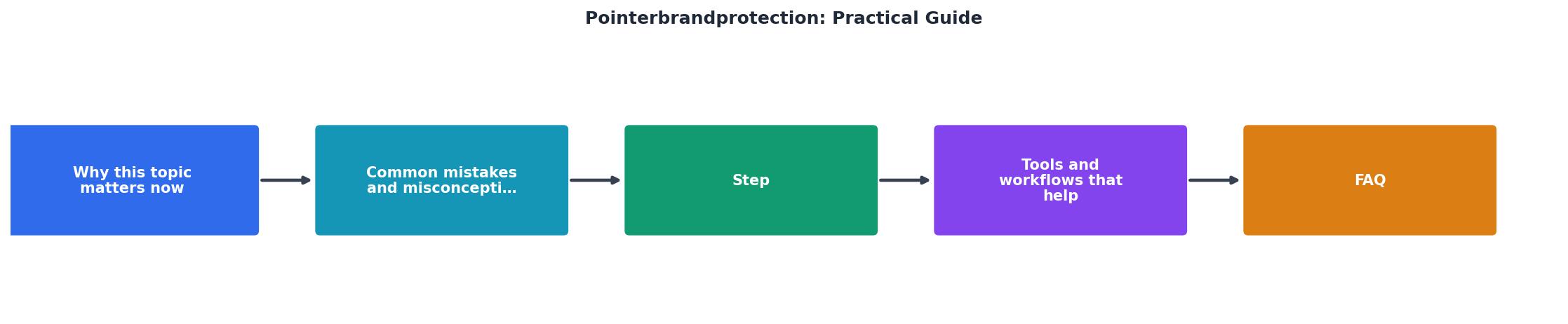
Here is a concrete workflow you can follow. The steps map directly to the diagram above: Audit, Register, Monitor, Document, Act.
Step 1: Audit Brand Assets
Start by listing every visual asset that needs protection. This includes:
- Primary logo and all approved variations
- Brand colour palette and typography specimens
- Hero images, illustrations, and icons from the brand kit
- Stock images purchased specifically for the brand (with licence info)
- Social media templates and ad creatives
clientname-logo-primary-rgb.svg, not final_v3_FINAL.ai.
Step 2: Register Key Visuals
Upload your core brand assets to Pointer Brand Protection's dashboard. The platform uses visual fingerprinting to create a unique signature for each image or logo. This signature is what gets matched against content found online.
Focus on the assets most likely to be copied:- The primary logo (full colour and monochrome)
- Product photography or hero images
- Any custom illustrations
Step 3: Configure Monitoring Scope
Pointer Brand Protection lets you choose which channels to monitor. At minimum, enable:
- E-commerce marketplaces (Amazon, eBay, Etsy, AliExpress)
- Social media (Instagram, Facebook, TikTok)
- Web search (Google Images, Bing)
- Domain registrations (lookalike domains)
Step 4: Document Everything
This is where most workflows fall apart. Every stock image, font licence, and custom asset needs a paper trail. For stock media specifically, keep the licence certificate PDF alongside the asset file.
If you use multiple stock platforms like Freepik, Shutterstock, or Adobe Stock, downloading individual licence certificates from each dashboard is tedious. A tool like Licence Downloader lets you bulk-download licence certificates across platforms in minutes, so your documentation stays current without eating your billable hours.
Step 5: Act on Alerts
When Pointer Brand Protection flags a potential infringement:
- Review the match. False positives happen, especially with generic imagery.
- Screenshot the infringing use with a timestamp.
- Gather your ownership proof: original design files, licence certificates, trademark registration.
- File a takedown request through the platform where the infringement appears (DMCA for US-based platforms, or the platform's own IP reporting form).
- Log the incident in your brand protection folder for the client.
Tools and Workflows That Help

Pointer Brand Protection does not work in isolation. A solid brand protection stack for freelance designers looks like this:
| Manual Approach | Automated Approach |
|---|---|
| Google reverse image search weekly | Pointer Brand Protection continuous scan |
| Download licences one by one from each platform | Licence Downloader bulk export |
| Spreadsheet tracking of assets | Cloud folder with naming conventions |
| Email-based takedown requests | Platform IP reporting tools with templates |
| Quarterly manual review | Automated alerts with daily/weekly digest |
The automated approach saves hours every month. The manual approach works when you have three clients. It collapses at ten.
Here is an example dashboard showing what a typical freelancer's brand protection setup tracks:
Brand Protection Dashboard (Example: 8-Client Freelancer)
Building Client Trust

Offering brand protection guidance as part of your deliverables changes the client relationship. You go from "the person who made our logo" to "the person who protects our brand." That distinction matters when renewal contracts come around.
A simple addition to your project handoff package makes this tangible:
- A folder with all original design files
- Licence certificates for every stock asset used
- A one-page brand protection brief explaining what monitoring is set up and how to respond to alerts
- Login credentials or shared access to the Pointer Brand Protection dashboard (if the client owns the account)
Brand Protection Setup Checklist
Your progress is saved automatically in your browser.
FAQ
Frequently Asked Questions
Additional Resources
- My son received a cease and desist letter from Pointer ... - My son received a cease and desist letter from Pointer brand protection & research. Should he sign the cease and desist page ... Practical Guide ...
- Corsearch acquires Pointer Brand Protection as M&A trend ... - Corsearch has acquired its second brand protection service in a year, purchasing Pointer Brand Protection for an undisclosed sum.
- Marval O'Farrell Mairal Appoints Two New Partners - Prior to joining Marval, she served as Data Protection Officer and Brand Protection Analyst at Pointer Brand Protection/Corsearch in the ...
Need to Download Your Licences?
Save hours of manual work. We download all your stock photo licence certificates for you.
Get Started“Thanks to LicenceDownloader.com, I was able to download more than 1,000 Freepik licences and receive them all at once via ZIP.”
Marlon Mainardy