Resolving Adobe Stock Licence Record Discrepancies
Your agency just got a compliance request from a client's legal team, and three Adobe Stock licence records don't match what's in your internal tracker. The asset IDs look right, but the licence types are wrong, the dates are off, or the records are missing entirely. This is not a rare edge case. It happens at agencies that license hundreds of assets per month across multiple seats, and the fix requires a structured audit, direct engagement with Adobe support, and a record-keeping system that prevents the same mess next quarter.

Your agency just got a compliance request from a client's legal team, and three Adobe Stock licence records don't match what's in your internal tracker. The asset IDs look right, but the licence types are wrong, the dates are off, or the records are missing entirely. This is not a rare edge case. It happens at agencies that license hundreds of assets per month across multiple seats, and the fix requires a structured audit, direct engagement with Adobe support, and a record-keeping system that prevents the same mess next quarter.
Photo by Jean Cont from Pexels
TL;DR:- Discrepancies in Adobe Stock licence records usually stem from multi-seat account confusion, expired subscriptions, or manual tracking errors.
- Fix them by running a systematic audit against Adobe's licence history, escalating unresolved gaps through Adobe support, and building a centralized record-keeping system.
- A proactive quarterly audit cycle prevents fire drills when clients or legal teams come knocking.
Why licence records go wrong
Adobe Stock licence records break for predictable reasons. Understanding the root causes saves you from chasing symptoms instead of fixing the actual problem.
The most common triggers include:
- Multi-seat account overlap. Two team members license the same asset under different seats. Your tracker shows one licence; Adobe's system shows two. Or worse, one person licenses an asset on a personal account instead of the agency account, and the record never makes it into your central system.
- Subscription lapses and plan changes. When an Adobe Stock subscription expires or downgrades, previously licensed assets retain their licence, but the licence history page can behave unpredictably. Assets licensed under a credit pack show differently than those under a monthly subscription.
- Manual tracking drift. Someone copies an asset ID wrong. A spreadsheet row gets deleted. A freelancer downloads an asset and never logs it. Over six months, these small errors compound into a compliance gap that looks far worse than it is.
- Adobe platform changes. Adobe periodically updates its Stock interface and API. Licence history exports sometimes change column formats, date formats, or include different metadata fields than previous versions.
How to audit your records

A proper audit compares your internal records against Adobe's licence history export, line by line. Here is the process that works at scale.
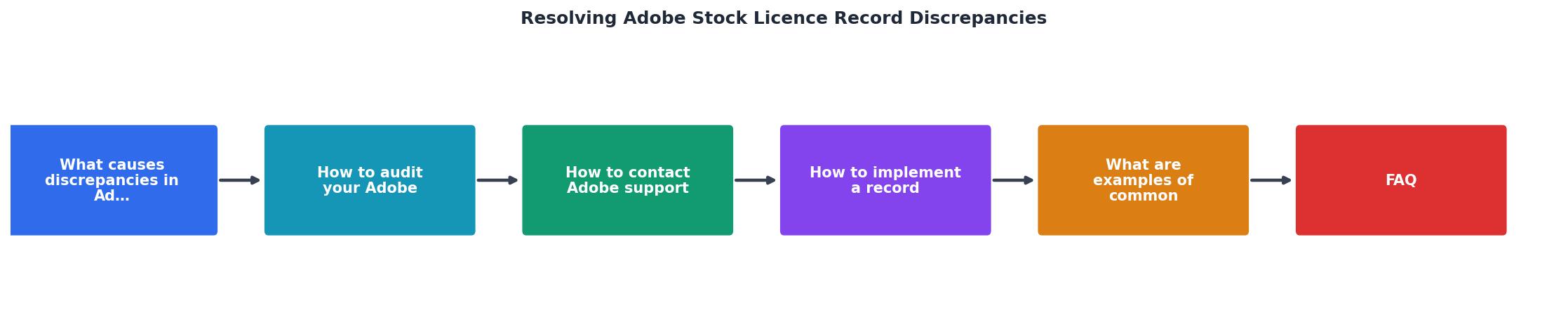
Step 1: Export Adobe's licence history. Log into each Adobe Stock account (or each seat on your team account). Navigate to your licence history and export the full CSV. Do this for every seat and every account your agency uses. Adobe's export includes the asset ID, licence date, licence type, and the licensing user.
Step 2: Export your internal tracker. Pull your spreadsheet, database, or project management tool records into a comparable format. You need asset ID, project association, licence type, and date.
Step 3: Cross-reference by asset ID. Match every asset ID in your internal tracker against Adobe's export. Flag three categories:- Present in both, data matches (clean)
- Present in both, data conflicts (discrepancy)
- Present in only one source (missing record)
Step 5: Document findings. Create a discrepancy log with the asset ID, the nature of the discrepancy, the suspected cause, and the corrective action needed.
In most cases, around 70% of discrepancies resolve during the internal audit itself. The remaining issues require Adobe support or a new licence purchase.
Contacting Adobe support effectively
Not every discrepancy can be resolved internally. When you need Adobe's help, preparation determines whether you get a resolution in days or weeks.
What to prepare before contacting support:- Your Adobe account email and organization ID
- The specific asset IDs in question
- Screenshots of your licence history showing the discrepancy
- Your order confirmation emails (if available)
- A clear, one-sentence description of each discrepancy
- Go to Adobe Help Center and select Adobe Stock.
- Use the live chat option during business hours for fastest response.
- For complex multi-asset issues, request a case number and ask for email follow-up so you have a written trail.
"The Illustrative Editorial collection focuses on conceptual imagery that uses real brands and products to convey strong ideas.">, Common Questions, Adobe Stock
Adobe support can confirm whether a licence exists in their system even if it does not appear in your export. They can also reissue licence certificates for assets that were legitimately purchased but where the record was lost due to account migration or platform updates.
Building a record-keeping system

Fixing discrepancies once is not enough. Without a system, the same problems return next quarter. Here is what a durable record-keeping setup looks like for an agency handling Adobe Stock at scale.
Centralized licence database. Every licence record lives in one place. Not in individual email inboxes, not in project folders, not in someone's personal Dropbox. A shared database, spreadsheet, or tool like licencedownloader.com that can bulk-pull licence certificates from Adobe Stock and other platforms into a single archive.
Mandatory fields per record:- Asset ID
- Platform (Adobe Stock, Shutterstock, etc.)
- Licence type (Standard / Enhanced / Editorial)
- Licensing account and seat
- Date licensed
- Project association
- Client name
- Licence certificate file (PDF or screenshot)
Automated exports. Schedule monthly exports from Adobe Stock's licence history. Compare them against your database on a fixed cadence. Quarterly is the minimum; monthly is better for high-volume agencies.
The following dashboard illustrates what a typical mid-size agency's licence tracking status might look like after implementing a centralized system:
Example: Agency Licence Audit Status (Q2)
Common errors and how to fix them

Here are the discrepancies that show up most often, along with the specific corrective action for each.
| Error Type | Cause | Fix |
|---|---|---|
| Wrong licence type in tracker | Manual entry mistake | Re-check Adobe export; update tracker |
| Asset missing from Adobe history | Licensed on different seat/account | Search all team accounts; contact Adobe if still missing |
| Duplicate licence entries | Two seats licensed same asset | Keep the one matching the correct project; note the duplicate |
| Date mismatch (off by 1 day) | Timezone difference in export | Standardize all dates to UTC in your tracker |
| Freelancer-licensed asset | Asset on personal, not agency account | Transfer licence or re-license under agency account |
| Expired subscription assets | Plan lapsed before renewal | Licences remain valid; re-export history after resubscribing to restore access to records |
The freelancer scenario deserves extra attention. When a contractor licenses an asset on their personal Adobe Stock account for your client project, that licence belongs to the contractor, not your agency. If the contractor relationship ends, you lose access to that licence proof. The fix: require all contractors to use your agency's Adobe Stock seat, or immediately collect the licence certificate upon delivery.
Adobe Stock Licence Audit Checklist
Your progress is saved automatically in your browser.
FAQ
Frequently Asked Questions
Additional Resources
- FAQ | Usage and licensing - Answers to commonly asked questions about Adobe Stock, a service that sells millions of royalty-free high-quality photos, illustrations, ...
- Stock licensing inconsistencies - When reading the summary information on the Adobe Stock page regarding various license types, vs. the full terms an conditions, I am seeing an inconsistency. ...
- FAQ | Adobe Stock basics - Find answers to commonly asked questions about Adobe Stock, a service that sells millions of royalty-free high-quality photos, illustrations ...
Need to Download Your Licences?
Save hours of manual work. We download all your stock photo licence certificates for you.
Get Started“Thanks to LicenceDownloader.com, I was able to download more than 1,000 Freepik licences and receive them all at once via ZIP.”
Marlon Mainardy