Retrieve Your iStock Licence Certificates
Every creative professional knows the importance of being audit-ready. But how do you ensure that your iStock licence certificates are easily accessible when needed? Imagine navigating a labyrinth of digital files without a map, frustrating, right? This guide will show you how to effortlessly retrieve your iStock licence certificates, ensuring you have the proof you need at your fingertips.

Every creative professional knows the importance of being audit-ready. But how do you ensure that your iStock licence certificates are easily accessible when needed? Imagine navigating a labyrinth of digital files without a map, frustrating, right? This guide will show you how to effortlessly retrieve your iStock licence certificates, ensuring you have the proof you need at your fingertips.
Photo by Danik Prihodko from Pexels
TL;DR:- Navigate to the iStock website.
- Locate the licence records section.
- Download your certificates and store them securely.
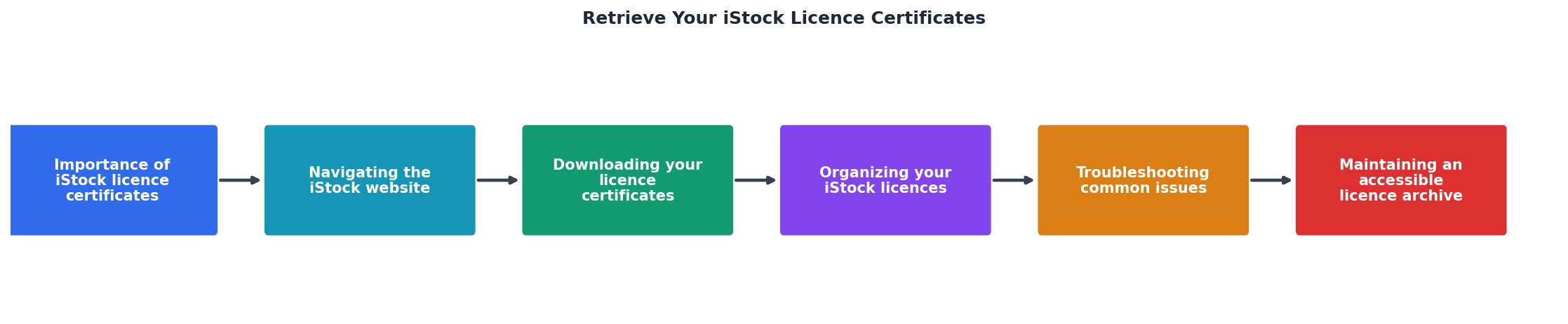
Importance of iStock Licence Certificates
Before diving into the retrieval process, let's understand why maintaining these documents is essential. iStock licence certificates serve as proof that you have legally acquired the rights to use specific images or media. Without them, you might face copyright claims, which can lead to financial penalties or damage to your reputation. Having these certificates readily available ensures you can quickly resolve any disputes with clients or legal entities.
For creative professionals, compliance with licensing agreements is not just a legal necessity but a professional obligation. When you use stock images or media, you are entering into a contract that specifies how you can use the material. Misunderstanding or ignoring these terms can lead to unauthorized usage, potentially resulting in costly legal battles. Furthermore, maintaining a record of your licences helps in auditing processes, ensuring that you can demonstrate compliance to any stakeholder who might require proof.

Navigating the iStock Website
To retrieve your iStock licence certificates, you'll first need to navigate their website. Here's how:
- Log In: Start by logging into your iStock account. Ensure you have your credentials handy. If you've forgotten your password, use the 'Forgot Password' feature to reset it.
- Access Your Profile: Once logged in, go to your profile section. This is typically located in the upper right corner of the homepage. Click on your profile picture or name to access the dropdown menu where you can find account settings and other personal information.
- Find Licence Records: Within your profile, locate the section labeled 'Licence History' or 'Downloads'. This is where your purchases and licences are stored. The interface may vary slightly depending on updates to the iStock platform, but these sections are generally easy to find with intuitive labeling.
Downloading Your Licence Certificates
Once you've found the licence records, downloading your certificates is the next step. Here's a simple process to follow:
- Select the File: Click on the specific image or media for which you need the licence. Ensure you have the correct file, as selecting the wrong one could lead to organizational issues later.
- Download the Certificate: Look for a download button or link. This will usually generate a PDF or similar document that serves as your licence certificate. If a download button isn't visible, check for a 'More Options' menu that might hide additional functionalities.
- Save Securely: Ensure you save these documents in a secure location. A cloud storage service like Google Drive or Dropbox can be useful for easy access and backup. Additionally, consider creating a dedicated folder on your local drive as a backup to your cloud storage.
Organizing Your iStock Licences
Organization is key when dealing with multiple licences. Here are some best practices:
- Create Folders: Use a logical folder structure on your computer or cloud storage to categorize licences by project or client. For example, create a main folder named "iStock Licences," with subfolders for each client or project.
- Name Files Clearly: Use descriptive filenames that include the date and project name for easy identification. For instance, "ClientName_ProjectName_Date_Licence.pdf" can help you quickly locate the necessary file.
- Regular Backups: Schedule regular backups to ensure no data is lost. Use automated backup solutions that synchronize your files across devices and cloud services, minimizing the risk of data loss.

Troubleshooting Common Issues
Sometimes, issues arise when retrieving licences. Here are solutions to common problems:
- Misplaced Licences: If a licence is missing, contact iStock support for assistance. They can help you retrieve past purchases. Make sure to provide them with as much detail as possible, such as the purchase date and the email associated with your account.
- Download Errors: Ensure your internet connection is stable. If errors persist, try a different browser or clear your cache. Sometimes, browser extensions can interfere with downloads, so disabling them temporarily might resolve the issue.
Maintaining an Accessible Licence Archive
Long-term management of your licences is crucial. Here's how to maintain an accessible archive:
- Regular Updates: Update your archive regularly with new licences. Set a specific day each month to review and organize new acquisitions.
- Audit Trail: Keep a record of all licences and their usage in a spreadsheet for easy reference. Include columns for client name, project, licence date, and any other relevant details.
- License Downloader: Consider using a tool like Licence Downloader to automate licence retrieval and storage, saving you time and effort. Such tools can integrate with cloud services to automatically classify and store licences.

Checklist for Managing iStock Licence Certificates
Your progress is saved automatically in your browser.
Frequently Asked Questions
Before you go, how do you currently manage your stock media licences? Share your tips and experiences in the comments below.
Additional Resources
- License Agreement - This is a license agreement between you and iStock that explains how you can use photos, illustrations, vectors, video clips and Music that you license from ...
- Licenses for Stock Photos - When you download a file on iStock, you're buying a standard license that lets you use the file for any personal, business or commercial purposes.
- Comprehensive Guide to iStock License: Pros, Cons, and ... - It's critically important to note that using the 'Download' button is the only legal way to obtain an iStock royalty free license without a watermark and ...
Need to Download Your Licences?
Save hours of manual work. We download all your stock photo licence certificates for you.
Get Started“Thanks to LicenceDownloader.com, I was able to download more than 1,000 Freepik licences and receive them all at once via ZIP.”
Marlon Mainardy