Retrieving Licences from Storyblocks for Agencies
Your agency downloads hundreds of stock videos, audio tracks, and images from Storyblocks every month. When a client's legal team asks for proof of licence on a specific asset used in a campaign delivered eight months ago, the scramble begins. This guide walks you through exactly how to retrieve, bulk-download, and organize Storyblocks licences so your agency stays audit-ready without burning hours on admin.

Your agency downloads hundreds of stock videos, audio tracks, and images from Storyblocks every month. When a client's legal team asks for proof of licence on a specific asset used in a campaign delivered eight months ago, the scramble begins. This guide walks you through exactly how to retrieve, bulk-download, and organize Storyblocks licences so your agency stays audit-ready without burning hours on admin.
Photo by KATRIN BOLOVTSOVA from Pexels
TL;DR:- Log into your Storyblocks agency account and access your Download History to find every asset your team has used.
- Use bulk-download and export features to pull licence records for multiple assets at once.
- Store licences in a structured folder system tied to client projects, and integrate retrieval into your existing production workflow.
- This keeps your agency audit-ready and eliminates fire drills when legal comes knocking.
Why Licence Management Matters
Agencies operate at scale. A single campaign might pull 30 video clips, 15 audio tracks, and a handful of images from Storyblocks alone. Multiply that across 10 active clients and a rotating roster of freelancers, and you have hundreds of assets flowing through your pipeline every quarter.
The risk is straightforward: if you cannot prove you licensed an asset, you are exposed. A copyright claim against a client project does not just cost money. It damages the trust that keeps that client on retainer.
Storyblocks operates on an unlimited download model for subscribers, which means your team downloads freely without per-asset invoices. That is great for creative output but creates a documentation gap. There is no individual purchase receipt for each clip. The licence proof lives inside your account's download history, and retrieving it requires a deliberate process.
"Every asset in our library is 100% human-made.">, Unlimited Stock Videos, Templates, Audio & Images
This commitment to human-created content is one reason agencies trust Storyblocks. But trust in the content does not replace the need for documented proof of licence.
Access Your Storyblocks Account

Start with the basics. Every team member who downloads assets should be on your agency's Storyblocks Enterprise or Business plan. Individual accounts create blind spots because downloads made under a personal login are invisible to the rest of the team.
Here is how to get to your licence records:
- Go to storyblocks.com and log in with your agency credentials.
- Click your profile icon in the top-right corner.
- Select Download History from the dropdown menu.
- You will see a chronological list of every asset downloaded under your account.
For agencies with Enterprise plans, Storyblocks provides additional admin tools including usage reports and centralized billing. These reports can serve as supplementary licence documentation during audits.
Bulk-Download Licence Records
Downloading licence proof one asset at a time is not realistic when your team processes hundreds of assets monthly. Storyblocks provides several approaches to handle this at scale.
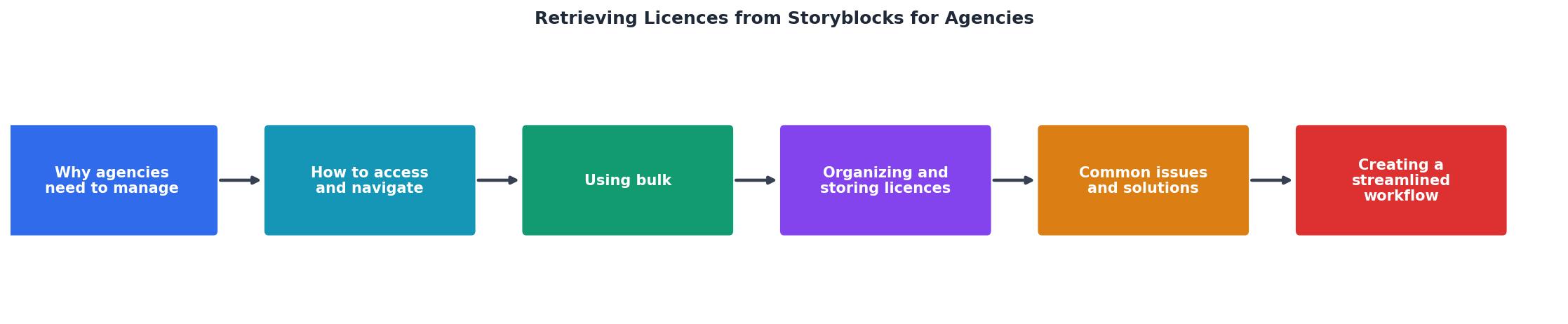
The process follows these steps:
- Log In to your agency account
- Open Download History from your profile
- Filter by Date Range to isolate the period you need
- Export Records as a CSV or PDF
- Match to Projects by cross-referencing asset names with your project management system
- Archive the records in your structured folder system
If your agency handles assets from multiple stock platforms, a tool like Licence Downloader can pull licence records from Storyblocks alongside Shutterstock, Adobe Stock, Envato, and others into a single archive. That eliminates the need to log into each platform separately.
| Manual Retrieval | Bulk Export | Licence Downloader |
|---|---|---|
| Screenshot each asset page | CSV export from Download History | Automated multi-platform pull |
| 2-3 min per asset | 5 min for entire history | Minutes for all platforms |
| No standardized format | Spreadsheet format | Standardized licence files |
| Difficult to scale | Scales within Storyblocks | Scales across all platforms |
Organize and Store Licences

Retrieving licences is only half the job. Without a consistent storage system, you will end up searching through folders during the next audit anyway.
Here is a folder structure that works for agencies managing multiple clients and platforms:
/Licences
/ClientName
/ProjectName-YYYY-MM
/Storyblocks
- download-history-export.csv
- asset-12345-licence.pdf
/Shutterstock
/AdobeStock
Best practices for organizing digital licences:
- Name files consistently. Use the format
platform-assetID-date.extso files sort predictably. - Include the export date in every CSV filename. Download histories can change if assets are removed from the platform.
- Store a copy of the Storyblocks licence agreement (their Terms of Service / licence page) alongside your asset records. Licence terms can update, and having the version that was active when you downloaded protects you.
- Back up to cloud storage. Google Drive, Dropbox, or SharePoint all work. The point is redundancy and team access.
- Tag or label by client and project in your project management tool (Asana, Monday, Notion) so anyone on the team can locate licence proof without asking you.
When a client's legal team sends a request, you should be able to locate the relevant licence file in under two minutes. If it takes longer, your system needs work.
Troubleshoot Common Issues
Not every retrieval goes smoothly. Here are the problems agencies hit most often and how to handle them.
Missing assets in download history. If an asset was downloaded under a different team member's seat and that seat is not linked to your organizational account, it will not appear in your history. Solution: consolidate all seats under the Business or Enterprise admin panel.
Expired subscription records. If your Storyblocks subscription lapsed and you renewed later, your previous download history should still be accessible. Storyblocks retains download records tied to your account. However, if the account was deleted entirely, those records are gone. Always export your download history before canceling a plan.
Asset removed from the library. Occasionally, Storyblocks removes an asset from its library. Your licence for that asset remains valid (you downloaded it while subscribed), but the asset page link in your history may break. This is why saving the CSV export with asset IDs and dates matters. The export itself serves as proof.
Freelancer downloaded on a personal account. This is the most common agency headache. If a freelancer used their own Storyblocks account for agency work, the licence belongs to them, not the agency. Prevent this by requiring all contractors to use agency-provided credentials and documenting this in your freelancer agreements.
Build a Streamlined Workflow

Licence retrieval should not be a quarterly panic. Build it into your existing production process so it happens automatically.
Here is a workflow that integrates licence management into typical agency operations:
- At project kickoff, create the licence folder structure for the client and project.
- During production, require team members to log every Storyblocks asset they download in the project tracker (Notion, Asana, or a shared spreadsheet).
- At project delivery, export the Storyblocks download history filtered to the project date range and save it to the project's licence folder.
- Monthly, run a bulk export of the full download history and archive it as a backup.
- At freelancer offboarding, verify that all assets the freelancer used were downloaded under agency credentials.
The following dashboard shows what a well-managed licence tracking setup looks like for a mid-size agency handling five active clients:
Agency Licence Tracker, Example Monthly Snapshot
Agency Storyblocks Licence Management Checklist
Your progress is saved automatically in your browser.
FAQ
Frequently Asked Questions
What does your agency's current licence retrieval process look like, and where does it break down? Share your experience so we can all build better systems.
Additional Resources
- Understand your licensing options - Learn all about Storyblocks' royalty free licenses with the highest level of legal coverage in the industry and our two licensing options.
- Storyblocks: Unlimited Stock Videos, Templates, Audio & Images - Our content is covered by our royalty-free license, with enhanced licensing coverage options for big companies and large productions. Get a Quote. Frequently ...
- How can I download my personalized License? - For Business License holders: You can get a copy of your organization's license by reaching out to your account manager. Did this answer your ...
Need to Download Your Licences?
Save hours of manual work. We download all your stock photo licence certificates for you.
Get Started“Thanks to LicenceDownloader.com, I was able to download more than 1,000 Freepik licences and receive them all at once via ZIP.”
Marlon Mainardy