Solving Corrupt Vecteezy Licence File Issues
You downloaded a Vecteezy licence file three months ago, and now a client needs proof that the vector in their brand kit is properly licensed. You open the file and it is blank, garbled, or refuses to render. That sinking feeling is familiar to any freelance designer who juggles multiple stock platforms. This guide walks through exactly why Vecteezy licence files corrupt, how to fix them, and how to stop it from happening again.

You downloaded a Vecteezy licence file three months ago, and now a client needs proof that the vector in their brand kit is properly licensed. You open the file and it is blank, garbled, or refuses to render. That sinking feeling is familiar to any freelance designer who juggles multiple stock platforms. This guide walks through exactly why Vecteezy licence files corrupt, how to fix them, and how to stop it from happening again.
Photo by George Milton from Pexels
TL;DR:- Corrupt Vecteezy licence files usually result from interrupted downloads, browser cache issues, or storage errors on your local drive.
- Re-download the licence from your Vecteezy account, verify the file with a checksum or PDF reader, and contact Vecteezy support if the server-side copy is also broken.
- Set up a consistent backup and naming workflow to prevent corruption from derailing future client requests.
Why licence files matter
A licence certificate is the single document that proves you paid for and are authorized to use a stock asset commercially. Without it, a copyright dispute becomes your word against a takedown notice. Vecteezy provides licence files as downloadable PDFs or text records tied to each asset in your account history. When one of those files corrupts, you lose your proof.
That statistic should worry you. Local-only storage means a single disk failure, accidental deletion, or file corruption event wipes out your evidence. The fix starts with understanding what goes wrong in the first place.
What causes corrupt licence files?
File corruption happens when the data inside a file no longer matches what the application expects. For Vecteezy licence PDFs, the most common causes break down into a few categories:
- Interrupted downloads. Your browser lost connection mid-download, or a VPN timeout cut the transfer short. The resulting PDF is incomplete and unreadable.
- Browser cache conflicts. Cached fragments from a previous session get mixed into the new download. This is especially common in Chrome when multiple Vecteezy tabs are open.
- Disk-level errors. Bad sectors on an aging HDD, or a full SSD with no write space left, can silently damage files during save.
- Cloud sync collisions. If your Downloads folder syncs to Dropbox, Google Drive, or OneDrive, two devices writing at the same time can produce a conflict copy that is neither complete nor valid.
- Antivirus interference. Some security tools quarantine or modify downloaded PDFs before you even open them, stripping embedded metadata that Vecteezy uses for licence identification.
How to re-download and verify
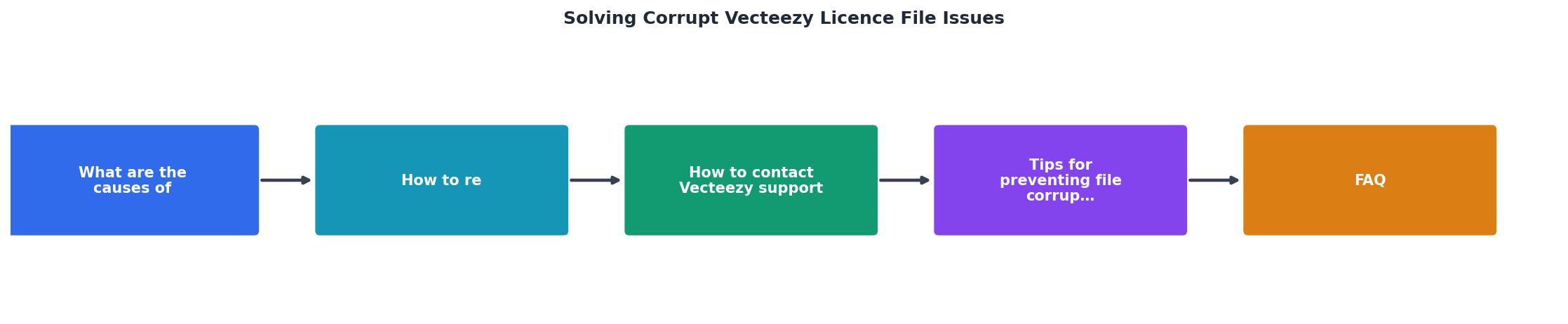
Follow these steps in order. Each one builds on the previous, so do not skip ahead.
Step 1: Log into Vecteezy
Go to vecteezy.com and sign in. Navigate to your Download History (found under your profile menu). Locate the asset whose licence file is corrupt.
Step 2: Re-download the licence
Click the licence download link next to the asset. Save it to a fresh folder, not your default Downloads directory. Name the file with the asset ID and date, like vecteezy-lic-4829371-2026-07-03.pdf.
Step 3: Verify the file opens
Open the newly downloaded PDF in two different readers: your browser's built-in viewer and a dedicated app like Adobe Acrobat Reader or Sumatra PDF. If both display the licence details (asset name, licence type, download date, your account email), the file is intact.
Step 4: Check the file size
Compare the new file's size to the corrupt one. A valid Vecteezy licence PDF typically ranges from 15 KB to 80 KB. If the corrupt file is 0 KB or under 5 KB, the original download clearly failed. If the new file also shows an abnormal size, the issue may be server-side.
Step 5: Optional checksum verification
For extra certainty, generate an MD5 or SHA-256 hash of the file using certutil on Windows:
certutil -hashfile vecteezy-lic-4829371-2026-07-03.pdf SHA256
Store this hash alongside the file. If the hash ever changes, you know the file was modified or corrupted after download.
Here is an example dashboard showing what a healthy licence file collection looks like versus a collection with integrity issues:
Licence File Integrity Check (example)
Contacting Vecteezy support

If re-downloading still produces a broken file, the problem lives on Vecteezy's end. Here is how to get it resolved quickly:
- Use the official support form. Go to Vecteezy's Help Center and submit a request. Include your account email, the exact asset ID or URL, and the date of the original download.
- Attach the corrupt file. Support teams diagnose faster when they can see the broken PDF themselves.
- State the business impact. Mention that you need the licence for a client deliverable or compliance audit. Support queues prioritize requests with clear urgency.
- Ask for a re-issued licence. Vecteezy can regenerate the licence document from their transaction records. Request that they email it directly as a backup delivery method.
Preventing future corruption

Fixing one corrupt file is straightforward. Preventing it across dozens of projects and hundreds of assets requires a system.
Dedicated licence folder structure
Create a top-level folder called Licences with subfolders per platform: Licences/Vecteezy, Licences/Freepik, Licences/AdobeStock, and so on. Every licence file goes into the correct subfolder immediately after download. No exceptions.
Download hygiene
- Close unnecessary browser tabs before downloading.
- Disable browser extensions that modify downloads (ad blockers sometimes interfere).
- Use a wired connection or stable Wi-Fi. Avoid downloading over mobile hotspots.
Automated backups
Sync your Licences folder to a cloud service with versioning enabled. Google Drive, Dropbox, and OneDrive all keep previous file versions for at least 30 days. If a file corrupts during sync, you can roll back.
Bulk licence management
When you work with five or more stock platforms, manually downloading and organizing licence files eats hours every month. Tools like licencedownloader.com let you bulk-find and download licence certificates across platforms in one workflow, with built-in integrity checks that flag corrupt or incomplete files before they reach your archive.
| Manual Process | Organized Workflow |
|---|---|
| Files scattered across Downloads folder | Dedicated per-platform folders |
| No verification after download | File size + hash check on every file |
| Single local copy | Cloud-synced with version history |
| Hours spent hunting old licences | Seconds to locate any certificate |
| Corrupt files discovered during audits | Corruption caught at download time |
Vecteezy Licence File Integrity Checklist
Your progress is saved automatically in your browser.
FAQ
Frequently Asked Questions
certutil -hashfile yourfile.pdf SHA256 in the command prompt.What is your current system for organizing and verifying stock licence files across platforms? Share your approach in the comments.
Additional Resources
- Resolving ZebraDesigner 3 License File Corrupt Error - This article outlines the way to resolve the License File Corrupt error when starting up the ZebraDesigner 3 software.
- Restoring a corrupt license file. - 1. Locate the Windows folder on the C:\ drive. · 2. In the Windows folder, locate the Rimage.lf and Rimage. · 3. Right-click the Rimage.lf file ...
- Licensing & Legal Information - We offer different levels of legal protection (that is, indemnification) depending on the license type. As long as you and (if permitted under our License.
Need to Download Your Licences?
Save hours of manual work. We download all your stock photo licence certificates for you.
Get Started“Thanks to LicenceDownloader.com, I was able to download more than 1,000 Freepik licences and receive them all at once via ZIP.”
Marlon Mainardy