Troubleshooting Missing Shutterstock Licence Certificates
You downloaded an image from Shutterstock three months ago, and now a client wants proof you licensed it. You log in, navigate to your download history, and the licence certificate is nowhere to be found. This happens more often than you would expect, and the fix is usually straightforward once you know where to look. Here is a systematic approach to track down missing Shutterstock licence certificates and make sure it does not happen again.


You downloaded an image from Shutterstock three months ago, and now a client wants proof you licensed it. You log in, navigate to your download history, and the licence certificate is nowhere to be found. This happens more often than you would expect, and the fix is usually straightforward once you know where to look. Here is a systematic approach to track down missing Shutterstock licence certificates and make sure it does not happen again.
TL;DR:- Check your Shutterstock account settings and confirm you are logged into the correct account (especially if you have multiple logins).
- Review your full download history and filter by date range to locate the specific asset.
- Contact Shutterstock support with your invoice number and asset ID if the certificate still does not appear.
- Set up a local backup system or use Licence Downloader to automate certificate retrieval going forward.
Why certificates go missing
Missing licence certificates on Shutterstock rarely mean the licence itself is gone. The certificate is a document that proves you hold a valid licence for a specific asset. When it seems to vanish, the root cause is almost always one of these:
- Wrong account login. Freelance designers who use both a personal and a team/agency Shutterstock account often download from one and search for the certificate in the other.
- Subscription plan changes. Switching from an annual plan to on-demand or vice versa can shift where download records appear in the dashboard.
- Browser or cache issues. Shutterstock's dashboard relies on session data. Stale cookies or aggressive ad blockers sometimes prevent the download history page from loading completely.
- Expired trial or cancelled plan. If you downloaded during a free trial that has since ended, the download history section may behave differently.
That number is not random. Most freelance designers maintain at least two stock platform accounts, and logging into the wrong one is the single most common reason a certificate appears to be missing.
Check your account settings
Start with the basics. Open shutterstock.com, click your profile icon in the top right, and verify:
- Account email. Confirm you are logged into the account that made the original purchase. Check the email address displayed under your profile name.
- Subscription status. Navigate to Account Settings > Plans. An active subscription should show your current plan name and renewal date. If it says "No active plan," your download history may still be accessible, but the interface can differ.
- Team membership. If you are part of a team account, switch to the team view. Downloads made under the team licence will not appear in your personal download history.
- Payment method. A failed payment can temporarily restrict access to certain account features, including licence certificate downloads.
Review your download history
The Download History page is where Shutterstock stores every asset you have ever downloaded along with its licence certificate. Here is how to use it effectively:
- Go to My Account > Download History (or use the direct link:
shutterstock.com/account/download-history). - Use the date filter to narrow results. If you remember roughly when you downloaded the asset, set the date range to that month.
- Search by asset ID if you have it. The asset ID is the numeric identifier visible in the Shutterstock URL of the image page (e.g.,
shutterstock.com/image-photo/example-123456789). - Click the licence icon next to any download to view or re-download the certificate PDF.
Filtering by date range resolves the vast majority of cases. Shutterstock's download history can contain thousands of entries if you have been a subscriber for years, and scrolling through all of them is not practical.
"The Recently Reviewed folder on your dashboard.">, Why are my approved images missing from my portfolio?
This tip from Shutterstock's own help center points to a commonly overlooked location. Assets that were recently reviewed or re-processed may temporarily move to a different folder in your dashboard.
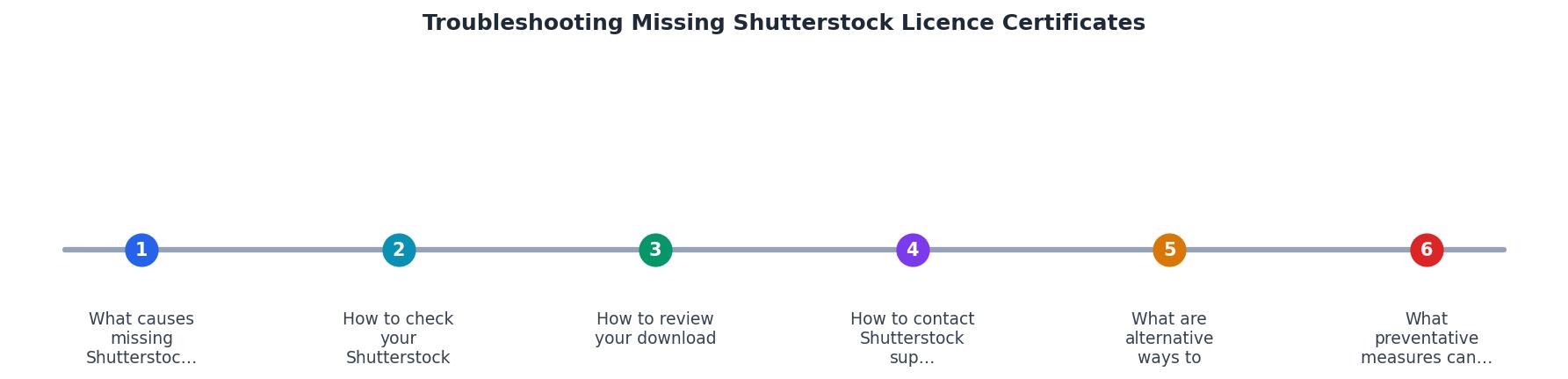
Follow the steps in the diagram: Check account > Filter downloads > Locate asset > Download certificate. If the certificate is not there after these steps, move to contacting support.
Contact Shutterstock support

When self-service does not work, Shutterstock's support team can retrieve licence certificates from their backend. Here is how to make the process fast:
- Use the support form, not social media. Go to Help > Contact Us on the Shutterstock website. Select "Licensing" as the topic.
- Include your invoice number. Find it in your email receipts or under Account > Billing. This is the fastest way for support to locate your transaction.
- Provide the asset ID. If you do not have it, describe the image and the approximate download date.
- State what you need clearly. Write something like: "I need the licence certificate PDF for asset ID 123456789, downloaded on March 15, 2026, under invoice #INV-78901."
Shutterstock support typically responds within one to three business days for licensing inquiries. Complex cases involving team accounts or legacy plans may take longer.
Alternative ways to verify ownership
While you wait for support or if you need proof immediately, these alternatives can help:
- Email receipts. Every Shutterstock purchase triggers a confirmation email. Search your inbox for "Shutterstock" plus the date or asset name. The email contains your invoice number and plan details.
- Bank or PayPal statements. A payment record matching the download date proves you had an active subscription.
- Browser download folder. Shutterstock image filenames often include the asset ID (e.g.,
shutterstock_123456789.jpg). Finding the original file on your hard drive confirms you downloaded it. - Metadata in the image file. Right-click the downloaded image, check Properties > Details (Windows) or Get Info (Mac). Shutterstock embeds IPTC metadata including the licence type.
The following card shows an example of what a typical freelancer's troubleshooting status might look like when working through these steps:
Troubleshooting Progress
Prevent future certificate loss
The best troubleshooting session is the one you never need. A few habits eliminate this problem entirely:
- Download the certificate immediately. Every time you download an asset from Shutterstock, grab the licence certificate PDF at the same time. Store it in a folder named by project or client.
- Use a consistent naming convention. Name certificate files with the asset ID and client name:
shutterstock_123456789_clientname_licence.pdf. - Back up to cloud storage. Keep a dedicated Google Drive or Dropbox folder for licence certificates. If your local drive fails, you still have proof.
- Automate the process. Tools like Licence Downloader can bulk-retrieve and organize licence certificates across Shutterstock and other platforms, saving you from manual downloads entirely.
- Audit quarterly. Once every three months, compare your active projects against your licence archive. Catch gaps before a client asks.
Shutterstock Licence Certificate Troubleshooting Checklist
Your progress is saved automatically in your browser.
FAQ
Frequently Asked Questions
What is your go-to method for organizing stock licence certificates across multiple platforms? Share your approach below.
Additional Resources
- Missing Shutterstock Images? Account Help & ... - If purchased Shutterstock images or licenses don't appear, verify you're logged into the correct account. Check email confirmations for purchase details.
- Shutterstock Terms of Service & License Agreements - The following is a legal agreement between you or the employer or other entity on whose behalf you are entering into this agreement and Shutterstock.
- Why are my approved images missing from my portfolio? - Why are my approved images missing from my portfolio? · 1. Processing time for new approvals · 2. Recently reviewed folder details · 3. Data ...
Need to Download Your Licences?
Save hours of manual work. We download all your stock photo licence certificates for you.
Get Started“Thanks to LicenceDownloader.com, I was able to download more than 1,000 Freepik licences and receive them all at once via ZIP.”
Marlon Mainardy